

Sessions, refresh and sign-out
An embedded person is signed in by an embedded session: the host's one-time token is exchanged once for an opaque session token, and the chat uses that session until it ends. This page covers how long a session lives, how it renews itself, what ends it early, and what your application must do when a person signs out.
Enterprise module
Embedding is part of the enterprise portals module — see Embedding a portal.
What a session is
| Token | cp_es_<workspace id>.<256 bits of randomness> — an opaque bearer token. It names the workspace (so a request with no cookie and no tenant in its address can find it) and carries nothing else. |
| Kept in the browser | In the frame's memory only. Never in a cookie, localStorage or a URL. |
| Kept by the console | Only the SHA-256 hash of the token, bound to the portal, the person, the site that opened it, the issuer and subject, the signed ctx, the time, and optionally the browser or network (see Tie a session to). The token itself cannot be recovered. |
| Sent as | Authorization: Bearer cp_es_… on every chat request, with credentials: "omit". |
On every request the console checks that the session is live (not ended, not revoked, not past its time), that it belongs to this portal, that its binding still matches, that the portal still allows embedding and still lists the site that opened it, that the person's account is still active — and then the policy engine decides what the person may do.
When a bearer token is offered it is the only credential looked at. An embedded request is never read as a cookie request, so a console administrator who happens to be signed in to the dashboard in the same browser is never mistaken for the embedded person.
Lifetime and renewal
The Session length (Embed tab → Session) is how long one session lasts: 60 minutes by default, from 5 minutes to 24 hours. It is an absolute lifetime — activity does not extend it. What keeps a person signed in is renewal: the frame asks your page for a fresh token and exchanges it without reloading the chat.
 session opened ───────────────────────────────────────┬──────────────┐
                                                        │              │
                                           renewal starts              the session would end
                                 (a fifth of its life before the end:
                                  at least 5 s, at most 60 s)

 at that point   frame ── cp:token_request { reason: "expiring" } ──► your page
your page ── cp:auth { token } ──► frame ── POST …/embed/session ──► a NEW session| Moment | What happens |
|---|---|
| A fifth of the life before the end (at least 5 s, at most 60 s) | The frame asks for a fresh token (reason: "expiring"). Your getToken is called, your server signs a new token, the frame exchanges it. |
| No answer | The frame asks again, more and more often as the end gets nearer (every 10 seconds at most, down to every second). A request for a fresh token waits up to 15 seconds for the page. |
| A request while less than 5 seconds are left | The frame renews first, then sends the request. |
A 401 from the chat API | One renewal (reason: "rejected") and one retry of the request. Only for requests that can be sent twice. |
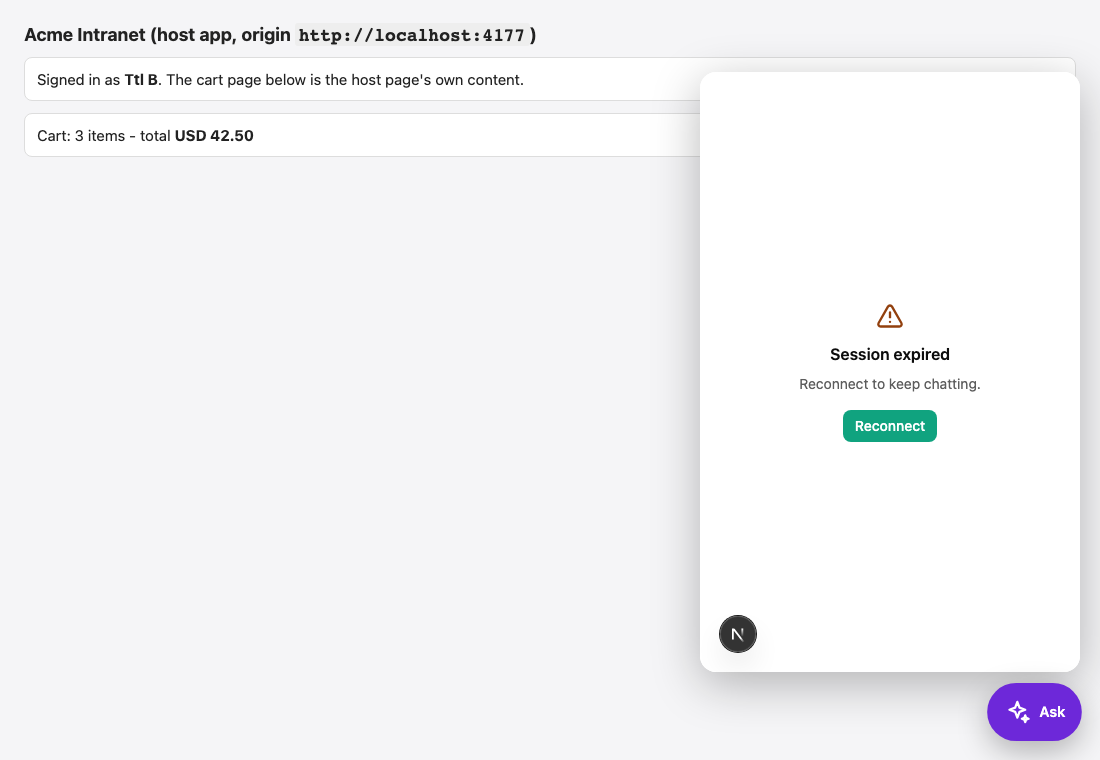
| The session ends without a renewal | The chat shows Session expired with a Reconnect button, emits auth:error with code: "session_expired", asks again (reason: "expired"), and recovers by itself when a token arrives. |
Things to know:
- Renewal does not end the previous session. A person may have several tabs and devices, so every renewed session is a new one; the old one simply runs out. This is why the session length matters for security.
- Prefer a short session. 30 minutes is plenty — the frame renews by itself. A shorter session limits how long a stolen session token is useful; the price is one call to your endpoint and one exchange per renewal.
- The console limits a person to 20 new sessions a minute; an application asking more often than that gets
rate_limited(HTTP 429, withRetry-After). - A renewed session carries the new token's
ctx, and re-syncs the person's name, email (external accounts) and mapped groups. A change in your directory reaches the console at the next renewal.
Signing out
Call logout() when the person signs out of your application. The chat does not know your application's session ended; without it the embedded session lives until its length runs out.
document.querySelector('#sign-out').addEventListener('click', async () => {
  await assistant.logout();           // ends the embedded session on the server
  await fetch('/logout', { method: 'POST' });
});logout():
- makes the frame forget the session and show You have been signed out,
- sends
DELETE /api/portal/<key>/embed/sessionwith the session's bearer token, which revokes it on the server (idempotent; it tells a stranger nothing about a token it does not know), - is audited as
portal.embed.logout.
After logout() the chat waits. To sign the same chat in again, give it a token with assistant.setToken(token), or destroy() it and mount() a new one. With a plain iframe, post cp:logout.
logout() ends one session
It ends the session of that frame. Other tabs and devices of the same person hold their own sessions, which run until their length does. If you must end all of them, use Sign everyone out, or stop minting tokens for that person and shorten the session length.
What ends a session early
| Event | Effect |
|---|---|
The host calls logout() | That session is revoked at once. |
| An administrator presses Sign everyone out (Embed tab → Embedded sessions) | Every live session of the portal is revoked. People are asked for a fresh token at their next message — if your application still signs them in, the chat re-exchanges by itself, and the token, the mapping and the account state are all checked again. |
| Allow embedding is switched off (or the portal is deleted) | Every session of the portal ends — it is not merely refused while the setting is off. Switching embedding on again does not bring them back; people sign in again with a fresh token. |
| A site is taken off the Allowed sites list | The sessions opened from that site end. The sessions of the other sites go on. Adding the site back does not revive them. |
| The person's account is disabled | Every request is refused from then on. |
| The session length runs out | The chat renews, or shows Session expired. |
Two things that do not end sessions:
- Removing a shared secret. It stops new sign-ins with that secret at once. Sessions already opened keep running until they end. After a leak, remove the secret and press Sign everyone out.
- Changing the identity mapping or the access list. The policy engine decides on every request, so an access change applies at once; the session itself is unchanged.
Changes reach every console node within a few seconds (the state is cached for five seconds), and immediately on the node that handled the change.
An administrator sees how many sessions are live in the Embed tab (N active sessions), and every revocation is audited as portal.embed.sessions_revoked with a reason (embedding_off, site_removed, or the administrator's own press).
Tie a session to a browser or network
By default whoever holds the session token is the person. Under Tie a session to a portal can require more:
| Choice | What the console remembers | Effect |
|---|---|---|
| Nothing (the token alone) | Nothing. | The default. |
| The browser (user agent) | A short hash of the User-Agent header. | A session token copied to another kind of client stops working. It is a speed bump, not an identity — the header is not secret. |
| The network range of the address | The /24 of an IPv4 address, the /64 of an IPv6 one, of the address the exchange came from. | A person moving between networks of one site stays inside the range. Needs an address the console can trust; see below. |
A request that does not match is treated like a token the console does not know (401), which makes the chat renew — and only the host's page, holding a real sign-in, can obtain a new session for the new browser or network. A copied session token cannot renew itself.
- The binding in force when a session is made stays with that session. Changing the setting never logs anyone out; Sign everyone out does.
- The address is the connection's own peer unless trusted proxies are configured — never a header the caller wrote. Behind a reverse proxy, list the proxy in
TRUSTED_PROXIES(Configuration), or every person looks like the proxy. If no address is known while the network range is selected, the exchange is refused.
Retention
Session rows are removed about 24 hours after they end; the used-token (jti) rows about an hour after they stop mattering. Neither holds a session token, a signing secret or message text.