

Browser Automation
The Browser module wraps Playwright behind a managed surface: reusable browser profiles, ephemeral sessions that own a real Chromium tab, and a per-browser MCP endpoint so agents (and any MCP-aware client) can drive the same toolset.
It replaces the previous standalone "Browser Agent" feature. Console-managed agents now browse by attaching the Browser Use system tool to a project agent; everything else (external runtimes, custom orchestrators) talks to the browser session API or per-browser MCP directly.
Operators manage browsers under Operate → Browser.
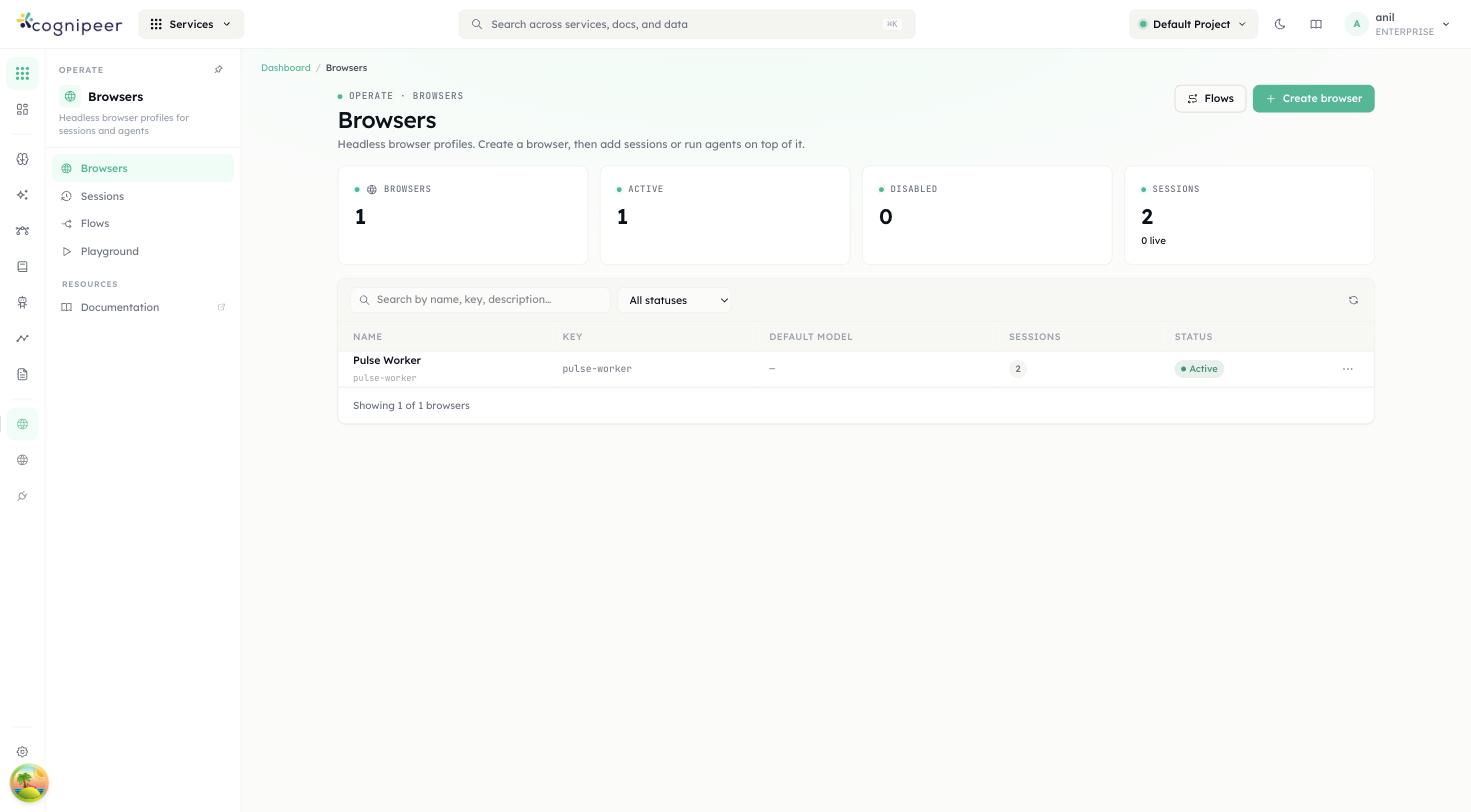
The landing page lists browser profiles with their active/disabled state and live-session counts. Browsers, Sessions, Flows and Playground are peers in the left nav — each is its own screen, not a tab buried inside another.
Concepts
- Browser profile — long-lived container with defaults for session config, the artifact bucket where screenshots/PDFs land, and a default model (used by extract/LLM-driven actions). Persisted in
browsers. - Session — a live Playwright context. Created from a profile, carries its own status (
starting | ready | closed | error), receives actions, and records every event (navigation, click, extract, screenshot) tobrowser_session_events. Auto-closes afteridleTimeoutMs. - Action — a single operation against a session:
goto,click,hover,type,press,select,check,upload,drag,scroll,wait,tab,back/forward/reload. The full schema lives inbrowserActionSchema. - Target — how an action names the element it acts on. See Addressing elements; this is the difference between an automation that works once and one that keeps working.
- Flow — a recorded, replayable step list. See Flows.
- Extract — a target + mode (
text | html | attr | value), optionally over every match. - Artifacts — screenshots and PDFs are stored in the configured file bucket; the response carries the bucket key.
Addressing elements
An action can name its element two ways, and only one of them survives being saved.
browser_snapshot returns the page's accessibility tree with [ref=e4] markers. A ref is the cheapest, least ambiguous handle for the turn you are in — and it is valid only until the next snapshot, because the browser renumbers them every time. Stored in a flow, a ref looks like a working target and then spends the step's entire timeout resolving to nothing.
Everything else is durable: it describes the element the way a person would, so it still resolves after a re-render and usually after a deploy.
| Field | Use when |
|---|---|
testId | the app sets data-testid — the most stable target there is |
role + name | almost always: { "role": "button", "name": "Sign in" } |
label | a form field with a <label> |
placeholder | an input with placeholder text and no label |
text | a link or element identified by its visible text |
selector | last resort — CSS encodes markup nobody promised to keep |
nth | disambiguates when the chosen strategy matches several elements |
frame | CSS selector of an iframe to look inside |
Every action result carries resolvedTarget: the durable description of whatever the action actually hit. That is what you save.
// Request — a live agent uses the ref it just saw
{ "type": "click", "ref": "e12" }

// Response — the durable form, safe to keep
{ "ok": true, "targetStrategy": "ref",
"resolvedTarget": { "role": "button", "name": "Sign in" } }A stale ref does not stall: when a durable target is supplied alongside it, the ref is probed briefly and then abandoned in favour of the durable one.
Flows
Driving a browser with a model is discovery — it reads the page, guesses, backtracks, and bills tokens for every step. Replaying a flow is execution: no model, no guessing, the same steps every time.
A flow is an ordered list of steps with durable targets, declared inputs, and per-step retry policy. Record one from a session you already drove — by hand in the live preview, or with an agent:
curl -X POST /api/client/v1/browser/flows/record \
-d '{ "sessionId": "…", "name": "Submit expense", "status": "active" }'Recording substitutes durable targets for refs, and turns every typed value into a declared input rather than a literal — the recorder cannot tell a search term from a password, and only one of those mistakes is recoverable. Steps reference them as {{input.name}}.
Replay it with different values, as often as you like:
curl -X POST /api/client/v1/browser/flows/<key>/run \
-d '{ "inputs": { "reference": "EXP-2002", "amount": "999" } }'The response is the run record: per-step status and attempt count, whatever captureAs collected, and — on a failure — the index of the step that broke plus a screenshot of the page it gave up on.
Step policy:
| Field | Effect |
|---|---|
policy.retries | attempts beyond the first; the delay doubles |
policy.timeoutMs | per-step bound, overriding the session default |
policy.optional | a failing step is recorded and skipped instead of aborting |
when | skip the step unless the expression is truthy |
captureAs | store the step's output for later steps and the run's outputs |
A run aborts at the first non-optional failure: a half-finished form is usually worse than an untouched one.
Agents reach flows through browser_list_flows and browser_run_flow — check for an existing flow before working a task out step by step.
Flows live at Operate → Browser → Flows.
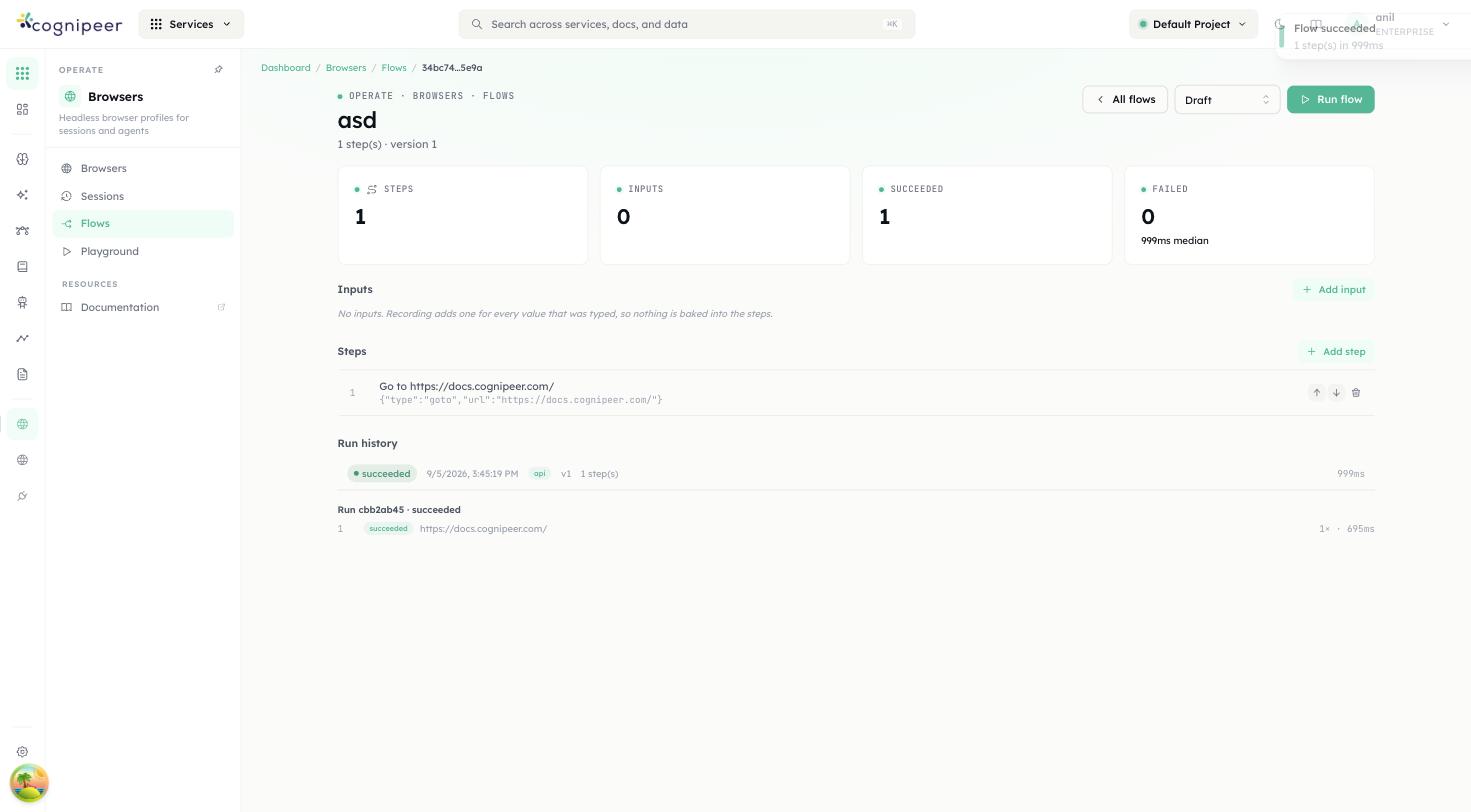
Every step shows the durable target it was recorded with — never a ref — and the run history underneath is a per-step ledger: status, attempt count and duration, so a failure names the step that broke rather than just the flow.
Signed-in profiles
An unattended run should not push credentials through a login form every time. A browser profile can carry a Playwright storageState — cookies plus origin storage — so every session it opens starts already authenticated:
curl -X PUT /api/client/v1/browser/browsers/<idOrKey>/profile \
-d '{ "storageState": <contents of profile.json> }'Get that file either from Playwright (context.storageState()) or from a session you signed into by hand — the session list has a save as profile action, and GET …/sessions/<key>/profile returns the same JSON.
The payload is encrypted at rest and is never readable back; the API returns only a summary (cookie count, origins, earliest expiry) so the dashboard can warn you before a profile goes stale.
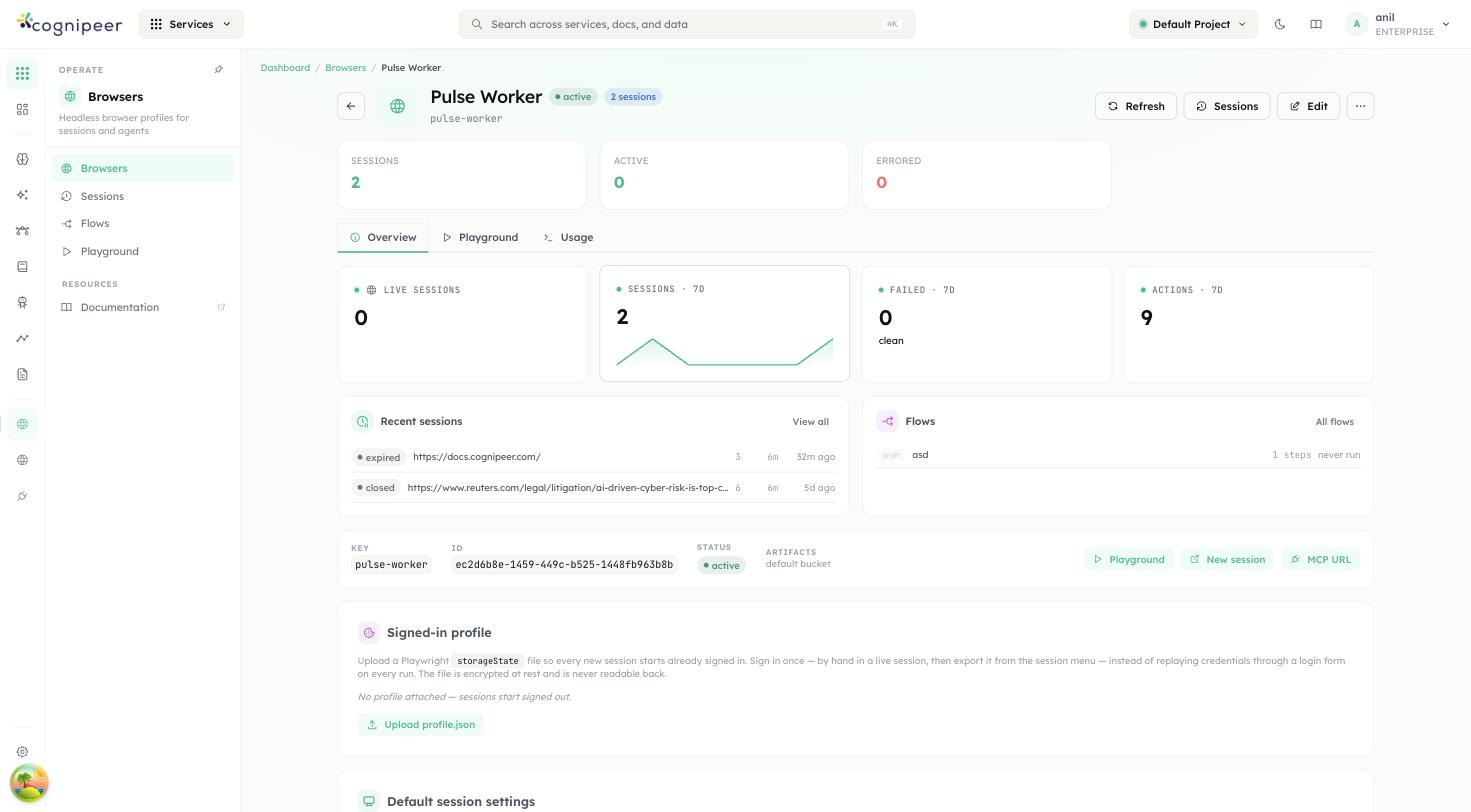
The overview leads with what the browser is DOING — live sessions, a 7-day sparkline, recent runs, the flows recorded against it — rather than a static list of its own fields. The signed-in profile and default session settings sit below it, still one scroll away.
Quick start
# 1. Create a profile (one-time)
curl -X POST /api/browser/browsers \
  -d '{
    "name": "research-browser",
    "defaultSessionConfig": { "headless": true, "viewport": { "width": 1440, "height": 900 }, "idleTimeoutMs": 120000 }
  }'

# 2. Open a session
curl -X POST /api/browser/sessions \
  -d '{ "browserId": "brw_…", "name": "akbank-research" }'

# 3. Drive it
curl -X POST /api/browser/sessions/<sessionKey>/actions \
  -d '{ "type": "goto", "url": "https://www.akbank.com", "waitUntil": "networkidle" }'

curl -X POST /api/browser/sessions/<sessionKey>/extract \
  -d '{ "selector": "h1", "mode": "text", "multiple": true }'

# 4. Capture artifacts
curl -X POST /api/browser/sessions/<sessionKey>/screenshot \
  -d '{ "fullPage": true }'

curl -X DELETE /api/browser/sessions/<sessionKey>The live screenshot endpoint (GET …/screenshot/live) returns an inline PNG/JPEG with cache-control: no-store — use it to drive a preview pane in the dashboard.
Per-browser MCP
Every profile exposes its own MCP server at /api/client/v1/browser/:browserKey/mcp/*. The toolset mirrors the action API but follows the Model Context Protocol:
browser_navigate · browser_history · browser_click · browser_hover ·
browser_type · browser_press · browser_select · browser_check ·
browser_upload · browser_scroll · browser_wait · browser_tabs ·
browser_snapshot · browser_find · browser_extract · browser_diagnostics ·
browser_screenshot · browser_pdf · browser_list_flows · browser_run_flow ·
browser_closeThe list is derived from the same tool definitions the Browser Use system tool binds, so the two surfaces cannot drift apart.
Open the SSE stream first:
GET /api/client/v1/browser/:browserKey/mcp/sseThe response carries an X-Mcp-Session-Id header and an endpoint SSE event with the message URL. Subsequent calls go to:
POST /api/client/v1/browser/:browserKey/mcp/message?sessionId=<id>…with the standard JSON-RPC payload (initialize, tools/list, tools/call, etc.). This is what the Browser Use system tool uses under the hood, so any MCP-compatible agent runtime can connect the same way.
Sessions in the dashboard
/dashboard/browser/[browserId] shows the profile's activity, its flows, and its signed-in profile and session defaults. /dashboard/browser/[browserId]/sessions lists every session for that profile.
Sessions in the left nav (/dashboard/browser/sessions) is the project-wide view: every session across every browser, with filters for browser, status and a time range (last hour / 24h / 7 days / 30 days / a custom range) — the question this page answers is "what ran last night and what is still open", which needs a time axis a single-browser list doesn't.
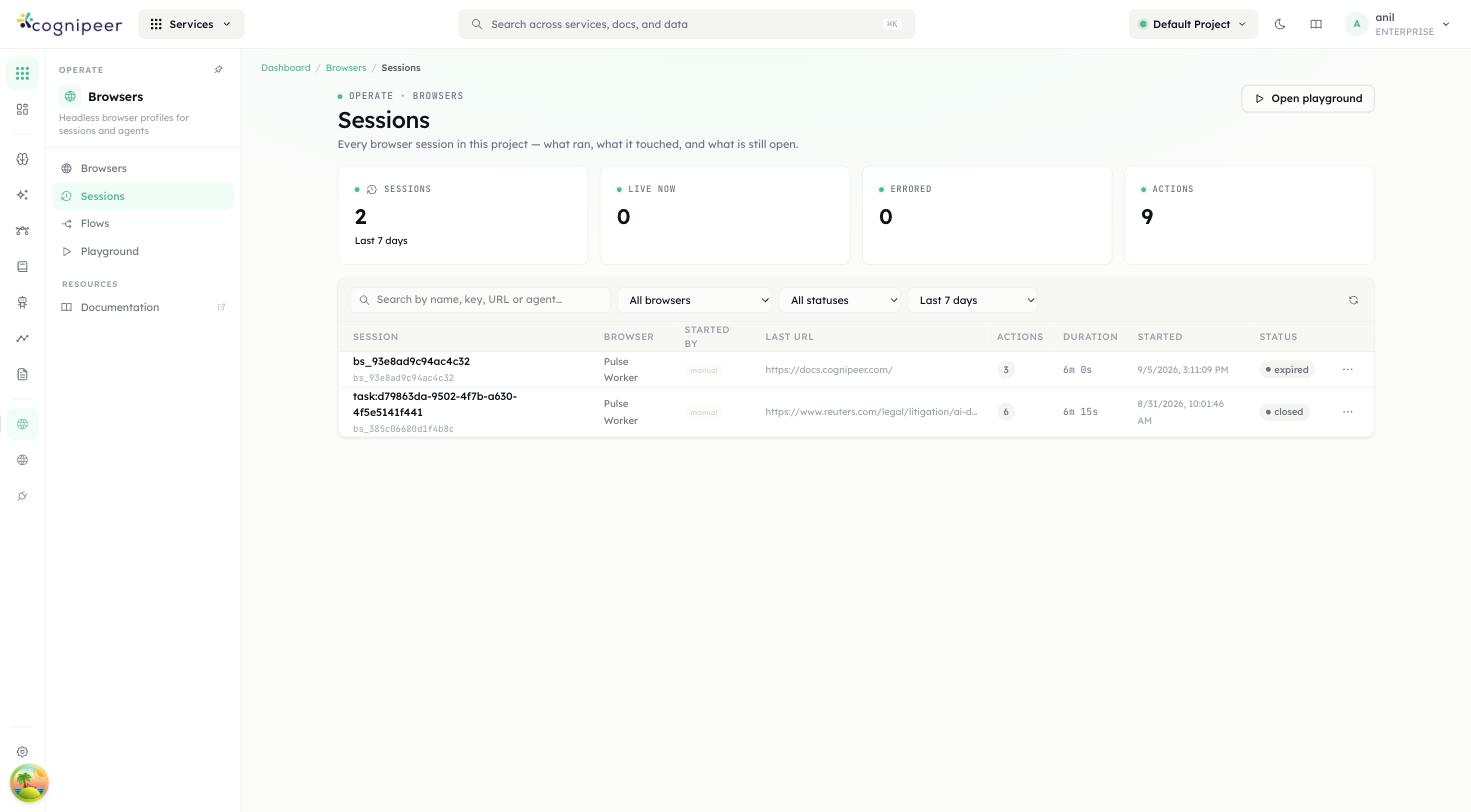
The Started by column names where a session came from — an agent, a recorded flow, MCP, or a person driving it by hand — which is the first thing worth knowing when a session misbehaves.
Playground
Playground (/dashboard/browser/playground) drives a session interactively: controls on the left, the live page on the right, so acting on an element never means losing sight of it.
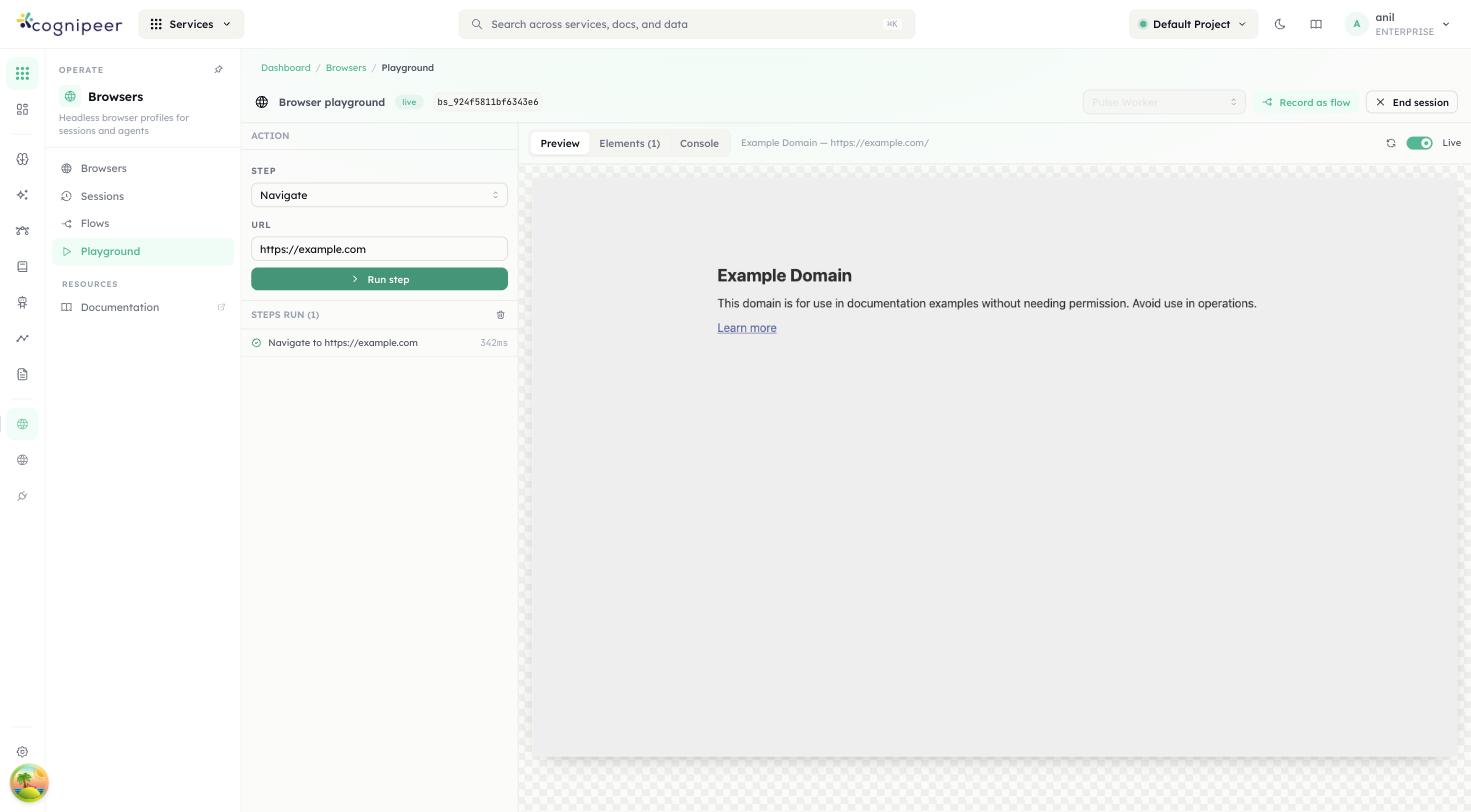
The right pane's Elements tab lists the page's interactive elements — clicking one fills the action composer with its durable target (the same role + name a recorded flow step stores), so discovering a step and recording it use the same gesture. Console surfaces the page's own console messages and failed requests, for when an action succeeded but the page didn't do what you expected.
Once a session has run a few steps, Record as flow freezes them into a flow — this is the fastest path from "I drove it once by hand" to "it runs every night".
Distributed execution
Browser is one of the entity types the Cluster layer can pin to a specific node. The browserConsumer registers a queue handler; when a profile is assigned to a node, all of its sessions and actions route through that node's queue. This matters when only some nodes have a real browser binary installed.
Concurrency
Each profile has a concurrency ceiling defined by its defaultSessionConfig and the worker pool in browserManager.ts. When the ceiling is hit, new createSession calls are queued — the session starts as soon as a slot frees.
See the Browser API reference for the full endpoint list.
Step by step: automate a browser task
Console runs Chromium through Playwright on the server and puts a small, auditable API in front of it. You create a browser profile once, open a session against it, and drive that session with discrete actions — navigate, click, type, extract, screenshot, PDF. Every operation is logged against the session, and screenshots and PDFs land in a Document Store bucket.
This page takes you from an empty tenant to a completed run, first through the dashboard and then over the API, and finishes by handing the same browser to an agent over MCP. Once you have driven a task once, Browser Flows let you record it and replay it deterministically — no model, no re-discovery — which is the piece that turns this from "an API for browsing" into an RPA substitute; this page covers the direct, discovery-style automation underneath it.
Browsers are a community feature. Only the multi-node routing note at the end depends on the Enterprise Cluster module.
What you will end up with
- A browser profile visible under Operate → Browsers, with a stable
keyandid. - A live session that you can watch in the dashboard while it works.
- A page snapshot you can feed to a model, and a screenshot plus a PDF stored as files with download URLs.
- An MCP endpoint for that profile that any MCP-aware client — including a Console agent — can connect to.
What the service does
Every call is synchronous. The HTTP request blocks until Playwright finishes the operation or the timeout fires; there is no job id and nothing to poll. Two background jobs exist, but neither is in your request path: an idle reaper that closes stale sessions, and a boot-time reconciliation that marks sessions the runtime lost.
| Operation | Endpoint, under /api/client/v1/browser | Result |
|---|---|---|
| Run an action | POST /sessions/:sessionKey/actions | One of goto, click, hover, type, press, select, check, upload, drag, scroll, wait, tab, back/forward/reload |
| Read the DOM | POST /sessions/:sessionKey/extract | text, html, attr or value, one element or all matches |
| Snapshot the page | GET /sessions/:sessionKey/snapshot | The accessibility tree as YAML, carrying [ref=…] markers |
| Find visible text | GET /sessions/:sessionKey/find?text=… | A durable target per hit — cheaper than a full snapshot, and safe to save into a flow step |
| Diagnostics | GET /sessions/:sessionKey/diagnostics | Console messages, failed requests, and the last dialog the session saw |
| Live screenshot | GET /sessions/:sessionKey/screenshot/live | Raw PNG/JPEG bytes, cache-control: no-store, not stored |
| Persist a screenshot | POST /sessions/:sessionKey/screenshot | Uploads to the artifact bucket, returns a download URL |
| Export a PDF | POST /sessions/:sessionKey/pdf | Same, as application/pdf |
| Export as a profile | GET /sessions/:sessionKey/profile | This session's storageState — hand it to PUT /browsers/:idOrKey/profile so future sessions start signed in |
| Close a session | DELETE /sessions/:sessionKey | Closes the Chromium context |
| Delete the record | DELETE /sessions/by-id/:sessionId | Closes it and removes the row |
| Read the audit trail | GET /sessions/:sessionId/events | Every operation the session performed |
Note the split: the driving endpoints (actions, extract, snapshot, find, diagnostics, screenshot, PDF, profile export, close) take the sessionKey (bs_…), while reading a session, listing its events and deleting its record take the id. The full endpoint list — including Browser Flows for recording and replaying a task without a model — is in the Browser API reference.
What it does not do
- No arbitrary JavaScript in the page — there is no general
evaluateendpoint. The only script the runtime executes itself iswindow.scrollByfor a coordinate scroll. - No raw mouse coordinates and no video recording.
- No interactive remote desktop. The dashboard's live preview polls the live-screenshot endpoint every few seconds; the Playground is the closest thing to hands-on-glass, and it is still built on that same poll.
- No model in the loop for a direct action.
extractreads the DOM literally; the profile's Default Model Key is stored and displayed but no browser runtime path reads it for a plain action. A model enters the picture when an agent drives the tools (see Give an agent the browser) — or, once you have driven a task once, a Browser Flow replays it with no model at all.
A few things that used to belong on this list no longer do: select, check, upload and drag actions exist now, a session can carry proxy, extraHTTPHeaders, httpCredentials, timezoneId and acceptDownloads in its config, a browser profile can carry a signed-in storageState (see Signed-in profiles), and a session can hold more than one tab via the tab action. dialogPolicy is accepted and stored on a session's config but nothing in the runtime applies it yet — a native alert/confirm/prompt still gets Playwright's default handling.
Before you start
| You need | Why | Where |
|---|---|---|
| Playwright with Chromium installed on the server | The runtime imports playwright lazily and fails the first session with an explicit install message if it is missing | npm install playwright then npx playwright install chromium |
| The right project selected | Profiles, sessions and buckets are project-scoped, and a token is bound to the project that was active when it was minted | Header project pill |
| A file bucket for artefacts | Screenshots and PDFs are uploaded as files; the bucket must already exist | Document Store — see Files |
| An API token, for the API half of this page | Authorization: Bearer cpeer_…; the owner needs Browsers read for the GETs and write for everything else | Settings → API Tokens — see Authentication |
If you skip the bucket, everything works until the first POST …/screenshot, which fails with File bucket not found. The default bucket key is browser-artifacts; either create a bucket with that key or set one explicitly on the profile.
Create a browser profile
- Open Operate → Browsers (
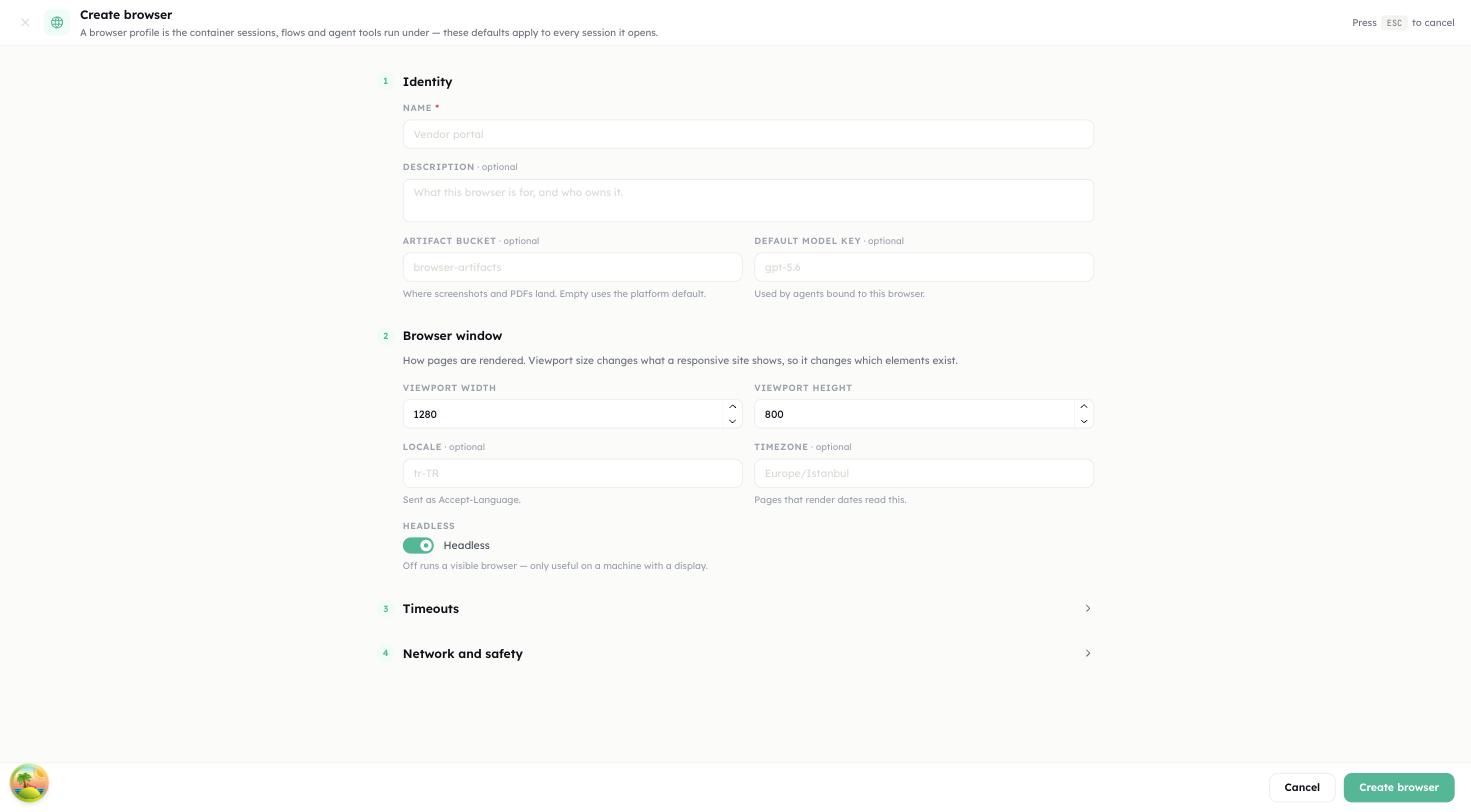
/dashboard/browser) — its own entry in the left nav, a peer of Sessions, Flows and Playground, not a tab. - Select Create browser. This opens a full-page form, in line with the rest of Console.
- Fill in its sections:
- Identity — Name, required, 2 to 120 characters (the profile
keyis slugified from it and uniquified with-2,-3… if it collides), an optional Description, and an optional Default Model Key, stored and shown on the profile though nothing in the browser runtime reads it for a plain action today. - Browser window — viewport size, user agent, locale, timezone.
- Timeouts — idle timeout, max lifetime, action and navigation timeouts.
- Network and safety — the artifact bucket that receives screenshots and PDFs, and the allow/block host lists.
- Identity — Name, required, 2 to 120 characters (the profile
- Select Create.
The row now shows the profile's Key, Default model, session counters and Status. Open it to reach the detail page, which has Overview, Sessions and Usage tabs, plus Edit and a Get MCP URL action.
Unlike the old modal, every defaultSessionConfig field the API accepts has a spot in this form — see Defaults and limits for the full field list and their ranges.
Run a session from the dashboard
Two places start a session, depending on what you're doing:
- On the profile's Overview tab, select New session for a session scoped to that one profile — the same full-page form covers name, initial URL, artifact bucket override and allow/block hosts.
- Playground (
/dashboard/browser/playground), a top-level page in the left nav, drives any browser interactively: pick (or start) a session, and the action composer sits on the left with the live page on the right, so acting on an element never means losing sight of it.
The right pane's Elements tab lists the page's interactive elements — clicking one fills the action composer with its durable target, the same role+name a recorded flow step would store — and its Console tab surfaces the page's own console messages and failed requests. Once you've run a few steps, Record as flow freezes them into a Browser Flow directly from here.
The profile's own Sessions tab lists every session scoped to it; the left nav's project-wide Sessions page (/dashboard/browser/sessions) lists every session across every browser, with filters for browser, status and a time range — useful for "what ran last night and what is still open."
Session status is one of pending, running, idle, closed, expired or errored. expired means the reaper closed it on idle timeout or maximum lifetime, or that the runtime restarted underneath it.
The same thing over the API
Base URL: https://<host>/api/client/v1. Every request carries Authorization: Bearer cpeer_….
export CONSOLE_HOST="https://console.example.com"
export CPEER_TOKEN="cpeer_..."
alias capi='curl -sS -H "Authorization: Bearer $CPEER_TOKEN" -H "Content-Type: application/json"'1. Create the profile. Here the full session config is set up front, which the dashboard modal cannot do.
capi -X POST "$CONSOLE_HOST/api/client/v1/browser/browsers" -d '{
  "name": "research-browser",
  "description": "Read-only research runs",
  "artifactBucketKey": "browser-artifacts",
  "defaultSessionConfig": {
    "viewport": { "width": 1440, "height": 900 },
    "locale": "en-GB",
    "idleTimeoutMs": 120000,
    "maxLifetimeMs": 900000,
    "navigationTimeoutMs": 45000,
    "access": { "allowList": ["example.com", "*.wikipedia.org"] }
  }
}'201 with { "browser": { "id": "…", "key": "research-browser", … } }. Keep both: sessions need the id, the MCP endpoint uses the key.
2. Open a session.
capi -X POST "$CONSOLE_HOST/api/client/v1/browser/sessions" -d '{
  "browserId": "6650f1c0a1b2c3d4e5f60718",
  "name": "example-run"
}'201 with { "session": { "id": "…", "sessionKey": "bs_9f3c…", "status": "idle", … } }. browserId must be the profile's id; passing the key returns 404 Browser not found: research-browser.
3. Navigate.
capi -X POST "$CONSOLE_HOST/api/client/v1/browser/sessions/bs_9f3c…/actions" -d '{
  "type": "goto",
  "url": "https://example.com",
  "waitUntil": "networkidle"
}'The response is 200 with a result envelope:
{
  "result": {
    "ok": true,
    "url": "https://example.com/",
    "pageTitle": "Example Domain",
    "ariaSnapshot": "- heading \"Example Domain\" [level=1] [ref=e2]\n- link \"More information...\" [ref=e5]\n"
  }
}Every successful action returns a fresh ariaSnapshot, so a click-then-read loop needs no extra round trip. Check result.ok, not the status code — a failed action is still 200, with the reason in result.errorMessage.
4. Address elements. The [ref=…] markers in the snapshot are the preferred way to target elements; a CSS selector is the alternative, and click, hover, type and press require one of the two.
capi -X POST "$CONSOLE_HOST/api/client/v1/browser/sessions/bs_9f3c…/actions" -d '{
  "type": "click", "ref": "e5", "selector": "a[href*=iana]"
}'Refs are bound to the snapshot that produced them. Supplying both ref and selector is the robust form: the runtime probes the ref for two seconds and falls back to the selector if the page has moved on.
5. Read the page.
capi -X POST "$CONSOLE_HOST/api/client/v1/browser/sessions/bs_9f3c…/extract" -d '{
  "selector": "h1, p", "mode": "text", "multiple": true
}'200 with { "result": { "ok": true, "values": ["…", "…"] } }. "mode": "text" (the default) reads innerText, "mode": "html" reads innerHTML, and "mode": "attr" needs "attribute": "href" — attribute is mandatory in that mode.
For the whole accessibility tree instead of one element:
capi "$CONSOLE_HOST/api/client/v1/browser/sessions/bs_9f3c…/snapshot"200 with { "ariaSnapshot": "…", "url": "…" }.
6. Capture artefacts.
capi -X POST "$CONSOLE_HOST/api/client/v1/browser/sessions/bs_9f3c…/screenshot" \
  -d '{ "fullPage": true, "type": "png" }'

capi -X POST "$CONSOLE_HOST/api/client/v1/browser/sessions/bs_9f3c…/pdf" \
-d '{ "format": "A4", "printBackground": true }'Both return 201:
{
  "artifact": {
    "bucketKey": "browser-artifacts",
    "fileId": "…",
    "objectKey": "bs_9f3c…-1723731600000-4c8a1b2e.png",
    "contentType": "image/png",
    "url": "/api/client/v1/files/buckets/browser-artifacts/objects/bs_9f3c…-1723731600000-4c8a1b2e.png/download"
  },
  "eventId": "…"
}objectKey is generated by the Document Store — it appends its own timestamp and a random suffix, so read it from the response rather than constructing it. artifact.url is a path on the same host; fetch it with the same bearer token. The bucket is resolved in this order: the session's artifactBucketKey, then the profile's, then the server default (BROWSER_DEFAULT_ARTIFACT_BUCKET, browser-artifacts). The screenshot pointer is also written to the session as lastScreenshot.
For a preview that you do not want to keep, GET …/screenshot/live returns the bytes directly and stores nothing.
7. Close the session.
capi -X DELETE "$CONSOLE_HOST/api/client/v1/browser/sessions/bs_9f3c…"200 with { "closed": true }. false means the runtime no longer held that session — the reaper or a restart had already taken it. Closing frees the tenant's concurrency slot, so do it explicitly rather than waiting for the idle timeout.
8. Read what happened.
capi "$CONSOLE_HOST/api/client/v1/browser/sessions/<sessionId>/events?limit=50"Note this one takes the session id, not the sessionKey.
With the SDK
@cognipeer/console-sdk (1.6.0) wraps the same endpoints:
import { ConsoleClient } from '@cognipeer/console-sdk';

const client = new ConsoleClient({
  apiKey: process.env.COGNIPEER_API_KEY!,
  // Host root — a trailing /api/client/v1 is stripped if you include it.
  baseURL: process.env.COGNIPEER_BASE_URL!,
});

const browser = await client.browsers.get('research-browser');
const session = await client.browserSessions.create({ browserId: browser.id, name: 'example-run' });

await client.browserSessions.action(session.sessionKey, { type: 'goto', url: 'https://example.com' });
const snap = await client.browserSessions.snapshot(session.sessionKey);
const shot = await client.browserSessions.screenshot(session.sessionKey, { fullPage: true });

await client.browserSessions.close(session.sessionKey);client.browsers.get() accepts an id or a key; browserSessions.create() still needs the id.
Give an agent the browser
Two routes lead to the same 21 tools.
In Console. Open the agent's Playground tab; the Configuration panel on the left has a Tools section. Select Add Tools (Edit Tools once the agent already has some). The Select Tools dialog lists Browser Use as a System source with a Browser picker: "Selecting a browser adds the Browser Use system tool to this agent." Choose the profile and select Save Configuration. At run time the agent opens its own session against that profile and closes it when the run ends. The agent workflow itself is covered in Build and publish an agent.
Over MCP. Every profile exposes its own MCP server. Use Get MCP URL on the profile — from the header menu or the Overview card — to copy both URLs, or build them yourself:
GET  /api/client/v1/browser/:browserKey/mcp/sse
POST /api/client/v1/browser/:browserKey/mcp/message?sessionId=<sessionId>Authenticate both with Authorization: Bearer cpeer_…. The SSE response carries an X-Mcp-Session-Id header and an endpoint event containing the message URL with the session id already filled in. The message endpoint speaks JSON-RPC and handles initialize, notifications/initialized, ping, tools/list and tools/call.
Tools exposed, grouped by what they do:
| Group | Tools |
|---|---|
| Navigate | browser_navigate, browser_history (back / forward / reload) |
| Act on an element | browser_click, browser_hover, browser_type, browser_press, browser_select, browser_check, browser_upload |
| Page and tabs | browser_scroll, browser_wait, browser_tabs |
| Read the page | browser_snapshot (accessibility tree with [ref=…]), browser_find (durable target per text hit), browser_extract |
| Observe | browser_diagnostics (console, failed requests, last dialog) |
| Artifacts | browser_screenshot, browser_pdf |
| Flows | browser_list_flows, browser_run_flow — replay a recorded flow with no model in the loop |
| Lifecycle | browser_close |
An action tool targets an element the same way the HTTP API does: a ref from the last browser_snapshot, or a durable role/name/testId/label/placeholder/text/selector. See Addressing elements — this is also what a flow records instead of the ref, so browser_run_flow keeps working across sessions where a saved ref wouldn't.
Lifecycle details that matter when you wire this up:
- The first
tools/callon an MCP session creates a browser session behind it; that one session serves the whole MCP session.initializeandtools/listwork without asessionId, buttools/callwithout one returnsMissing sessionId; open SSE first. - Dropping the SSE stream closes the backing browser session.
- A disabled profile returns
-32002 Browser is disabledon the message endpoint and403on the SSE endpoint. - Tool failures come back as a normal JSON-RPC result with
isError: trueand the message as text, not as a JSON-RPC error.
Defaults and limits
Session configuration, merged as profile defaultSessionConfig then the session's own config:
| Field | Default | Accepted range |
|---|---|---|
headless | true | boolean — accepted and stored, but the launch mode comes from BROWSER_HEADLESS (see the gotcha below) |
viewport | 1280 × 800 | width 320–8192, height 240–8192 |
userAgent | Chromium default | ≤ 512 characters |
locale | Chromium default | ≤ 64 characters |
timezoneId | Chromium default | ≤ 64 characters |
idleTimeoutMs | 300000 (5 minutes) | 1000 – 86400000 |
maxLifetimeMs | 1800000 (30 minutes) | 1000 – 604800000 |
actionTimeoutMs | 15000 | 1 – 120000 |
navigationTimeoutMs | 30000 | 1 – 300000 |
access.allowList / access.blockList | none | up to 100 entries each, ≤ 255 characters per entry |
proxy.server / .username / .password / .bypass | none | server + optional credentials, bypass ≤ 1000 characters |
extraHTTPHeaders | none | header map, keys ≤ 128 / values ≤ 2000 characters |
httpCredentials.username / .password | none | HTTP basic auth for the context |
acceptDownloads | boolean | accepted and stored |
ignoreHTTPSErrors | boolean | accepted and stored |
dialogPolicy | accept | dismiss | accepted and stored, not yet applied — a native dialog still gets Playwright's own default handling |
storageState | — | session-only: replay a storageState export for one session without attaching it to the profile; the profile-level signed-in profile is set separately, see Signed-in profiles |
Per-action limits: type.text ≤ 10000 characters and type.delay 0–5000 ms; wait.ms 1–60000; scroll.x / scroll.y ±100000; screenshot quality 1–100 (JPEG only, default 80); PDF format one of A4, Letter, Legal, A3, A5 with printBackground defaulting to true.
Server-level settings:
| Variable | Default | Effect |
|---|---|---|
BROWSER_HEADLESS | true | Chromium launch mode |
BROWSER_VIEWPORT_WIDTH / _HEIGHT | 1280 / 800 | Fallback viewport |
BROWSER_DEFAULT_IDLE_TIMEOUT_MS | 300000 | Reaper idle window |
BROWSER_DEFAULT_MAX_LIFETIME_MS | 1800000 | Hard session lifetime |
BROWSER_DEFAULT_ACTION_TIMEOUT_MS | 15000 | Default per-action timeout |
BROWSER_DEFAULT_NAVIGATION_TIMEOUT_MS | 30000 | Default goto timeout |
BROWSER_REAPER_INTERVAL_MS | 30000 | Reaper sweep interval |
BROWSER_DEFAULT_MAX_CONCURRENT | 10 | Live sessions per tenant |
BROWSER_DEFAULT_ARTIFACT_BUCKET | browser-artifacts | Fallback artefact bucket |
BROWSER_BLOCK_PRIVATE_NETWORK | true | Egress guard, described below |
BROWSER_CONCURRENCY_PROVIDER | memory | Concurrency limiter; memory is the only implementation |
When the tenant is at its concurrency ceiling, POST /sessions queues for 60 seconds and then fails with Browser concurrency wait timed out after 60000ms.
What gets recorded
Each operation appends an event to the session with a monotonic sequence, a type (create, goto, click, hover, type, press, wait, scroll, extract, snapshot, screenshot, pdf, close), a status of success or error, a duration, the selector or ref, and the artefact reference where there is one. A failure keeps the operation's own type and records the reason in errorMessage. Two redactions are applied before anything is written:
- URLs are stored with the query string and the fragment stripped, so tokens in links do not reach the log.
- Text typed with the
typeaction is replaced by[redacted:N chars]. The event log tells you that 24 characters went into the password field, never which ones.
Usage attribution emits one event per session under the service browser: a success event at close carrying the session duration as latency, or — if the session never opened — a single error event instead. Neither carries token counts or a cost, so browser sessions appear in usage surfaces as counted activity rather than money.
Two maintenance jobs are visible on Automations (/dashboard/automations) under the Browser domain, both with Run now:
- Browser Session Reaper — closes idle or over-lifetime sessions inside the local runtime. Supports Pause and Resume.
- Browser Session Reconciliation — after a restart, marks sessions the database still believes are active as
expiredwithBrowser runtime restarted before the session completed. It cannot be paused.
Gotchas
A failed action is still HTTP 200. POST /actions and POST /extract return { "result": { "ok": false, "errorMessage": "…" } } for anything Playwright refuses — a missing selector, a timeout, a blocked host. Branch on result.ok.
Egress denials look like action failures, not 403s. With BROWSER_BLOCK_PRIVATE_NETWORK on (the default), the runtime refuses hosts that resolve to loopback, private, link-local, CGNAT or multicast space, plus localhost, *.localhost, localhost.localdomain, *.local and *.internal. A host whose DNS lookup fails is also treated as private — the guard fails closed. Results are cached for five minutes. The denial arrives as result.ok: false with the reason in errorMessage. This is also why a session cannot reach a service on localhost or on a private address — including Console itself, when Console is reached that way.
Allow and block lists are evaluated per request, not just per navigation. They are applied to every resource the page loads. Order is: block list first (a match denies), then the allow list (if non-empty, a non-match denies), then the private-network guard. A pattern matches exactly, or as a suffix — example.com also matches www.example.com, while *.example.com matches subdomains only and not the apex. * allows everything.
Sessions live in one process's memory. They are not shared between nodes and do not survive a restart; a restarted runtime marks them expired. In an Enterprise Cluster deployment only POST /actions is routed to the node that owns the profile — extract, snapshot, screenshot, PDF and close execute on whichever node receives the request, so pin your traffic or keep the whole run on one node. Assigning a profile to a different node affects future sessions only.
Ids and keys are not interchangeable. browserId on session creation must be the profile's id; the MCP path accepts either the id or the key; driving endpoints take the sessionKey; reading a session, its events and deleting its record take the session id.
The bucket must exist before the first capture. A missing bucket surfaces as 404 File bucket not found. from the screenshot and PDF endpoints only — session creation and every action succeed without one.
PDF export requires headless mode. Chromium only renders PDFs headless, and the launch mode comes from BROWSER_HEADLESS (default true) — it is a server-wide setting. A headless value on a profile's defaultSessionConfig or on a session's config is accepted and stored, but the runtime never applies it, so you cannot turn headless off for one session.
Deleting a profile with sessions returns 409. The check counts session records, whatever their status, so closing them is not enough — delete them with DELETE /sessions/by-id/:sessionId first. The message is Cannot delete browser with existing sessions. Delete or archive sessions first.
The snapshot endpoint reports every failure as 500. Unlike the other routes it does not map errors to status codes, so a closed session there returns 500 with the message in error rather than 404.
Request bodies are strict. Every browser payload rejects unknown fields with 400, and the error message names only the first failing path — fix them one at a time.
Playwright is a runtime dependency, not a build one. If Chromium is missing, the first session fails with Playwright is not installed in this environment. and nothing before that point gives you a warning.
Related
- Browser automation — the module reference.
- Browser API — the full endpoint list.
- Files — creating the bucket that receives artefacts.
- Build and publish an agent — attaching Browser Use to an agent.