

Files
The file service provides multi-provider file storage with bucket management, upload/download, and automatic Markdown conversion for document processing. Operators interact with it through Data → Document Store.
Document Store
Buckets are the unit of file organisation — each bucket points to a remote prefix on a configured file provider (local filesystem, S3, R2, MinIO, etc.). The list view counts total buckets, active buckets, and disabled buckets, and shows the provider/driver each bucket sits on.
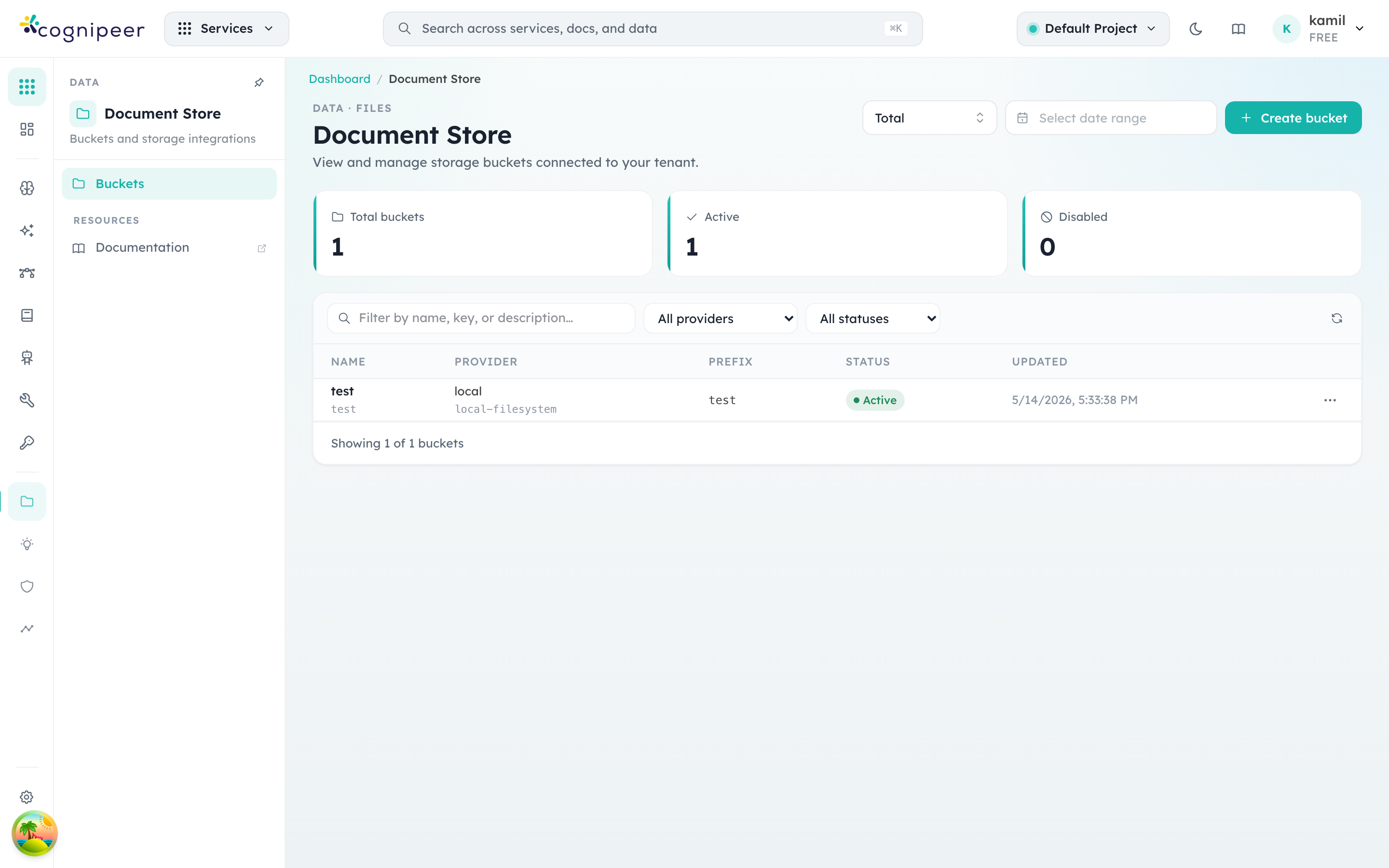
Click a bucket row to drill into the file browser for that bucket — uploads, downloads, deletes, and bulk operations all happen there. Create bucket opens a form where you pick the provider, declare a prefix (used to namespace the bucket within the provider), and optionally enable on-upload Markdown conversion. The conversion step uses @cognipeer/to-markdown to extract text from PDFs, Office docs, and images for downstream Knowledge Engine ingestion.
Folders and session files
A bucket's Files tab browses the bucket as folders, the way an object store with a / delimiter does: a breadcrumb starts at Bucket root, a folder row opens the folder, Up one folder goes back, and Upload file saves into the folder you are looking at (The file is saved in the folder …). Folders are not separate objects — they are found from the file keys, so a folder exists as long as a file does.
The Show filter at the right of the breadcrumb narrows the list:
| Filter | Shows |
|---|---|
| All files | Everything in the folder |
| Session files | Only files attached to agent sessions |
| Other files | Everything else |
A session file is told apart in the list: it carries a Session file badge and shows the session it belongs to (with an Open session link), when it expires (or Does not expire), and who uploaded it. It is removed automatically when it expires or when the session is deleted — see Session files.
Session files live in the bucket an agent names in Build → Files, under <folder>/<agentKey>/<sessionId>/ (the agent's Folder setting defaults to agent-sessions), so opening agent-sessions/ in the browser shows one folder per agent and, inside it, one per session.
A bucket that agents keep session files in cannot be deleted or disabled
Deleting or disabling it is refused with 409 bucket_in_use, naming the agents — including an agent whose published version still names the bucket after its draft moved on. Choose another bucket in each agent's Files settings (and publish) first. The same goes for the bucket's storage provider: a provider that is not active makes uploads fail with storage_unavailable.
Supported Providers
File providers are registered through the contract system. Common providers include S3-compatible storage (AWS S3, MinIO, Cloudflare R2, etc.) and the local filesystem of the server running Console. A local-filesystem bucket keeps files on one server's disk — fine for a single node, not for a cluster that scales out without a shared volume.
Service Functions
| Function | Description |
|---|---|
listFileDrivers() | List available file provider drivers |
listFileProviders() | List tenant's configured providers |
createFileProvider() | Create provider configuration |
listFileBuckets() | List buckets for a provider |
createFileBucket() | Create bucket (with prefix) |
getFileBucket() | Get bucket details |
deleteFileBucket() | Delete bucket (with force option) |
listFiles() | List files in bucket, or one folder of it |
uploadFile() | Upload file with optional Markdown conversion |
downloadFile() | Download file from bucket |
deleteFile() | Delete file record and remote object |
getFileRecord() | Get file metadata |
Client API
List Buckets
GET /api/client/v1/files/buckets
Authorization: Bearer <token>Upload File
POST /api/client/v1/files/buckets/:bucketKey/objects
Authorization: Bearer <token>
Content-Type: application/jsonThe file travels inside a JSON body, base64-encoded (a data: URL is accepted too) — this endpoint does not take multipart/form-data.
| Field | Type | Required | Description |
|---|---|---|---|
fileName | string | Yes | Original file name. Path components and control characters are stripped. |
data | string | Yes | The file as base64 or a data: URL. |
contentType | string | No | MIME type. Must be allowed by the platform's upload allowlist when one is set. |
convertToMarkdown | boolean | No | Convert to markdown on upload. Default false. |
keyHint | string | No | The object's key inside the bucket. Without it a unique name is generated (<slug>-<timestamp>-<id>.<ext>). A hint that ends with / names a folder: the file lands in it under a generated name. Any other hint is the whole key. |
metadata | object | No | Free-form metadata stored on the record. |
curl -X POST "$CONSOLE_URL/api/client/v1/files/buckets/my-bucket/objects" \
  -H "Authorization: Bearer $COGNIPEER_API_TOKEN" \
  -H "Content-Type: application/json" \
  -d "{
    \"fileName\": \"document.pdf\",
    \"contentType\": \"application/pdf\",
    \"keyHint\": \"contracts/2026/\",
    \"convertToMarkdown\": true,
    \"data\": \"$(base64 < document.pdf | tr -d '\n')\"
}"201: { "file": { … }, "message": "File uploaded successfully" }. Over the project's file quotas or rate limits: 429.
Download File
GET /api/client/v1/files/buckets/:bucketKey/objects/:objectKey/download
Authorization: Bearer <token>?variant=original (default) returns the stored bytes; ?variant=markdown returns the text the file was converted to.
List Files
GET /api/client/v1/files/buckets/:bucketKey/objects
Authorization: Bearer <token>Without further parameters this is the flat list of every file in the bucket. Add prefix to list one folder, the way an object store does with a / delimiter:
GET /api/client/v1/files/buckets/:bucketKey/objects?prefix=agent-sessions/support-bot/The answer then holds the files directly in that folder (files) and its sub-folders (folders, each a full path ending in /), found from the file keys; prefix= (empty) is the bucket root.
{
  "count": 1,
  "files": [ { "id": "6710…", "key": "agent-sessions/support-bot/notes.txt", "name": "notes.txt", "…": "…" } ],
  "folders": [ "agent-sessions/support-bot/6f1c0a2b9d3e4f5a6b7c8d9e/" ],
  "prefix": "agent-sessions/support-bot/",
  "nextCursor": null
}| Query | Description |
|---|---|
prefix | List one folder: its files in files and sub-folders in folders. prefix= (empty) is the bucket root. With search, prefix just narrows the search to everything under it, however deep. |
purpose | conversation keeps only session files; other only the rest. |
search | Search by name. |
limit | Page size; default 50. |
cursor | The nextCursor of the previous page. |
The Document Store screens show buckets this way, with a breadcrumb.
Session files
Files attached to agent sessions are ordinary files in the bucket the agent names (Build → Files), under <folder>/<agentKey>/<sessionId>/. They carry purpose: "conversation", the conversationId and agentKey they belong to, when they expire (expiresAt) and who uploaded them (uploadedBy). A bucket an agent keeps session files in cannot be deleted or disabled until the agent uses another one (409 bucket_in_use, naming the agents — also an agent whose published version still uses it).
Session files have their own upload, read and delete calls on the session — see Agent Sessions API.
Dashboard uploads into a folder
The dashboard's own upload route (/api/files/…, used by the Document Store screens) also takes folder (alias prefix): the file lands in that folder under a generated name, or under keyHint taken as its name in the folder. A .. or . segment is refused. The client API does the same with a keyHint that ends in /.
Markdown Conversion
When a file is uploaded, the gateway can automatically convert it to Markdown using @cognipeer/to-markdown. This is used by the Knowledge Engine pipeline for document ingestion, and by session files so an agent can read a document.
Supported formats include PDF, DOCX, PPTX, HTML, and plain text.
Bucket Configuration
{
  "name": "Documents",
  "key": "documents",
  "prefix": "tenant-acme/docs/"
}Buckets use a prefix to isolate tenant files within shared storage infrastructure.
File Record
| Field | Description |
|---|---|
id | Record id |
key | Object key inside the bucket (a folder is the part of the key before the last /) |
name | Original file name |
contentType | Content type |
size | File size in bytes |
bucketKey, providerKey | Where the file is stored |
markdownStatus | pending, succeeded, failed or skipped |
markdownKey, markdownSize, markdownError | The converted text object, and why conversion failed |
metadata | Free-form metadata |
purpose, conversationId, agentKey, expiresAt, uploadedBy | Session files only |
createdBy, createdAt, updatedAt | Who created it, and when |
Runtime Pooling
File provider SDK clients are cached via runtimePool with credential change detection:
const runtime = await runtimePool.getOrCreate(
  `${tenantId}:${providerKey}`,
  hashCredentials(credentials),
  () => providerRegistry.createRuntime(driver, context),
);What's new
The bucket browser now shows folders with a breadcrumb, filters Session files from Other files, and the client API lists one folder with prefix. Session files from agents are stored here — see Session files. The upload and file-record sections above were corrected to match the API: uploads are JSON with base64 data, not multipart.