

Authentication
The control plane supports two authentication mechanisms: JWT-based session auth for the dashboard and API token auth for client APIs. On the Enterprise tier, a tenant's dashboard login can additionally be backed by an external directory (LDAP) or an OIDC identity provider (SSO) instead of the local password — see External Identity Providers below.
Authentication Modes
| Mode | Used For | Mechanism |
|---|---|---|
| JWT Session | Dashboard UI | HTTP-only cookie |
| API Token | Client APIs (/api/client/v1/*) | Authorization: Bearer <token> |
| LDAP (Enterprise) | Dashboard UI, directory-backed | Local password path replaced per-tenant; same JWT session issued on success |
| SSO / OIDC (Enterprise) | Dashboard UI, identity-provider-backed | Authorization-code + PKCE redirect flow; same JWT session issued on success |
| API Token + user token | Client APIs, acting for your application's own signed-in users | Authorization: Bearer <token> plus a signed X-Cognipeer-User-Token statement — see Acting for a user |
JWT Session Authentication
Login Flow
- User submits slug + email + password to
POST /api/auth/login - Server finds tenant by slug, switches to tenant database
- Validates email/password against stored bcrypt hash
- Generates JWT with user info, license features, and tenant data
- Sets HTTP-only cookie (
token) - Returns user profile
Registration Flow
- User submits company name, slug, name, email, password to
POST /api/auth/register - Server creates tenant with the given slug
- Creates a new
tenant_{slug}database - Creates user as owner with hashed password
- Assigns default license (FREE)
- Generates JWT and sets cookie
- Sends welcome email
JWT Payload
{
  userId: string;
  email: string;
  role: 'owner' | 'admin' | 'project_admin' | 'user';
  tenantId: string;
  tenantSlug: string;
  tenantDbName: string;
  licenseType: string;
  features: string[];
}The JWT is signed using the jose library (Edge Runtime compatible) with JWT_SECRET.
Middleware Processing
The global middleware (src/middleware.ts) processes every request:
Request → Is public path? → Pass through
        → Is client API? → Skip cookie auth (Bearer handled in route)
        → Extract cookie → Verify JWT → Check license endpoint access
→ Inject headers → Forward to route handlerHeaders injected for authenticated requests:
| Header | Content |
|---|---|
x-user-id | User ObjectId |
x-user-email | User email |
x-user-role | owner, admin, project_admin, user |
x-tenant-id | Tenant ObjectId |
x-tenant-slug | Tenant slug |
x-tenant-db-name | tenant_{slug} |
x-license-type | License tier |
x-features | JSON array of feature flags |
x-request-id | Request UUID |
Public Paths
These paths skip authentication:
/login,/register/api/auth/*(includes the SSO login flow,/api/auth/sso/*— see below)/api/health/*
API Token Authentication
For programmatic access, tenants create API tokens through the dashboard. These tokens authenticate requests to /api/client/v1/* endpoints.
Every token is owned by a user record, and that user's canLogin flag shapes where the token gets managed:
- A regular member (
canLogin: true, the default) mints and manages their own tokens under Configure → API Tokens. - A Programmatic User (
canLogin: false) — a login-disabled identity with no password and an optional email, meant to exist only to own API tokens (a service account, a CI job, an integration) — can never sign in, so it can't reach that self-service page. An owner/admin instead manages its tokens from its row in Configure → Members → <user>, on that user's dedicated per-user token page.
For anything that isn't a human logging into the dashboard, prefer creating a Programmatic User and minting its tokens from that per-user page (or the equivalent Client API calls below) rather than handing out a real teammate's personal token. See User Types (canLogin) for how the flag interacts with roles.
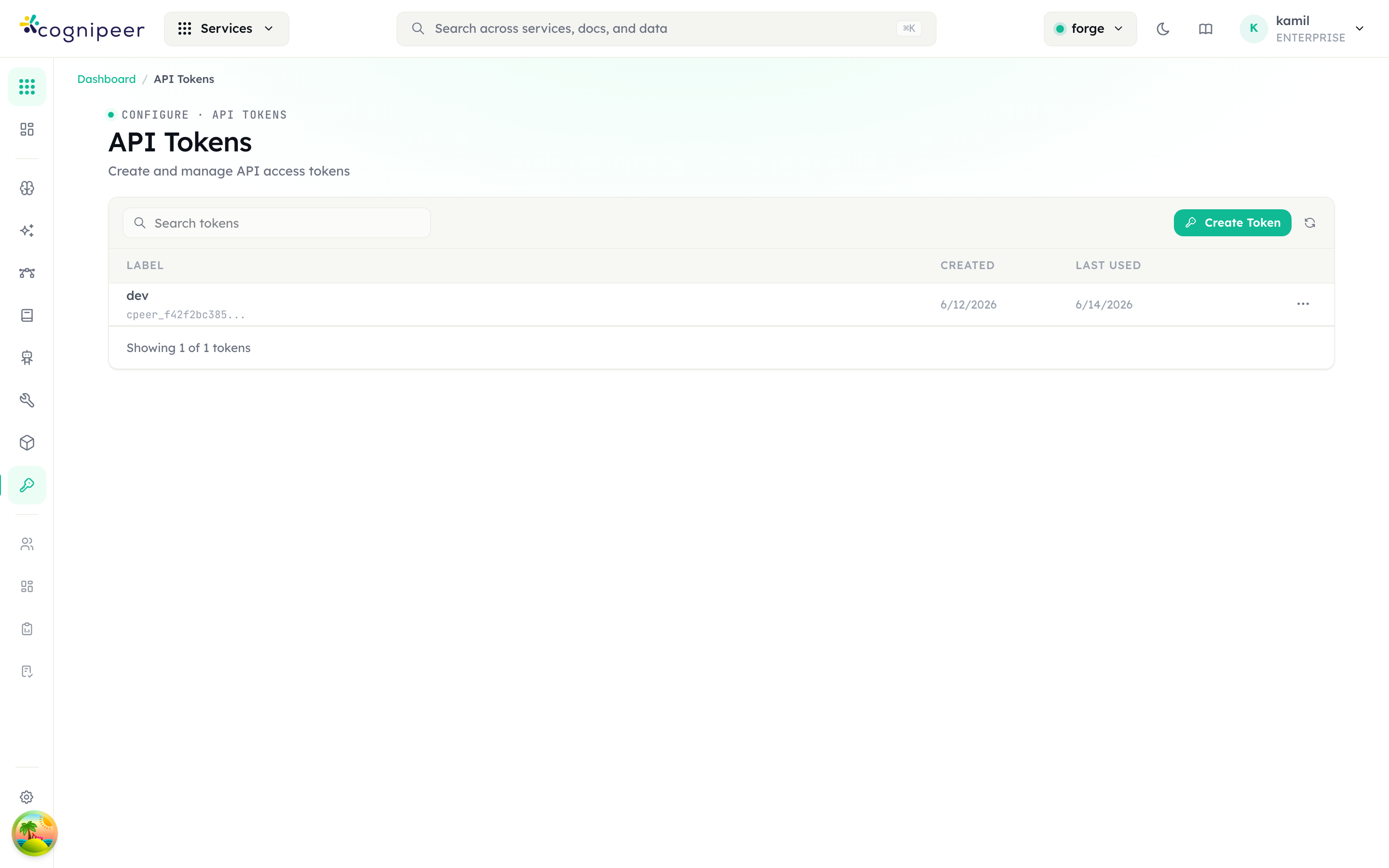
Tokens are managed under Configure → API Tokens (your own tokens) or Configure → Members → <user> (any user's tokens, including a Programmatic User's). Each row shows the label, creation date, and last-used timestamp; the full secret is shown only once at creation time:
Usage
curl -X POST https://gateway.example.com/api/client/v1/chat/completions \
  -H "Authorization: Bearer cpeer_abc123..." \
  -H "Content-Type: application/json" \
-d '{"model": "gpt-4", "messages": [{"role": "user", "content": "Hello"}]}'Provisioning a non-login identity from the API
The per-user token page has a Client API equivalent — two endpoints, both requiring an owner/admin-owned token:
POST /client/v1/users— creates a Programmatic User.canLoginis always forced tofalseserver-side, so this endpoint can never create a login-capable account no matter what the request body sends.POST /client/v1/users/:id/tokens— mints an API token for that user (or any user in the tenant) and returns the plaintext secret once.
# Create a login-disabled service account
curl -X POST https://gateway.example.com/api/client/v1/users \
  -H "Authorization: Bearer cpeer_admin_token..." \
  -H "Content-Type: application/json" \
  -d '{"name": "billing-sync-bot", "role": "user"}'

# Mint an API token for it (id from the response above)
curl -X POST https://gateway.example.com/api/client/v1/users/<user_id>/tokens \
  -H "Authorization: Bearer cpeer_admin_token..." \
  -H "Content-Type: application/json" \
-d '{"label": "billing-sync nightly job"}'See Users API for full request/response fields and error cases.
requireApiToken Helper
All client API routes use the requireApiToken helper:
import { requireApiToken, ApiTokenAuthError } from '@/lib/services/apiTokenAuth';

export async function POST(request: NextRequest) {
  try {
    const ctx = await requireApiToken(request);
    // ctx.token, ctx.tokenRecord, ctx.tenant
    // ctx.tenantId, ctx.tenantSlug, ctx.tenantDbName
    // ctx.projectId, ctx.user
  } catch (error) {
    if (error instanceof ApiTokenAuthError) {
      return NextResponse.json({ error: error.message }, { status: error.status });
    }
    throw error;
  }
}Token Validation Flow
- Extract Bearer token from
Authorizationheader - Check cache (SHA-256 hash key, 60s TTL)
- On cache miss: query database, resolve tenant
- Fire-and-forget: update
lastUsedtimestamp - Switch to tenant database
- Ensure default project exists
- Resolve user from token record
- Return
ApiTokenContext
Token Properties
| Field | Description |
|---|---|
token | The raw token string |
userId | Owning user |
tenantId | Owning tenant |
projectId | Scoped project (optional) |
expiresAt | Expiration date (optional) |
lastUsed | Last usage timestamp |
Acting for a user (verified end-user identity)
Requires a Console release with the IAM engine
The X-Cognipeer-User-Token header and its per-token setup exist only in releases that include the IAM engine.
A token acts as its owner by default. An application that signs its own users in can instead let each call act as the person it is for: it keeps sending its API token and adds a signed statement about the person in the X-Cognipeer-User-Token header. Console verifies the statement (issuer, audience, pinned algorithm, signature, expiry), finds or creates the person's account, and runs the call with that person's access and limits, still capped by the token's scope and project. Without the header nothing changes; with it, a statement that is not accepted is refused and the owner is never the fallback.
Owners and admins set it up per token under Settings → IAM center → Principals → API tokens. See Acting for a user for the setup, the claims, the refusal codes and example code, and External users for the accounts it can create.
External Identity Providers (Enterprise)
Both integrations let a tenant's members sign in through a corporate identity system instead of a local password, and both just-in-time (JIT) provision a local user record on first successful login. They are configured per tenant from Configure → LDAP Directory and Configure → Single Sign-On, and require an active ENTERPRISE license on that tenant — a FREE/STARTER/PROFESSIONAL tenant sees an upgrade prompt instead of the configuration form, and the admin config/test endpoints (/api/ldap/config, /api/ldap/test, /api/sso/config, /api/sso/test) return 402 Payment Required. The login paths themselves are never license-gated — once configured, authentication keeps working even if the license check runs before every other request.
LDAP
Verifies the login against a directory (OpenLDAP, Active Directory, …): binds as a service account, searches for the user entry, then re-binds as that entry to verify the password — the directory always holds the real credential, console never sees or stores it.
| Field | Description |
|---|---|
url | ldap://ldap.corp:389 or ldaps://ldap.corp:636 |
bindDN / bindCredentials | Service account used to search for the user entry (password encrypted at rest) |
searchBase | Subtree to search for user entries |
userFilter | e.g. (|(uid={{username}})(mail={{username}})) — {{username}}/{{uid}} are replaced with the escaped login identifier |
emailAttribute / nameAttribute | Directory attributes read into the local user record |
defaultRole / adminGroupDNs | Tenant role for provisioned users; members of any admin group DN become tenant admin |
groupSearchBase / groupMemberAttribute | Optional — enables group→role resolution via a subtree search in addition to the user entry's own memberOf |
syncGroups / ldapGroupMappings | Optional — reconciles console user groups (Members → Groups) from directory group membership on every login. Console groups are auto-created on first match; what a synced group grants (role, service permissions, project access) is still configured in the Groups admin UI — LDAP only owns membership, and never touches a group's local (hand-added) members |
tlsRejectUnauthorized | Set to false to accept a self-signed certificate (ldaps://, dev only) |
Login is slug-scoped — a directory user signs in with their organization's slug the same way a local user does; there is no cross-tenant directory lookup for LDAP identities on their first login. Password login for an existing account is refused (not silently allowed) once LDAP rejects a directory user, so a directory outage fails closed rather than falling back to a stale local password.
SSO (OIDC)
Authorization-code + PKCE (S256) against any OIDC-conformant provider — Keycloak, Okta, Entra ID, Auth0, Google Workspace — configured generically, with no per-provider code.
/login → "Sign in with SSO"
  → GET /api/auth/sso/discover
      exactly one tenant-wide connection enabled? → skip the email step, redirect straight to the IdP
      otherwise → show the email field
  → GET /api/auth/sso/start?email=…
      resolve the tenant by matching the email's domain against each connection's allowed domains
      → redirect to the identity provider with a signed, httpOnly state cookie (PKCE + nonce)
  IdP → GET /api/auth/sso/callback
      → exchange the code, verify the id_token against the provider's JWKS, resolve/provision the user
      → mint a short-lived, single-use ticket (the session token itself never appears in a URL)
      → redirect to /login/sso-callback?ticket=…
  browser → POST /api/auth/sso/session { ticket }
→ claims the ticket exactly once and issues the same JWT/cookie session as password login| Field | Description |
|---|---|
issuer / discoveryUrl | Provider issuer; discovery defaults to {issuer}/.well-known/openid-configuration and is resolved once, at save time |
clientId / clientSecret / clientAuthMethod | Confidential client credentials (secret encrypted at rest) |
scopes / usePkce / fetchUserInfo | ["openid","email","profile"] by default; PKCE on by default; optionally merge in /userinfo claims |
subjectClaim | The stable identity anchor (default sub) — matched before email on every login, so a changed or synthesized email can never orphan the account |
requireVerifiedEmail | Reject the login when the provider's email_verified claim is false |
allowedEmailDomains | Routes a login attempt to this tenant's connection; public mailbox domains (gmail.com, outlook.com, …) are rejected outright |
defaultRole / adminClaimName / adminClaimValues | Tenant role for provisioned users; a matching claim value maps to tenant admin |
Email is not required. Two independent mechanisms cover directories that never send a usable email claim, or deployments with only one identity provider:
- Synthetic email — configure a username claim (default
preferred_username) and a synthetic domain; console builds{localpart}@{syntheticdomain}as a placeholder email. The account stays stable across a resynthesized email because it's matched by the subject claim, not the email. - Single-connection shortcut — when exactly one tenant-wide SSO connection is enabled (a single-tenant/on-prem deployment), the login page skips the email step entirely and redirects straight to the identity provider.
License-Based Feature Control
Features are controlled through a license system defined in src/config/policies.json:
import { LicenseManager } from '@/lib/license/license-manager';

const hasAccess = LicenseManager.hasFeature(licenseType, 'LLM_CHAT');
const canAccessEndpoint = LicenseManager.hasEndpointAccess(licenseType, '/api/models');License Tiers
| Tier | Features | Request Limit |
|---|---|---|
| FREE | 16 features | 1,000/month |
| STARTER | 10 features | 10,000/month |
| PROFESSIONAL | 14 features | 100,000/month |
| ENTERPRISE | All features | Unlimited |
| ON_PREMISE | All features | Unlimited |
Feature Endpoint Mapping
Each feature in policies.json maps to API endpoint patterns:
{
  "LLM_CHAT": {
    "name": "LLM Chat",
    "endpoints": ["/api/chat/*", "/api/client/v1/chat/*"]
  }
}The middleware checks these mappings automatically.
User Roles
| Role | Scope |
|---|---|
owner | Full tenant control |
admin | Manage users and settings |
project_admin | Manage assigned projects |
user | Access assigned projects only |
A role sets the default level of each service. What a person can actually do is the result of their role, their own service permissions, the grants of their groups, their project permissions and, for API tokens, the token's scope, all decided by one policy engine, with custom policies for exceptions. See Authorization (IAM) for how the levels combine, and Troubleshooting and FAQ for reading a refusal (403 with a decision id).
User Types (canLogin)
role and canLogin are independent axes on the same user record — role governs what a user can do once authenticated, canLogin governs whether it can authenticate as a dashboard session at all. A user of any role can be either type:
canLogin | Type | Meaning |
|---|---|---|
true (default — missing/undefined is treated as true for back-compat) | Regular member | Has a password, can log into the dashboard and hold a JWT session, in addition to owning API tokens. |
false | Programmatic User | No password, no dashboard session, email optional. Exists only to own API tokens — a service account, integration, or CI identity. Shown with a "No login" status badge and a "Programmatic" badge next to its role in Configure → Members. |
POST /client/v1/users (the Client API) can only ever create canLogin: false users — it forces the flag server-side regardless of the request body, so an API token can never provision a login-capable account. A human teammate must still be added from the dashboard, with a password, via Configure → Members → Add User (with the Send invite toggle left on).
Configuration
| Variable | Default | Description |
|---|---|---|
JWT_SECRET | — | Required. Secret for JWT signing |
JWT_EXPIRES_IN | 7d | JWT expiration duration |
PROVIDER_ENCRYPTION_SECRET | JWT_SECRET | Encryption key for stored credentials |