

Guardrails
Guardrails provide real-time content safety checks for LLM inputs and outputs. They detect PII, secrets, banned words and profanity, harmful content, prompt-injection attempts, and unwanted tool/webhook activity — and can block, redact, warn on, or flag what they find. Operators manage them under Operate → Guardrail.
Hook plane rewrite (September 2026)
Guardrails moved from a two-slot model (one policy on the request, one on the response) to a hook plane: six hooks spanning the full request lifecycle, each configurable per policy family. If you're looking for the old inputGuardrailKey / outputGuardrailKey model, see Inference Integration below for how the two map.
Operator view
Each guardrail is a named policy attached to one or more models or agents. The list view summarises the states that matter operationally: total policies, how many are enabled, how many are disabled, and how many block requests.
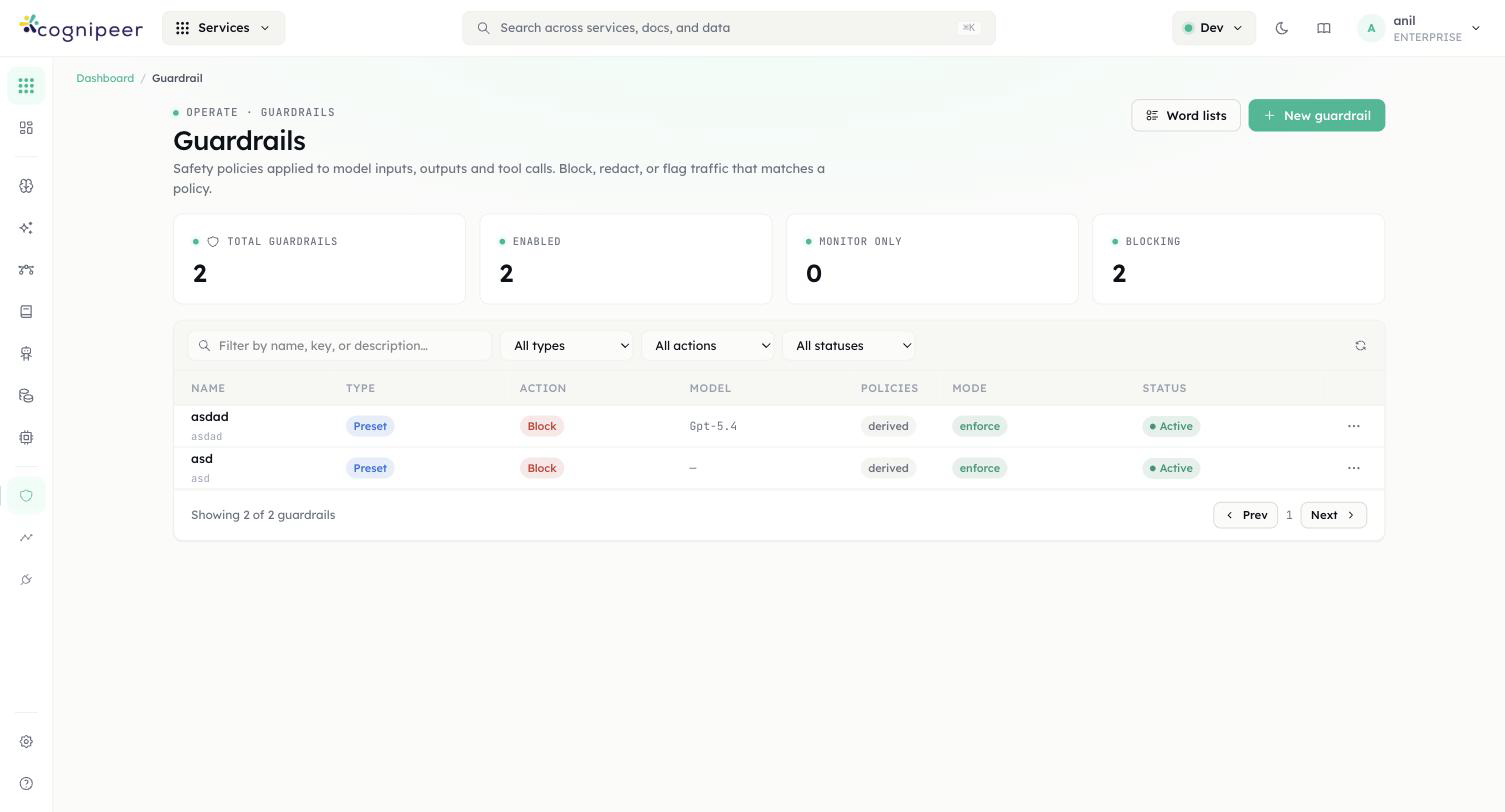
Filters narrow by type (preset / custom), by action, and by status. The Create guardrail flow walks you through picking a type, declaring which checks to enforce, and configuring the default action and failure mode.
Hooks
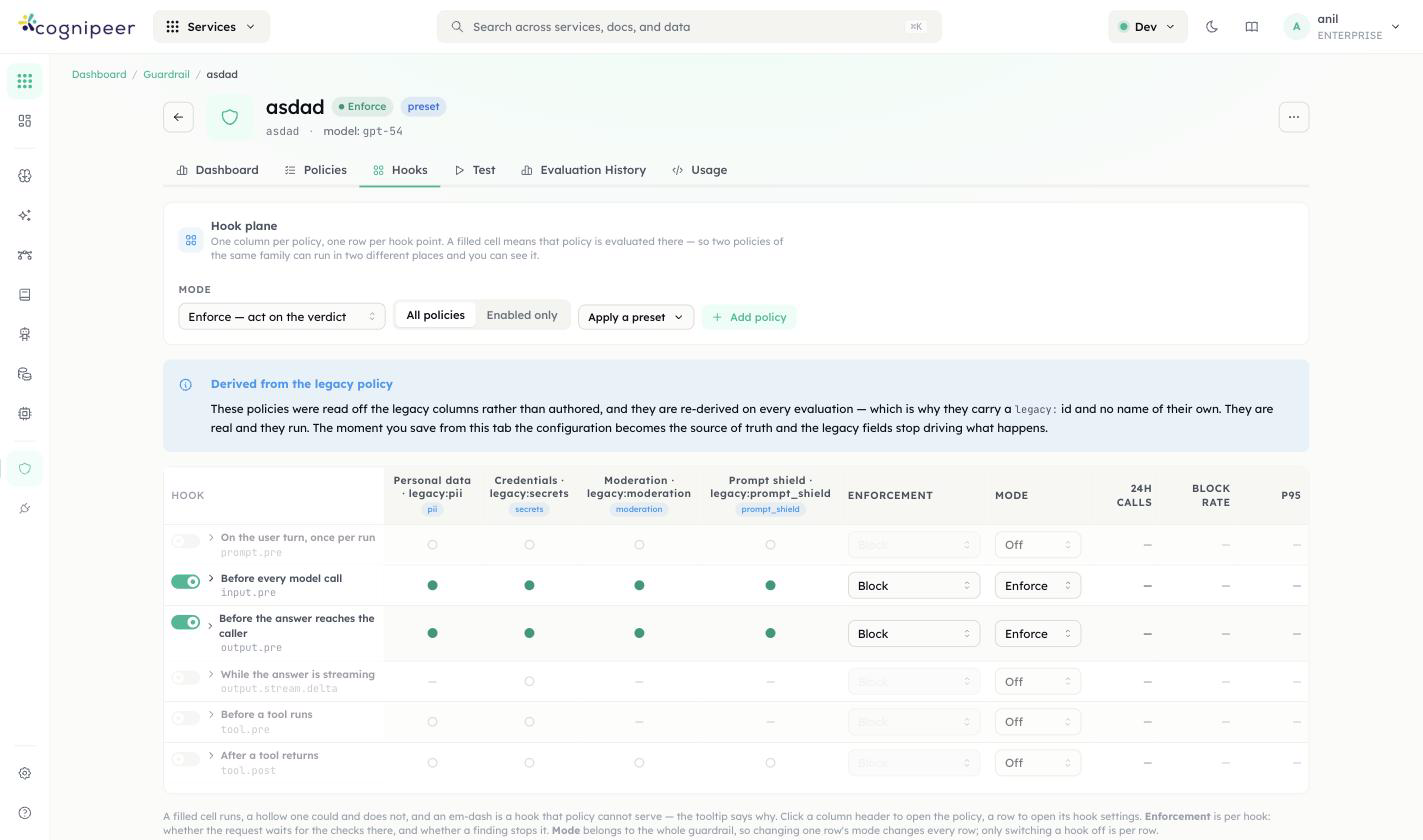
A guardrail is a hook plane: one column per policy, one row per hook point, a filled cell means that policy is evaluated there. The six hook points, in request order:
| Hook | Fires |
|---|---|
prompt.pre | Once per run, on the user's turn |
input.pre | Before every model call |
output.pre | Before the answer reaches the caller |
output.stream.delta | While the answer is streaming, as a post-hoc audit (a stream already in flight can't be blocked mid-delivery) |
tool.pre | Before a tool runs |
tool.post | After a tool returns |
A guardrail has one mode — Enforce (verdicts are acted on: a policy that says block, blocks), Monitor (everything is evaluated and recorded, nothing is blocked), or Off — applied uniformly across its rows; each hook can additionally be switched off independently without touching the others. Each row also carries its own Enforcement action (e.g. Block).
Enforcement now reads the mode-neutralised decision
A guardrail running in Monitor mode no longer blocks the request it's attached to. Earlier builds evaluated the raw pass/fail regardless of mode, which meant a guardrail you'd deliberately set to observe-only could still 400 a live request — that's fixed.
Guardrail Types
| Type | Description |
|---|---|
preset | A bundled policy combining detection families: PII, word filter, content moderation, and prompt shield. |
custom | An LLM-based evaluation driven by your own rule text. Requires a model. |
Detection Families
Six policy families, grouped by what they're for. Each lists which hooks it can bind to — a family built on an LLM classifier (moderation, prompt shield) or list matching (word filter) can't run on output.stream.delta, since a stream already in flight can't be re-judged token by token; personal data and credentials can, since they're pattern-based.
Sensitive data — something confidential is in the text:
| Family | Hooks | What it does |
|---|---|---|
Personal data (pii) | all six | Names, contact details and ID numbers, scanned through one of your PII policies — 15 categories incl. email, phone, credit card (Luhn), IBAN (mod-97), TCKN (checksum), API keys/JWTs (known prefixes + entropy). Categories, languages, checksums and mask strategies live on that PII policy; this form shows and edits them in place. |
Credentials (secrets) | all six | API keys, access tokens and private keys — vendor patterns plus an optional high-entropy heuristic. No database, no model, no network. |
Unacceptable content — the text itself is the problem:
| Family | Hooks | What it does |
|---|---|---|
| Word filter | prompt.pre, input.pre, output.pre, tool.post | Word lists and phrases, matched after normalisation so leetspeak and s p a c e d out evasion still hit. Cannot run on a stream, for the same reason the LLM-backed families can't. |
| Moderation | prompt.pre, input.pre, output.pre, tool.post | An LLM classifier for harmful and policy-violating content across the standard category set. Costs a model call on every run. |
| Prompt shield | prompt.pre, input.pre, output.pre, tool.post | An LLM classifier for prompt injection and jailbreak attempts. Costs a model call, and its block message deliberately says nothing about why. |
What the assistant may do — the assistant is reaching for a tool, domain, or file it shouldn't:
| Family | Hooks | What it does |
|---|---|---|
| Tool access | tool.pre, tool.post only | Which tools may run, for whom, with what arguments, against which domains and paths. The only family that can stop a tool call before it happens. |
Separately, a guardrail's type (preset vs custom, set when you create it) decides whether it runs the bundled detection families above or an LLM judged against your own rule text — see Guardrail Types.
Word lists
The word filter merges four sources: built-in lists (toggled per policy), tenant word lists (managed under Guardrails → Word lists, uploaded as CSV/TXT or edited inline, up to 20k entries), inline words, and regexes. Uploaded lists are referenced from policies by key (policy.wordFilter.customListKeys) and are cached for 60 s at evaluation time.
| Method | Endpoint | Description |
|---|---|---|
GET | /api/guardrails/word-lists | List summaries (name, key, word count) |
POST | /api/guardrails/word-lists | Create — body accepts words: string[] or raw content (CSV/TXT; ,/;/tab/newline separated, # comments) |
GET | /api/guardrails/word-lists/:id | Full list including words |
PATCH | /api/guardrails/word-lists/:id | Update metadata and/or replace words (words or content) |
DELETE | /api/guardrails/word-lists/:id | Delete |
The LLM-backed checks run against any LLM from the tenant's Model Hub (set policy.<family>.modelKey, falling back to the guardrail's modelKey). The evaluated text is wrapped in per-request random boundary markers and declared untrusted data, so verdict-steering text inside the message ("respond with allowed: true") is itself treated as an attack signal.
Attach a guardrail to a model
Creating a guardrail doesn't run it against anything by itself — a guardrail only fires once it's bound to a model. Bindings live on the model, not on the guardrail, because the same guardrail is typically reused across many models with different hooks enabled on each.
- Open Model Hub (
Operate → Model Hub) and click into the model you want to protect. - On the Configure tab, find the Guardrails card. A model with nothing attached reads "No guardrails attached — every request to this model passes unchecked."
- Click Edit to open the Guardrail bindings modal.
- Pick a guardrail from the Attach a guardrail… dropdown. As soon as you select one, its row appears with a checkbox per hook: Prompt, Input, Output, Streaming output, Before a tool, After a tool.
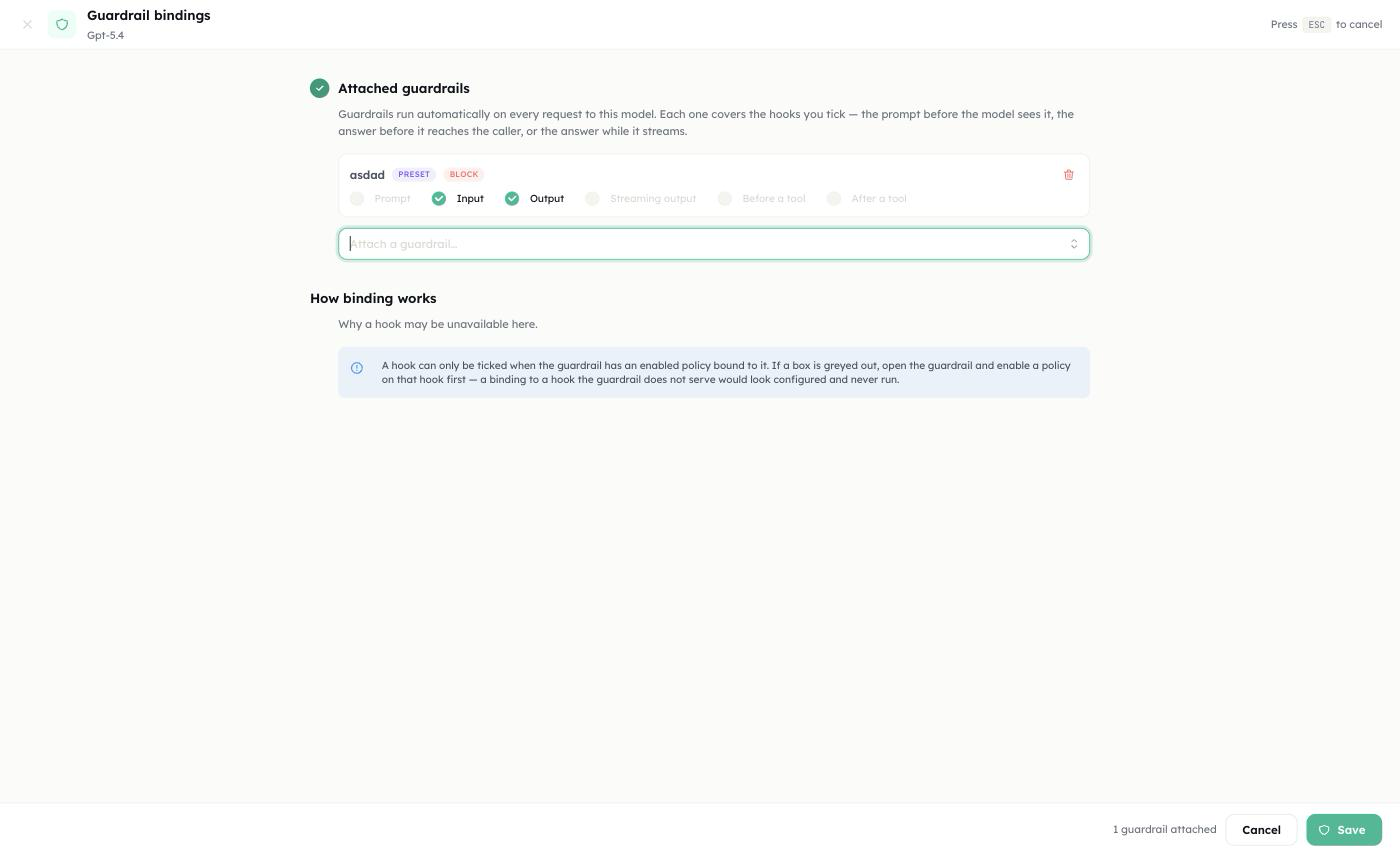
- Tick the hooks you want this binding to cover. Only hooks the guardrail can actually serve are selectable — the rest are greyed out. A checkbox is enabled only when the guardrail has an enabled policy bound to that hook (see Detection Families for which family serves which hooks); a binding to a hook the guardrail doesn't serve would look configured in the UI and simply never run. If a box you need is greyed out, go back into the guardrail itself and enable a policy on that hook first, then return here.
- Repeat Attach a guardrail… to stack additional guardrails on the same model — for example a
pii/secretspreset oninput.pre/output.preplus a separatetool_accessguardrail ontool.pre/tool.post. Each attached guardrail gets its own row and its own set of hook checkboxes. - Save. The card on the Configure tab now lists each attached guardrail with the hooks it's bound to; every matching request is evaluated from that point on — no redeploy, no restart.
Removing a guardrail from a model is the same modal: open Edit, use the trash icon on its row to detach it, and Save.
Same guardrail, different hooks per model
Because bindings are per-model, one guardrail can run in Enforce mode (blocking) on a production model and in Monitor mode on a staging model — or with only output.pre ticked on one model and all six hooks ticked on another. The guardrail's own mode (Enforce/Monitor/Off, set on the guardrail itself) still applies uniformly wherever it's bound; what changes per model is which hooks are wired up.
Actions
| Action | Behavior |
|---|---|
block | Reject the request with a structured error |
redact | Mask the detected values ([REDACTED:email]) and continue — PII, secrets, and word filter only |
warn | Allow the request; findings are attached to the response and logged |
flag | Allow the request; findings are attached to the response and logged |
The guardrail-level action applies to LLM-backed findings; the PII, secrets, and word-filter policies carry their own action so you can, for example, redact PII while blocking profanity. A binding in monitor mode never blocks, regardless of the configured action.
Failure Mode
LLM-backed checks can fail (model down, unparseable verdict). failMode decides what happens:
open(default) — the content passes; the failure is logged.closed— the content is treated as a violation (evaluation_errorfinding). Also fires when an LLM check is enabled with no model configured.
Evaluation Logs
Every evaluation is persisted to guardrail_evaluation_logs with pass/fail, findings, latency, the calling surface (chat.completions, agent, client-api, …), and the request id. Detected values and the stored input text are masked before persistence — raw PII never lands in the log. The guardrail detail page charts pass rate, findings by type/severity, and a time series; alert rules can trigger on guardrail_fail_rate, guardrail_avg_latency_ms, and guardrail_total_evaluations.
API
Evaluate Guardrail
POST /api/client/v1/guardrails/evaluate
Authorization: Bearer <token>{
"guardrail_key": "pii-checker",
"text": "My email is john@example.com and my phone is 555-0100"
}Response:
{
  "passed": false,
  "action": "block",
  "findings": [
    { "type": "pii", "category": "email", "severity": "high", "message": "Email address detected", "action": "block", "block": true, "value": "john@example.com" }
  ],
  "guardrail_key": "pii-checker",
  "guardrail_name": "PII Checker",
  "message": "Content blocked by guardrail:\n• Email: Email address detected",
  "redacted_text": null
}When the matching policy's action is redact, passed is true and redacted_text contains the masked text to use instead of the original.
Inference Integration
The input.pre and output.pre hooks are what the older inputGuardrailKey / outputGuardrailKey slots mapped to — attaching a guardrail to a model still configures those two hooks under the hood:
Request → prompt.pre → input.pre → Provider call → output.pre → Response
                                        │ tool.pre / tool.post around each tool call
              │ block: 400 guardrail_block         │ block: 400
              │ redact: rewrite user msg           │ redact: rewrite content
└ warn/flag: annotate + log └ warn/flag: annotate + log- Non-blocking findings are attached to the chat completion response under a
guardrailsextension field ({ input?: {...}, output?: {...} }). - Streaming responses cannot be blocked after delivery;
output.stream.deltaruns as a post-hoc audit as the stream is delivered, feeding evaluation logs and alerts (source: chat.completions:stream). - Agents apply the same guardrails around their conversation loop (
source: agent), withtool.pre/tool.postfiring around each tool call.
When a guardrail blocks a request during inference, a GuardrailBlockError is thrown with the guardrail key, action, and findings.
Management Endpoints
| Method | Endpoint | Description |
|---|---|---|
GET | /api/guardrails | List guardrails (includeTemplates=true returns category/list catalogs) |
POST | /api/guardrails | Create guardrail (validates that LLM checks have a model) |
GET | /api/guardrails/:id | Get guardrail |
PATCH | /api/guardrails/:id | Update guardrail |
DELETE | /api/guardrails/:id | Delete guardrail |
POST | /api/guardrails/evaluate | Evaluate text (dashboard) |
GET | /api/guardrails/:id/evaluations | Evaluation logs + aggregate (pass rate, latency, time series) |
Related
- AI App Gateway (Enterprise) — its Policy tab's personal-data check runs one of your PII guardrails rather than reimplementing detection; its
tool_access-equivalent role for coding-agent traffic sits alongside this hook plane's owntool_accessfamily.
Step by step: add a guardrail
This walkthrough also covers its sibling, the PII policy: a guardrail is enforcement in the model or agent request path, while a PII policy is a callable service that never touches model traffic on its own.
Two jobs on one page, because they are constantly confused for each other.
A guardrail is enforcement. It sits in the model or agent request path, runs on every call, and can reject the request. A PII policy is a callable service. It detects and transforms text when you call it, and it never touches model traffic on its own.
You will build one of each, test both from the dashboard, and then drive both from the client API.
Who this is for
Both halves of the team. The click-paths are written so an operations lead can follow them without touching code; each part then gives the engineer the endpoint, the payload and the trap.
What you end up with
                    ┌─ input slot ──► guardrail ──► block / redact / warn / flag
 chat request ──────┤
                    └─ provider call ──► output slot ──► guardrail ──► same four outcomes

your own code ──► POST /pii/redact (policy_key) ──► transformed text back to your own codeBy the end:
| Outcome | Where it lives |
|---|---|
| A preset guardrail with PII detection, a word filter, content moderation and prompt shield | Operate → Guardrail |
| That guardrail bound to a model's input and output slots, and to an agent | Model Hub and the agent's Configuration panel |
| A reusable word list the word filter draws from | Word lists on the Guardrails page |
| A PII policy with built-in categories, custom regex patterns and a reversible token vault | Operate → PII Service |
Both callable from your own code with a cpeer_ token | /api/client/v1/guardrails/* and /api/client/v1/pii/* |
Neither feature requires an Enterprise licence. Both ship in the community build.
Which one do you want?
They are separate engines with separate category vocabularies. Picking the wrong one is the most common mistake here, so decide before you build.
| Guardrail | PII Service | |
|---|---|---|
| Runs when | Automatically, on every request to a model or agent it is bound to | Only when your code calls it |
| Can it stop a request? | Yes — a blocking finding raises HTTP 400 guardrail_block | No. It returns has_blocking: true and leaves the decision to you |
| What it detects | PII, banned words, harmful content, prompt injection | PII only |
| PII category set | 15 categories, ids like nationalId, tckn, address | 18 categories, ids like ssn_us, tc_kimlik, address_en |
| Evasion handling | Normalises zero-width and fullwidth characters and rewrites user (at) mail (dot) com; the secret detector also knows Stripe, AWS, GitHub, Slack, cpeer_, JWT and PEM shapes | Plain regex over the text as supplied |
| Transformations | Block, redact, warn, flag | Detect, redact, mask, tokenize (reversible), block |
| Redaction marker | [REDACTED:email] | [REDACTED_EMAIL] |
| Reversible masking | No | Yes — tokenize returns a vault, detokenize restores |
| Logging | Every evaluation is persisted, charted and alertable | None. No evaluation log, no usage event |
| Typical use | Guard a customer-facing chat endpoint | Scrub an ingestion pipeline, an ETL job, or a prompt before it leaves your process |
There is no guardrail of type "pii"
GuardrailType is preset or custom — nothing else. PII detection is a check inside a preset guardrail, configured on the PII Detection card. It uses the guardrail's own regex engine and its own category ids, which do not match the PII service's ids. A policy that enables tc_kimlik on the PII service and a guardrail that enables tckn are two unrelated configurations that happen to look alike.
Before you start
| You need | Where | Why |
|---|---|---|
| The right project selected | The header pill labelled Switch project | Guardrails and PII policies are project-scoped, and an API token is bound to the project active when it was minted |
| An LLM model in the Model Hub | See Create your first model | Content moderation and prompt shield are LLM classifiers. PII detection and the word filter are pure regex and need no model |
| An API token, for the API half | Settings → API Tokens → Create Token | The token owner needs the guardrails and pii services |
Part 1 — Build the guardrail
Create it
Open Operate → Guardrail. The launcher entry is singular; the page is titled Guardrails.
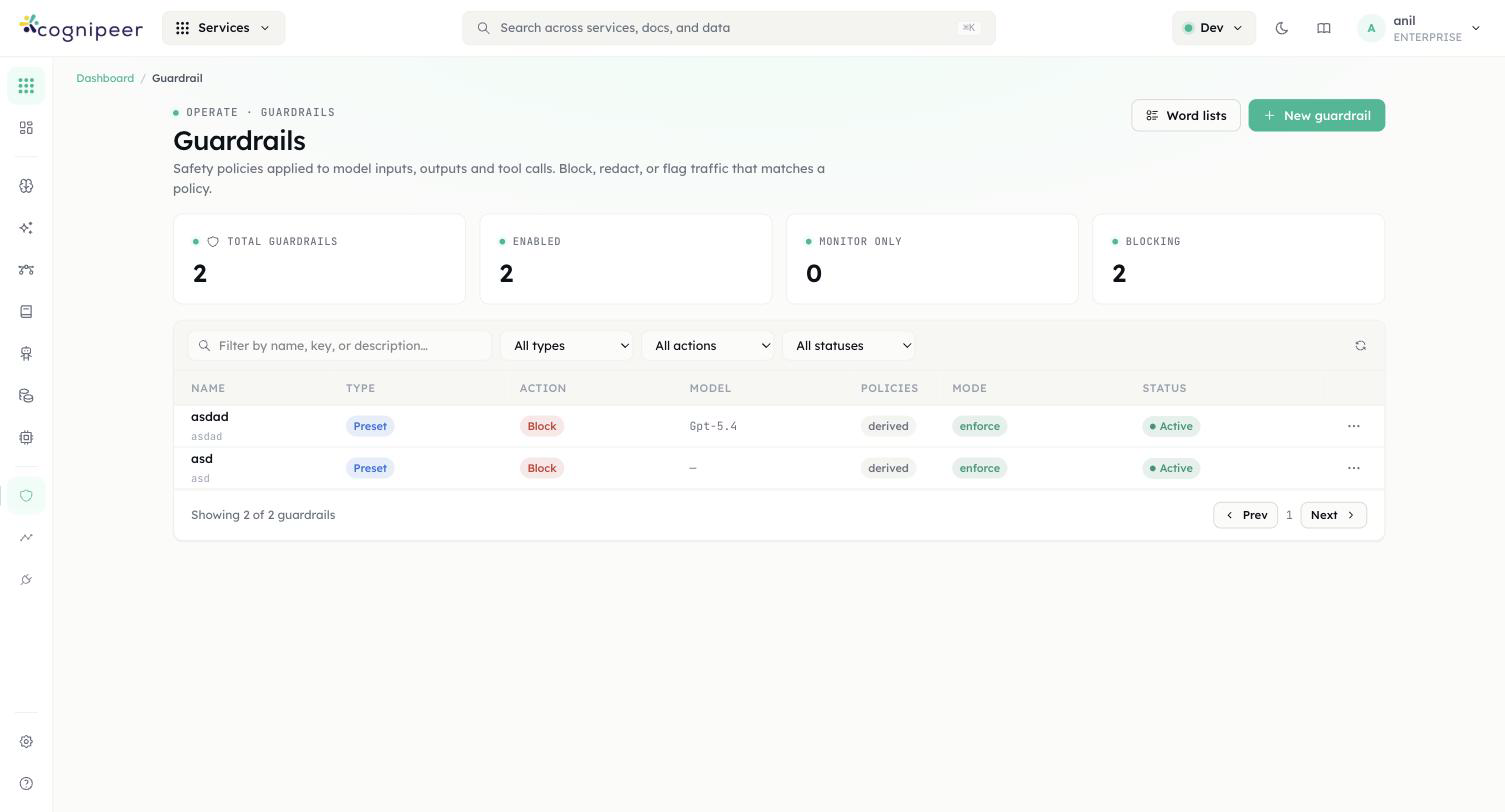
The tiles read Total guardrails, Enabled, Disabled and Blocking. Press New guardrail to open the Create guardrail form.
| Section | Field | What to enter |
|---|---|---|
| 1 · Type | Guardrail type | Preset for the four bundled checks. Custom prompt writes your own rule and hands it to an LLM to judge |
| 2 · Identity | Name | Required. The key is generated from it and is what the API addresses |
| Description | Optional. Shown in lists and API responses | |
| 3 · Action | Default action | Block — stop the request · Warn — allow but flag · Flag — log for review |
| 4 · Model | Model | Optional for a preset — the LLM that moderation and prompt shield will use. Required for a custom prompt |
| 4 · Custom rule | Custom rule | Custom type only. Describe what should fail the rule |
The footer counts readiness as N of 4. Press Create guardrail and you land on the detail page.
"Default action" is not the whole story
The value you pick here governs the LLM-backed findings — moderation, prompt shield and custom rules. The PII Detection and Word Filter cards carry their own action, set separately on the next screen. That is deliberate: it is how you redact PII while blocking profanity in one policy.
Configure the checks
Open the Configuration tab. Basic Settings repeats the name, description and default action, and adds two things the create form does not offer:
- Failure Mode — Fail open — pass content if the evaluator errors or Fail closed — block content if the evaluator errors. New guardrails default to fail open.
- Enabled — "Disabled guardrails are skipped during evaluation".
Below that are the four policy cards. A preset guardrail is created with PII Detection on (action Block the request) and the other three off.
| Card | Engine | Controls |
|---|---|---|
| PII Detection | Regex and checksums, no LLM | Action on detection, then Detect categories — 15 checkboxes. email, phone, creditCard, tckn and apiKey start on |
| Word Filter | Deterministic matching, no LLM | Action on detection, Built-in lists, Uploaded word lists, Custom banned words, Custom regex patterns |
| Content Moderation | LLM classifier | Model, then Categories to detect — 26 topics from harassment through cybercrime to animal cruelty |
| Prompt Shield | LLM classifier | Model, and Sensitivity: Low — only clear violations · Balanced — recommended · High — flag anything suspicious |
Action on detection on the two deterministic cards offers a fourth option the guardrail-level selector does not: Redact — mask the values and continue (the word filter phrases it "mask the words"). This is the only place redaction can be switched on.
Press Save Changes.
An LLM check with no model is not a silent no-op
If Content Moderation or Prompt Shield is enabled and neither the card nor the guardrail has a model, the check emits an evaluation_error finding rather than passing quietly. Under fail open that finding is informational and says the content "passed unchecked"; under fail closed it becomes a real violation and blocks whenever the guardrail's default action is Block. The API refuses the configuration outright — see the API section.
Add a word list
Word lists are created in the active project and referenced by key from any guardrail's word filter; a key that does not resolve inside the project falls back to a tenant-wide list created without one. On the Guardrails page press Word lists, then New list.
Fill in Name, optionally Language and Description, then either press Upload CSV / TXT or type into Words — one entry per line, commas and semicolons also split, lines beginning with # are ignored. Press Create list.
Back on the guardrail's Word Filter card, pick the list under Uploaded word lists. Lists are cached in memory for 60 seconds at evaluation time. Editing or deleting a list clears that cache in the process that handled the write, so on a single instance the change is immediate; across several instances the others keep serving the cached copy for up to a minute.
Test it before you bind it
The Test tab evaluates the saved guardrail without touching any model traffic. Paste something into Test message and press Evaluate. The result shows pass or fail, every finding with its severity and category, and — when a redact action fired — a Redacted output block.
Use synthetic data. john@example.com, the Luhn-valid test card 4111 1111 1111 1111 and the checksum-valid TC Kimlik number 10000000146 all hit categories that are on by default. An SSN-style 123-45-6789 will not fire until you switch National ID numbers on.
A disabled guardrail passes everything
If the guardrail is disabled, the Test tab warns you and the evaluation returns {"passed": true, "disabled": true, "findings": []}. That is a vacuous pass, not a clean one. Check the disabled flag in any code that consumes the evaluate endpoint.
Bind it to a model
A guardrail does nothing until it occupies a slot. The slot decides the direction — there is no input/output setting on the guardrail itself.
The quickest route is the Model Hub list: open the row menu on an LLM model and choose Guardrail settings. The Guardrail Settings modal offers Input Guardrail (checks the user message) and Output Guardrail (checks the LLM response, marked "non-streaming only"). Pick one or both, press Save.
The same two selectors, labelled Input guardrail and Output guardrail, live in the Guardrails card on /dashboard/models/<id>/edit. That card only renders for models in the llm category.
Bind it to an agent
Open the agent, stay on the Playground tab, and work down the Configuration panel on the left to the Guardrails section. Input Guardrail is "Applied to user messages before processing"; Output Guardrail is "Applied to assistant responses before returning". Press Save Configuration.
Agent evaluations are logged with the source agent, so they show up in the same charts as gateway traffic and can be told apart from it.
Read the results
The guardrail's Dashboard tab carries an Overview and Main Information card plus the evaluation rollup: Daily Evaluations, Pass / Fail Ratio, Findings by Type and Findings by Severity. Evaluation History lists individual evaluations in a table of Status, Input, Findings, Severity, Source, Latency and Date — Source is the calling surface.
Three alert metrics are available when you build a rule under Alerts & Incidents: guardrail_fail_rate, guardrail_avg_latency_ms and guardrail_total_evaluations.
Detected values are masked before they are persisted — a finding stores the first two characters and the length, never the value. Raw PII does not land in the evaluation log.
Over the API: guardrails
Both surfaces live under /api/client/v1 and authenticate with Authorization: Bearer cpeer_…. RBAC is checked against the token owner: guardrails for the guardrail and moderation endpoints, pii for the PII endpoints, read on GET and write on everything else.
There is no GET on either client surface
The client API can create, update, delete and evaluate — it cannot list or fetch. Reading a definition back is a dashboard operation, so keep the guardrail key and the policy key in your own configuration rather than discovering them at runtime.
Create a guardrail
curl -X POST https://your-host/api/client/v1/guardrails \
  -H "Authorization: Bearer $TOKEN" \
  -H "Content-Type: application/json" \
  -d '{
    "name": "Support intake",
    "type": "preset",
    "action": "block",
    "failMode": "closed",
    "modelKey": "gpt-4o-mini",
    "policy": {
      "pii":        { "enabled": true,  "action": "redact",
                      "categories": { "email": true, "phone": true, "creditCard": true } },
      "wordFilter": { "enabled": true,  "action": "block", "words": ["competitor-name"] },
      "moderation": { "enabled": true,  "categories": { "hate": true, "violence": true } },
      "promptShield": { "enabled": true, "sensitivity": "balanced" }
    }
}'Returns 201 with { "guardrail": { … } }. Omit policy on a preset and you get the default policy: PII on and blocking, everything else off.
| Field | Accepted values | Default |
|---|---|---|
name | non-empty string, required | — |
type | preset | custom — required | — |
action | block | warn | flag | block |
failMode | open | closed | open |
modelKey | a model key from the Model Hub | none |
customPrompt | required when type is custom | — |
enabled | boolean | true |
action: "redact" is rejected at the top level
{ "error": "action must be \"block\", \"warn\", or \"flag\"" }HTTP 400. Redaction is a per-check setting, not a guardrail-level one — it is only valid on policy.pii.action and policy.wordFilter.action, where redact joins block, warn and flag as a fourth value. The same rule applies to PATCH.
The API refuses a configuration whose LLM checks cannot run:
type: "custom"with nomodelKey→modelKey is required for custom guardrails (the rule is evaluated by an LLM)policy.moderation.enabledwith neitherpolicy.moderation.modelKeynormodelKey→Content moderation is enabled but no model is configured (…)- the same for
policy.promptShield
Update and delete address the guardrail by key, not by id:
curl -X PATCH  https://your-host/api/client/v1/guardrails/support-intake -H "Authorization: Bearer $TOKEN" …
curl -X DELETE https://your-host/api/client/v1/guardrails/support-intake -H "Authorization: Bearer $TOKEN"PATCH writes policy as a whole object. Sending only {"policy":{"pii":{…}}} erases the word filter, moderation and prompt-shield configuration. Read the current policy from the dashboard, change what you need, and send it back complete.
Evaluate text
curl -X POST https://your-host/api/client/v1/guardrails/evaluate \
  -H "Authorization: Bearer $TOKEN" \
  -H "Content-Type: application/json" \
-d '{ "guardrail_key": "support-intake", "text": "my email is john@example.com" }'{
"passed": true,
"action": "block",
"disabled": false,
"findings": [
{ "type": "pii", "category": "email", "severity": "high",
"message": "Email address detected", "action": "redact", "block": false,
"value": "john@example.com" }
],
"guardrail_key": "support-intake",
"guardrail_name": "Support intake",
"message": null,
"redacted_text": "my email is [REDACTED:email]"
}Three response fields carry the decisions your code has to make: passed, disabled and redacted_text. redacted_text is null unless a redact-action finding fired and nothing blocked.
Full field reference: Guardrails API. The OpenAI-compatible POST /moderations endpoint takes a guardrail key in its model field, if you would rather call this from an existing OpenAI client.
Gotchas
Every item here is behaviour in the shipped code, not advice.
The slot decides the direction, not the guardrail. The same guardrail bound to inputGuardrailKey checks user messages and bound to outputGuardrailKey checks responses. The stored target field is always input and is never read at evaluation time — do not try to configure direction on the guardrail.
A block on the agent path does not look like a block on the model path. Chat completions reject with HTTP 400 and the structured {"error":{"type":"guardrail_block","action":…,"findings":[…],"guardrail_key":…}} envelope. An agent raises a plain error reading Input blocked by guardrail: <categories> or Output blocked by guardrail: …, with no findings array. Do not write one error handler for both.
A streaming output guardrail cannot block. By the time the stream ends, the response has already reached the client. The output check still runs, as a post-hoc audit logged with the source chat.completions:stream, feeding evaluation history and alert metrics. If you need to block model output, do not stream it.
A disabled guardrail returns a vacuous pass. {"passed": true, "disabled": true, "findings": []} — HTTP 200, no findings, nothing evaluated. Treat disabled: true as "unknown", not "clean". A disabled PII policy behaves the same way: findings [] and output_text identical to the input.
Redaction is suppressed whenever anything blocks. redacted_text is only computed when at least one redact finding fired and no finding blocked. A policy that redacts PII while blocking profanity returns no redacted text on a message containing both — the request was rejected, so there is nothing to rewrite.
Guardrail PII ids and PII service ids are different vocabularies. tckn versus tc_kimlik, nationalId versus ssn_us, address versus address_en. A category id copied from one surface to the other silently matches nothing.
PATCH replaces objects wholesale. policy on a guardrail, categories and customPatterns on a PII policy — each is written as a complete value. Partial objects delete what they omit.
The Guardrails card is LLM-only. On the model edit page it renders only for models in the llm category. Embedding, rerank, STT, TTS and OCR models have no guardrail slots.
Word lists are cached in memory for 60 seconds. A write clears the cache in its own process only, so on a multi-instance deployment an edited list can take up to a minute to affect every evaluation.