

History Sidebar
Manage conversation history with the built-in sidebar.
New in 0.4.0
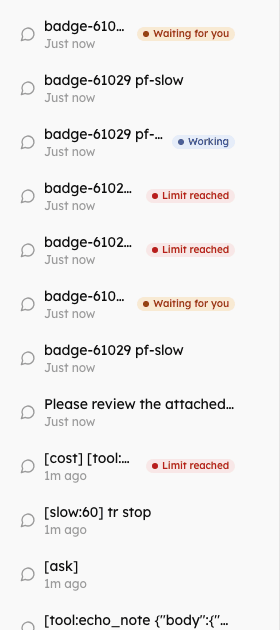
Status badges (Working, Waiting for you, Limit reached), keyboard-operable rows, opening a conversation selects its agent, and, switched on by the host, rename, pin and select-and-delete. See Portal Experience.
Overview
The Chat component includes a history sidebar that shows:
- The list of past conversations in the order the server sends them, loaded in pages of 20 with a "Load more" button
- A "New Chat" button
- A delete button on each row
- Conversation titles and relative times ("Just now", "5m ago")
- A status badge on conversations that are working, waiting for you or stopped on their usage limit
- With
enableMessageSearch, a search box that filters by title - With
showAgentName(off by default), the agent's name beside the time
Enable/Disable History
// With history (default)
<Chat
  baseUrl="/api/agents"
  agentId="assistant"
  showHistory={true}
/>

// Without history
<Chat
  baseUrl="/api/agents"
  agentId="assistant"
  showHistory={false}
/>

// Or use ChatMinimal
import { ChatMinimal } from "@cognipeer/chat-ui";

<ChatMinimal
  baseUrl="/api/agents"
  agentId="assistant"
/>On small screens the sidebar is an overlay opened with the header's menu button (defaultHistoryOpen opens it at first). It closes when a conversation is picked, on the backdrop and on Escape.
Multiple agents
When the server lists more than one agent, the history is not filtered by agent: it shows the conversations of all of them. Opening one selects its agent in the header (and calls onAgentChange), so the paperclip, the file limits and the composer mode match that conversation. With a single agent the list is filtered to that agent.
Status badges and keyboard
With agent-server 0.3.0 or later each conversation in the list carries runtime, and the sidebar marks the ones that need a look: Working (a turn is running, perhaps in another window), Waiting for you (an approval or a question is open) and Limit reached (the conversation's usage limit is used up). The open conversation shows what the page itself knows, and the list is fetched again when a turn ends, so a badge does not outlive the state it reports. Turn them off with showStatus={false}.
Every row is a button: Tab, Enter and Space open it, the arrow keys, Home and End move between rows, and the delete button is visible as soon as the row has keyboard focus. See ChatHistory and Running turns, Stop and reattach.
Rename, pin and delete several
Switch these on with historyActions (all off by default):
<Chat
  baseUrl="/api/agents"
  historyActions={{ rename: true, pin: true, bulkDelete: true }}
/>| Action | How |
|---|---|
| Rename | The pencil button, F2 on a row, or a double click on it. Enter or leaving the field saves, Escape keeps the old title. A title is at most 200 characters |
| Pin | The pin button. Pinned conversations are listed first and show a pin icon |
| Delete several | "Select" turns the rows into checkboxes; "Select all", "Done", "Delete selected (n)" and a confirmation follow |
Each change shows at once and is taken back when the server refuses; the reason shows under the list. What can be offered depends on the transport (renameConversation, pinConversation, deleteConversations) and on what the agent allows (metadata.experience.history).
History Callbacks
<Chat
  baseUrl="/api/agents"
  agentId="assistant"
  onConversationCreated={(conversation) => {
    console.log("New conversation:", conversation.id);
  }}
  onConversationSelected={(conversation) => {
    console.log("Selected:", conversation.id);
    // Update URL, analytics, etc.
  }}
  onConversationTitleGenerated={(conversationId, title) => {
    console.log("The server named it:", title);
  }}
  onAgentChange={(agentId) => console.log("Agent:", agentId)}
/>There is no delete callback on Chat; deleting from the sidebar updates the list and clears the chat if the open conversation was deleted. For your own reaction, build the layout from the parts (below).
useChatHistory Hook
For custom implementations:
import { useChatHistory } from "@cognipeer/chat-ui";

function CustomHistory() {
  const {
    conversations,
    isLoading,
    hasMore,
    error,
    load,
    loadMore,
    refresh,
    deleteConversation,
  } = useChatHistory({
    baseUrl: "/api/agents",
    agentId: "assistant",       // optional: without it all conversations are listed
    authorization: "Bearer token",
    pageSize: 20,               // default 20
  });

  return (
    <div>
      {conversations.map((conv) => (
        <div key={conv.id}>
          <span>{conv.title || "Untitled"}</span>
          <button onClick={() => deleteConversation(conv.id)}>Delete</button>
        </div>
      ))}

      {hasMore && <button onClick={loadMore}>Load More</button>}
    </div>
  );
}See useChatHistory for every option and return value, including renameConversation, pinConversation and deleteConversations.
ChatHistory Component
Use the standalone component:
import { ChatHistory, useChat, useChatHistory } from "@cognipeer/chat-ui";

function CustomLayout() {
  const chat = useChat({
    baseUrl: "/api/agents",
    agentId: "assistant",
  });

  const history = useChatHistory({
    baseUrl: "/api/agents",
    agentId: "assistant",
  });

  return (
    <div className="flex h-full">
      <ChatHistory
        conversations={history.conversations}
        selectedId={chat.conversation?.id}
        isLoading={history.isLoading}
        hasMore={history.hasMore}
        onLoadMore={history.loadMore}
        onSelect={(item) => chat.loadConversation(item.id)}
        onDelete={history.deleteConversation}
        onNewChat={chat.clearMessages}
      />

      <div className="flex-1">{/* Chat content */}</div>
    </div>
  );
}Refresh the list when a turn ends (history.refresh()), so the badges and titles stay current. Chat does this for you.
Custom header and footer
<Chat
  baseUrl="/api/agents"
  renderHistoryHeader={() => <div className="px-4 py-3 font-medium">Conversations</div>}
  renderHistoryFooter={() => <div className="px-4 py-2 text-xs">Kept for 90 days</div>}
/>renderHistoryHeader replaces the "New Chat" header, so offer your own way to start a chat (for example controllerRef.current?.newChat()). There is no per-row render prop: to draw rows yourself, build the list from useChatHistory as above.
Conversation Titles
The server names a conversation after the first message when it can (onConversationTitleGenerated). You can set one yourself:
// Create with a title
const conversation = await chat.createConversation("My Important Chat");

// Change it later
await client.updateConversation(conversation.id, { title: "Updated Title" });With historyActions.rename the person can rename it from the sidebar.
Search/Filter History
enableMessageSearch adds a search box to the sidebar that filters the loaded conversations by title:
<Chat baseUrl="/api/agents" enableMessageSearch />Styling
The sidebar uses the theme variables: --chat-bg-secondary (background), --chat-bg-hover (the open row), --chat-bg-tertiary (hover), --chat-border-primary, and the status colours for the badges. See Theming.
Troubleshooting
| Symptom | Cause and fix |
|---|---|
| The list does not update after a message | Chat refreshes it for you. In a custom layout, call history.refresh() after onMessageReceived / onConversationCreated. |
| No badges | The server is older than agent-server 0.3.0 (no runtime on the list), or showStatus is false. |
| A conversation of another agent opens with the wrong paperclip | Make sure the agent list (GET /agents) contains the agent of that conversation; unknown agents are ignored. |
| Rename and pin buttons are missing | historyActions is off, the transport has no renameConversation / pinConversation, or the agent's experience.history turned them off. |
| Only 20 conversations show | The list is paged: use "Load more" (hasMore, loadMore) or raise pageSize in your own hook. |