

Approvals and Questions
Some agents pause before running a tool, or stop to ask the user something. With @cognipeer/agent-server 0.3.0 or later, Chat UI 0.4.0 shows those requests as cards under the assistant message and sends the answer back, so the turn can continue.
New in 0.4.0
Approval and question cards, argument editing against a JSON Schema, deadlines, "remember for this chat", restored cards after a reload, and localized error messages. The server side of the protocol is described in Approvals & Questions.
Nothing changes for servers that never pause: no card appears and no new request is made.
When to use it
Turn the cards on (they are on by default) when an agent can do something you want a person to confirm, such as sending an email, running a command or changing a record, or when it needs information only the person has (which environment, which customer). Turn a kind of card off (enableToolApprovals={false} or enableQuestions={false}) when approvals are handled in another application: the card is still drawn, read-only, so the person knows why the assistant is quiet.
What the user sees
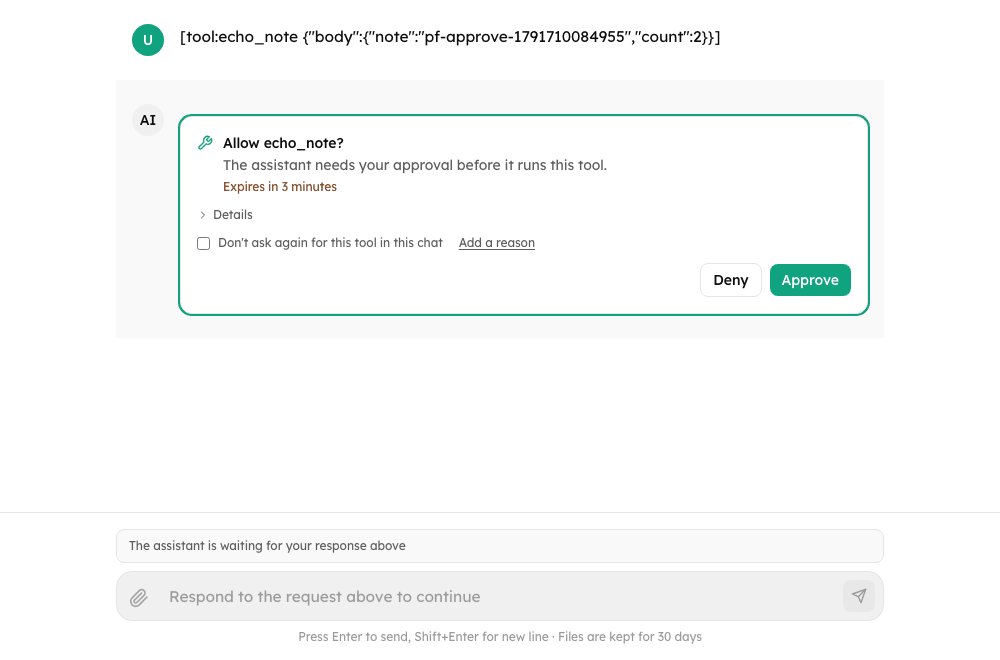
- Tool approval: the tool name (or the server's
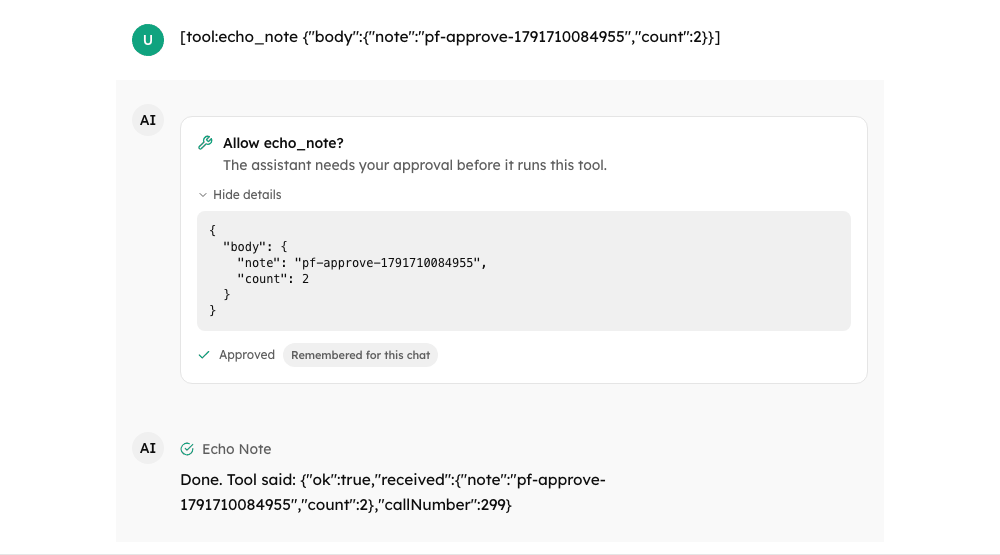
title/summary), a collapsible "Details" section with the arguments, and Approve / Deny. Deny can carry a reason ("Add a reason"), and a checkbox, "Don't ask again for this tool in this chat", makes Approve count for the rest of the chat (rememberForSession). With argument editing on, "Details" becomes a JSON editor. - Question: one block per question, with an optional
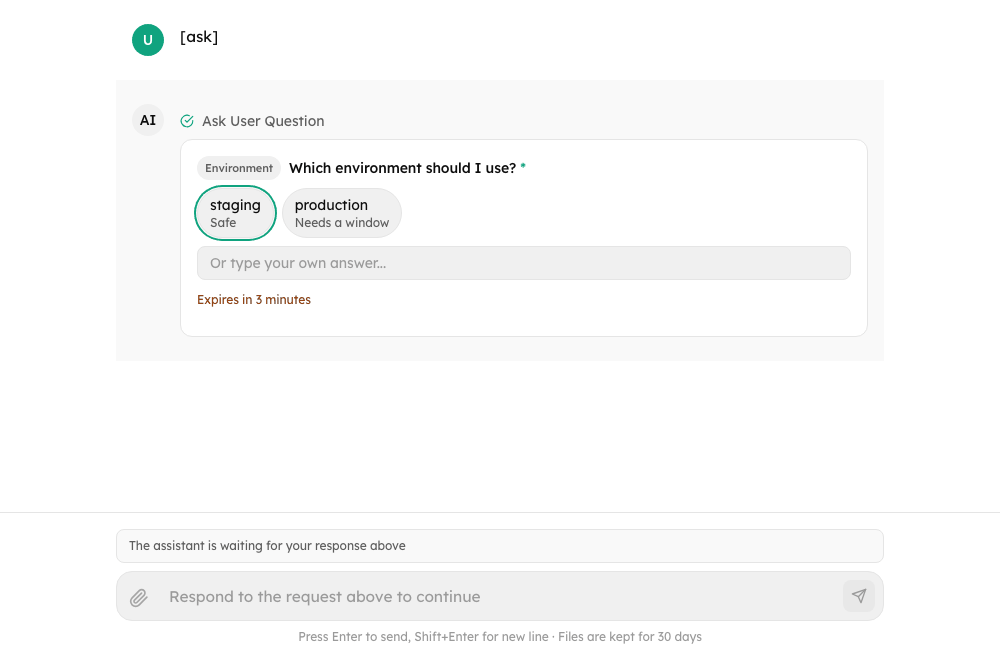
headerchip above it. A single single-choice question submits as soon as an option is picked. Multi-select questions use checkboxes and a Send button; text typed next to the checkboxes is sent as one more answer. An option that comes with apreview(code or text showing what it leads to) is a row of the list with a collapsed "Preview" under it, and a single-choice question with previews then needs Send. Free text is offered when the question has no options or the server allows it (allowFreeTextis notfalse); the question'splaceholderis the hint of that field. A question is required unless the server saysrequired: false(marked with an asterisk); Skip (which answers withcancelled: true) is offered only when no question of the card is required. - Deadline: when the server gives an
expiresAt, the card says when the request expires ("Expires in 23 hours"), turns amber when little time is left, and turns Expired at the deadline: its buttons go away and the composer is free again. - After an answer the card shows how it ended (Approved, Approved with edited arguments, Denied, Answered, Skipped, Expired, Cancelled...) and the assistant's continuation appears as a new message. A request nobody answered in time that the server refused on its own behalf (
resolvedBy: "system:timeout") reads Expired, not Denied. - Reloading the conversation brings back anything still waiting, and shows how the rest ended when the server says (see History).
A third kind of request, client_tool, is not for a person: it is a tool of the page that embeds the chat. It draws no card and does not close the composer; see Embedding the Chat.
Props
<Chat
  baseUrl="https://agents.example.com"
  agentId="support"
  enableToolApprovals      // default true
  enableQuestions          // default true
  allowArgumentEdit        // default false
  expiryWarningSeconds={600}          // default 600
  pendingActionComposerMode="block"   // or "cancel"
  onActionResolved={({ actionId, resolution }) => console.log(actionId, resolution)}
  renderToolApproval={({ action, resolve, readOnly }) => /* your card */}
  renderQuestion={({ action, resolve, readOnly }) => /* your card */}
/>| Prop | Default | Effect |
|---|---|---|
enableToolApprovals | true | When false, approvals show "Waiting for approval in another app" instead of buttons |
enableQuestions | true | Same for questions |
allowArgumentEdit | false | Let the person edit a call's arguments before approving. An agent's capabilities.approvalArgsEdit overrides it (see below) |
expiryWarningSeconds | 600 | A card's countdown turns amber when less than this many seconds are left |
pendingActionComposerMode | "block" | While something is waiting, block disables the input; cancel allows a message, which cancels the pending request. Must match the server's pendingActionPolicy. An agent's metadata.pendingActionComposerMode overrides it (see below) |
renderToolApproval, renderQuestion | built-in cards | Replace a card. resolve(resolution) sends the answer |
onActionResolved | none | Called after the server accepted an answer |
onActionRequired | none | Called when a turn pauses for an approval or a question (not for a host-page tool, which has no card) |
If the only thing waiting is a single question without options, the composer answers it directly. If that answer (or a message sent in cancel mode) is refused, the typed text stays in the composer.
Per-agent settings
The host that lists the agents (GET /agents) can say these in each agent, the same way it narrows uploads. The agent's value wins over the prop; anything unusable is ignored and the prop applies:
{
  "id": "ops",
  "name": "Ops",
  "metadata": { "pendingActionComposerMode": "cancel" },
  "capabilities": { "approvalArgsEdit": true }
}Editing the arguments
With allowArgumentEdit (or the agent's capabilities.approvalArgsEdit: true), the approval card's "Edit arguments" opens the call's arguments as JSON. The edit is checked before Approve is allowed:
- it has to be valid JSON, and an object;
- when the action carries an
argsSchema(the tool's JSON Schema;args_schemaandinputSchemaare read as the same thing, also on the Console wire), the edit is checked against it. Supported keywords:type(also unions),enum,const,properties,required,additionalProperties,items,minimum/maximum(and the exclusive forms),minLength/maxLength,pattern,minItems/maxItems,anyOf/oneOf/allOf. Keywords it does not know ($ref,format, ...) are ignored, and the server validates the edit again.
The problems are listed under the editor in the person's language. A changed call is marked "Arguments edited", Reset arguments puts the proposal back, and Approve sends approvedArgs only when the arguments differ from what the agent proposed (a reordered but identical object is not an edit). Deny ignores the edit. Once approved the card says "Approved with edited arguments" and its Details show what was approved.
await resolveAction("act_1", {
  type: "tool_approval",
  decision: "allow",
  approvedArgs: { command: "ls -la" },
});Deadlines
A card with an expiresAt counts down ("Expires in 3 hours", then minutes, then seconds). At the deadline useChat marks the request Expired by itself, which frees the composer, and about 1.5 s later (actionExpiryRefreshMs) fetches the conversation again, so that a server which carries on by itself (it denies the request and continues) shows its continuation. An Expired or Cancelled card does not turn into "Answered" because of that refresh. A request whose answer is already on its way is not expired.
If the person answers a request that has expired in the meantime, the server refuses with action_expired and the card turns Expired.
History
When a conversation is loaded, the server's list of open requests (pendingActions on GET /conversations/:id) is authoritative: those are waiting. The others are shown as settled, with as much detail as the message carries:
message.actionStates-{ [actionId]: { status, resolution } }, what this app keeps while it runs; a server may send it as well;message.metadata.actionStates, the same shape;- settled entries of
message.metadata.pendingActions, each with astatus(resolved,cancelledorexpired) and aresolution:
{
  "id": "msg_1",
  "role": "assistant",
  "content": "Done.",
  "metadata": {
    "pendingActions": [
      { "id": "a1", "type": "tool_approval", "toolName": "sandbox_exec", "args": { "cmd": "ls" },
        "status": "resolved",
        "resolution": { "decision": "allow", "approvedArgs": { "cmd": "ls -la" }, "rememberForSession": true } },
      { "id": "a2", "type": "tool_approval", "toolName": "web_fetch", "status": "resolved",
        "resolution": { "decision": "deny", "comment": "not that site" } },
      { "id": "a3", "type": "tool_approval", "toolName": "slow_tool", "status": "expired" },
      { "id": "q1", "type": "user_question", "questions": [{ "question": "Which env?" }],
        "status": "resolved", "resolution": { "answers": { "Which env?": "staging" } } }
    ]
  }
}(kind is accepted in place of type, as the Console writes it.) The cards then read "Approved with edited arguments" and "Remembered for this chat", "Denied - not that site", "Expired", and the answer to the question. When the message says nothing about how a request ended, the card falls back to a plain "Answered".
Requests that are no longer open
If an answer is refused because the request expired (action_expired), was cancelled (action_cancelled) or was already answered elsewhere (action_not_pending), the card switches to Expired, Cancelled or Answered, the composer is released, and the error is shown. Any other error puts the card back to waiting.
Cards can be answered through AgentServerClient, and through the transports whose backend takes answers: the Responses transport (a Console client API response that stops with status: "requires_action"), the A2A transport when it is given an actionUrl, and the in-process agent-sdk transport for an agent that can pause. For any other transport, and for A2A without actionUrl, the cards are shown but read-only; see Transports.
If the connection breaks after the server took an answer, the turn goes on without the page and the page looks at the conversation again instead of reporting a failure (Running turns).
Errors
A failed request is shown as a friendly message in the person's language when its code is one the library knows (the full list is in Error codes), and the server's own wording is kept on error.serverMessage. For example: conversation_busy ("The assistant is still working on this conversation..."), action_pending / pending_action ("The assistant is waiting for your answer above..."), action_forbidden ("Only the person who started this chat can answer this request."), action_expired, rate_limited, quota_exceeded, message_too_long, guardrail_blocked, file_too_large, unsupported_file_type, attachments_disabled. Codes are matched case-insensitively (PENDING_ACTION is pending_action). A code without a string shows the server's message. Every string is a chat.error.code.<code> message and can be replaced with customMessages.
After a send is refused with action_pending, pending_action or conversation_busy, the page did not know about a waiting card or a running turn. The conversation is fetched again, so the card (or the latest answer) shows, and the typed text stays in the composer. The same goes for an answer refused as busy.
Custom layouts
Chat wires everything up. A layout built from ChatMessageList and ChatInput passes the actions and the composer mode itself; without actions the cards are read-only ("Waiting for approval in another app"):
const chat = useChat({ baseUrl: "https://agents.example.com", agentId: "support" });

<ChatMessageList
  messages={chat.messages}
  isStreaming={chat.isStreaming}
  streamingText={chat.streamingText}
  actions={{
    onResolve: chat.resolveAction,
    canResolve: chat.canResolveActions,
    allowArgumentEdit: true,        // optional
    expiryWarningSeconds: 600,      // optional
  }}
/>
<ChatInput
  onSend={(text) =>
    chat.composerState === "answer" && chat.answerableQuestion
      ? chat.resolveAction(chat.answerableQuestion.actionId, {
          type: "user_question",
          answers: { [chat.answerableQuestion.question.question]: text },
        })
      : chat.sendMessage(text)
  }
  state={chat.composerState}   // "blocked" | "cancel" | "answer" while a card waits (the agent's composer mode, or the pendingActionComposerMode option)
  isLoading={chat.isStreaming}
  /* ... */
/>Accessibility
Cards are labelled groups. A card that appears while the person is not typing is announced (a hidden live region says "The assistant needs your approval: sandbox_exec" or "The assistant has a question") and takes keyboard focus: a question lands on its first control, an approval on the card itself, so that no button which decides is ever the first thing a key press hits. Once the last card is answered, focus goes back to the composer. Outcomes are role="status"; editor problems are an alert. Cards that arrive with a loaded conversation are not announced and do not take focus.
Hook
useChat returns pendingActions, awaitingAction, isResolvingAction, canResolveActions, answerableQuestion and resolveAction(actionId, resolution).
await resolveAction("act_1", { type: "tool_approval", decision: "allow", rememberForSession: true });
await resolveAction("act_2", { type: "user_question", answers: { "Which region?": "eu" } });Protocol
The server side of all of this, including who may answer, how requests lapse and what the event log records, is in Approvals & Questions. What Chat UI sends and expects:
Stream events stream.action_required and stream.action_resolved are added, and stream.done may carry status: "requires_action" and pendingActions. Answers go to POST /conversations/:conversationId/actions/:actionId with { resolution, stream? }. Pending actions are restored from pendingActions on GET /conversations/:id (or on the last assistant message). A tool_approval action may carry args, argsSchema and expiresAt; a user_question action carries questions (each required unless required: false) and expiresAt.
Troubleshooting
| Symptom | Cause and fix |
|---|---|
| No card ever appears | The agent never pauses, or the server is older than agent-server 0.3.0 (no pendingActions). Check GET /conversations/:id for pendingActions while the turn waits. |
| The card says "Waiting for approval in another app" | The card is read-only: enableToolApprovals / enableQuestions is false, the transport cannot answer (canResolveActions is false; see Transports), or a custom ChatMessageList has no actions.onResolve. |
| The composer is closed and says the assistant is waiting | That is pendingActionComposerMode="block". Answer the card, or set "cancel" so that a new message cancels the request (the server must use pendingActionPolicy: 'cancel', or it answers 409 action_pending). |
| Approve is greyed out in the editor | The edit is not a JSON object, or it breaks the action's argsSchema. The reasons are listed on the card, also with the editor closed. |
| "That request has expired" | The deadline passed before the answer arrived (action_expired). The card turns Expired; if the server carries on by itself, its continuation appears about 1.5 s later (actionExpiryRefreshMs). |
| "That request was already answered" | Someone answered in another window or app (action_not_pending). The card switches to Answered and the composer is released. |
| Only the person who started the chat can answer | The server refused with action_forbidden. The card goes back to waiting. |