

File Uploads
Enable file attachments in your chat: pick, drag and drop or paste files, see image thumbnails, send files without text, and choose how the bytes travel.
New in 0.4.0
Drag and drop and paste, image thumbnails, files without text, the upload and upload-on-select transports with progress, per-conversation limits read from the agent, expired and unreadable files in the history, safe image rendering, and localized refusals. The server side of files is in File management.

Enable File Uploads
<Chat
  baseUrl="/api/agents"
  agentId="assistant"
  enableFileUpload={true}  // Default is true
/>Configuration
<Chat
  baseUrl="/api/agents"
  agentId="assistant"
  enableFileUpload={true}
  allowedFileTypes={["image/*", ".pdf", ".txt", ".doc", ".docx"]}
  maxFileSize={10 * 1024 * 1024}  // 10MB
  maxFiles={5}
/>Options
| Prop | Type | Default | Description |
|---|---|---|---|
enableFileUpload | boolean | true | Enable file uploads |
allowedFileTypes | string[] | any | Allowed MIME types and extensions |
maxFileSize | number | 10MB | Max file size in bytes |
maxFiles | number | 10 | Max files per message, or per conversation (see maxFilesScope) |
maxFilesScope | "message" | "conversation" | "message" | What maxFiles counts. An agent's own maxFiles counts per conversation |
fileTransport | "inline" | "upload" | "upload-on-select" | "inline" | Files in the message body, uploaded when the message is sent, or uploaded as soon as they are picked (see below) |
attachmentsOnlyMessage | string | localized | Text sent when a message has files and no typed text |
What the agent says
GET /agents tells Chat what each agent takes, so the paperclip and the limits are the selected agent's (and a conversation opened from the history selects its agent). Per field the precedence is capabilities.attachments, then the older metadata keys, then the props above:
{
  "id": "contracts",
  "capabilities": {
    "attachments": {
      "enabled": true,
      "maxFiles": 3,
      "maxFileSize": 10485760,
      "allowedMimeTypes": ["application/pdf", "image/*"],
      "acceptsImages": true,
      "retentionDays": 30
    }
  }
}| Field | Effect |
|---|---|
enabled: false | No paperclip; drag and drop and paste do nothing |
maxFiles | How many files one conversation may hold (unless maxFilesScope: "message"). The chat counts what the conversation holds - the server's file list, or the files of the loaded messages - and shows "3 of 10 files in this chat" |
maxFileSize, allowedMimeTypes | Checked before a file is attached, with the limit in the message |
acceptsImages: false | An attached image gets a warning (below) |
retentionDays | Shown under the composer: "Files are kept for 30 days". Taken from capabilities.attachments.retentionDays when the agent listing carries it, else from metadata.fileRetentionDays; without either there is no hint |
The older keys (metadata.enableFileUpload, maxFileSize, maxFiles, allowedFileTypes, acceptsImages, maxFilesScope, fileRetentionDays) keep working.
Refused files
Files are checked before they are attached: too many for maxFiles (for a conversation limit, counting what the chat already holds), over maxFileSize (the message names the limit), not in allowedFileTypes, or empty (0 bytes). A file the browser could not give a type is judged by its name against extension entries (.pdf); a list of media types cannot be compared with it, so the server decides and answers with its own refusal. A refused file is not attached; the reason is shown in the chat's error banner (several refusals of one batch are joined with semicolons) and still passed to onError, one call per refusal. With useChat, the same message is in error.
If an upload or the message itself is refused by the server, nothing is added to the conversation, the attached files stay attached and the typed text stays in the composer, so the person can fix it and send again. The refusal is shown as a localized message when the server gives a known code (file_too_large, too_many_files, unsupported_file_type, attachments_disabled, ...); see Approvals and Questions.
Allowed File Types
Use MIME types or extensions:
// Images only
allowedFileTypes={["image/*"]}

// Specific image types
allowedFileTypes={["image/png", "image/jpeg", "image/gif"]}

// Documents
allowedFileTypes={[".pdf", ".doc", ".docx", ".txt"]}

// Mixed
allowedFileTypes={["image/*", ".pdf", "application/json"]}UI Features
When file uploads are enabled:
- Attachment button - Click to select files. It is off while the composer is closed (a card waits, a turn runs in another window, the usage limit is used up), while the files of a message are being read, and at the file limit
- Drag and drop - Drop files onto the composer; a hint shows while a drag is over it
- Paste - Paste a screenshot or a copied file into the text box. Pasted text stays text, also when the clipboard carries an image next to it (a copied spreadsheet cell)
- Chips - Attached files show as chips with name and size; an image shows a thumbnail straight away, before anything is uploaded. A file going up shows a progress bar and a percentage; a stored one a check mark; one that failed is red with the reason on hover, a retry button and a remove button
- Remove - X button on each chip; on a file that is going up it stops the upload, on one already stored it deletes the stored copy
- Files without text - A message may carry only files. The text sent with them is
attachmentsOnlyMessage(default: a localized "Please review the attached files."; set""to send none and let the server decide) - Counter and hint - For a conversation limit, "3 of 10 files in this chat"; and, when the agent says how long it keeps files, "Files are kept for 30 days"
<Chat baseUrl="/api/agents" attachmentsOnlyMessage="Summarize these files" />Uploading: three ways
inline (default)
The files travel base64 inside the message body. Nothing else is needed.
upload: when the message is sent
Each file is first stored with POST /files (with the conversation id) and the message carries only the ids:
<Chat baseUrl="/api/agents" fileTransport="upload" />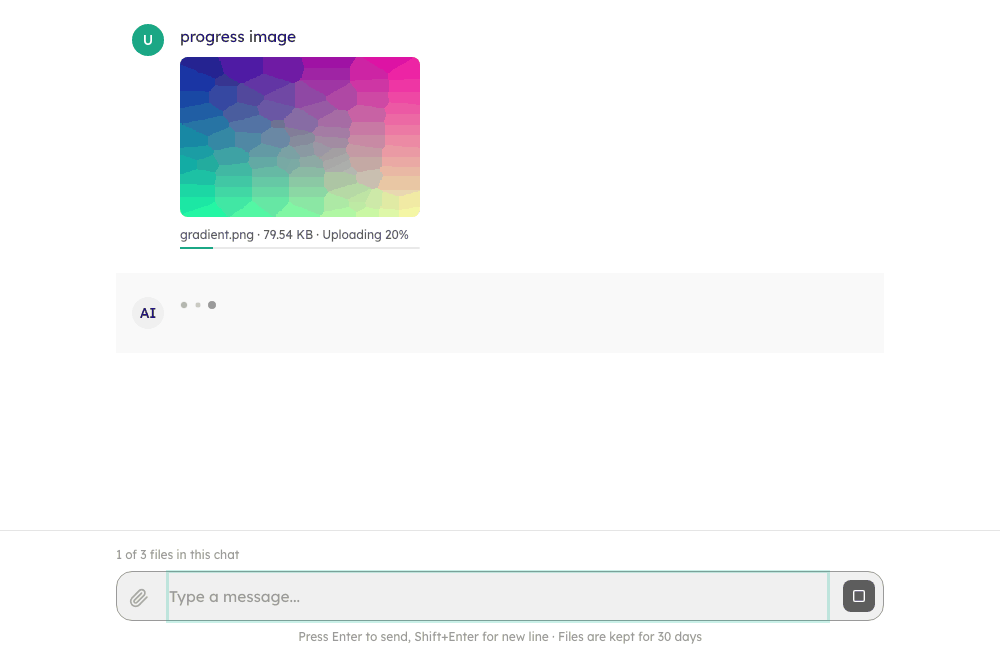
The message bubble appears at once, with each file's chip going up in it: "Uploading 40%" and a progress bar (a picture keeps its local thumbnail with the bar under it). A file that is not stored yet offers no Download and is never fetched from the server; the chip turns plain, and gets its Download, once the files are in. A failed upload or a refused message takes the bubble back and returns the files and the text to the composer; a file stored for a message that then fails is removed again. Stop aborts the upload.
upload-on-select: as soon as they are picked
<Chat baseUrl="/api/agents" fileTransport="upload-on-select" />Each file is stored the moment it is picked, dropped or pasted, so a large file is already on the server when the person finishes typing. The chip shows uploading with a progress bar, then ready; sending waits for every file to be ready, and a failed file blocks the send until it is retried or removed. The message carries only the ids, and nothing is uploaded twice if a send is refused. The conversation is created at the first file (it shows in the history as an empty chat); files stored for a conversation that is left are deleted again.
Raw bodies and progress
A transport with supportsRawUpload (AgentServerClient) is given the file as itself: the bytes are the request body with the file's own Content-Type (POST /files?name=...&conversationId=...), not base64 in JSON. That avoids the 33% inflation and giant strings in memory, and reports progress. Progress uses XMLHttpRequest (the one browser API with upload progress); a host that gives its own fetch keeps using it and sees progress only at the end. A file with no type goes up as application/octet-stream and the server guesses from the name. A JSON file (application/json, application/*+json) goes up as application/octet-stream with ?mimeType=application/json in the query, because the server reads a JSON Content-Type as its base64 JSON form of the upload. A request that never gets an answer (no network) fails with the code upload_failed, shown in the person's language.
new AgentServerClient({ baseUrl: "/api/agents", rawUpload: false }); // a server that only takes JSONThe transport methods:
uploadFile({ file: { name, mimeType, blob }, conversationId, onProgress: ({ loaded, total }) => {}, signal })A transport without raw support keeps getting file.content (base64), as before.
The requests behind it
POST /api/agents/files?name=report.pdf&conversationId=conv_1
Content-Type: application/pdf
Authorization: Bearer ...

<the bytes of the file>POST /api/agents/files (the JSON form: rawUpload: false, or a transport that only takes base64)
Content-Type: application/json
{ "file": { "name": "a.txt", "content": "<base64>", "mimeType": "text/plain" }, "conversationId": "conv_1" }Both answer { "file": { "id": "file_1", "name": "report.pdf", "mimeType": "application/pdf", "size": 48213, "expiresAt": "2026-11-09T10:00:00.000Z" } }. The message then names the file instead of carrying it:
POST /api/agents/conversations/conv_1/messages
{ "message": "Summarise this", "fileIds": ["file_1"], "stream": true }| Request | Used for |
|---|---|
POST /files | Store a file (raw body, or the JSON form) |
DELETE /files/:id | Remove a file that was stored for a message that never went out, or that the person removed from the composer |
GET /files/:id | Read a file's record |
GET /files/:id/content?disposition=inline|attachment | The bytes: pictures in a loaded conversation, and downloads |
GET /conversations/:id/files?limit=200 | The files a conversation holds: { files, total, maxFiles?, hasMore? }, for the counter, deadlines and expired chips |
The full list of routes is in Server routes.
Files in the history
Message.files of a loaded conversation are enriched from the conversation's file list (transport.listFiles):
- Expiry - a file the server still holds carries its
expiresAt; a chip with a deadline says "Kept until ..." on hover. A file whose deadline passed, or that the list no longer holds (deleted, past retention), is a muted, struck-through chip marked Expired with no download. A picture still on this device keeps showing. - Conversion -
FileAttachment.conversionStatus(failedorskipped) tints the chip "No readable text": the assistant may not have seen what is in the file. Servers and hosts that convert files set it. - Pictures - an image without a
urlis fetched with the transport's credentials (getFileUrl: a blob URL, cached) and shown as a thumbnail. Other files download on request the same way. Only raster pictures keep their own type as blobs; anything else becomes a plain download so a stored HTML or SVG file never runs on your page.
Handling Files with Hooks
import { useChat } from "@cognipeer/chat-ui";

function CustomChat() {
  const {
    pendingFiles,
    isUploading,
    addFiles,
    removeFile,
    retryFile,
    heldFiles,
    sendMessage,
  } = useChat({
    baseUrl: "/api/agents",
    agentId: "assistant",
    enableFileUpload: true,
    maxFileSize: 10 * 1024 * 1024,
    maxFiles: 10,
    maxFilesScope: "conversation",
    fileTransport: "upload-on-select",
  });

  const handleFileSelect = async (event: React.ChangeEvent<HTMLInputElement>) => {
    const files = Array.from(event.target.files || []);
    await addFiles(files);   // with upload-on-select this resolves when the files are stored
  };

  return (
    <div>
      <input type="file" onChange={handleFileSelect} multiple />
      <small>{heldFiles + pendingFiles.length} files in this chat</small>

      {pendingFiles.map(file => (
        <div key={file.id}>
          {file.previewUrl && <img src={file.previewUrl} alt="" width={32} />}
          {file.name} {file.status === "uploading" && `${Math.round((file.progress ?? 0) * 100)}%`}
          {file.status === "failed" && <button onClick={() => retryFile(file.id)}>Retry</button>}
          <button onClick={() => removeFile(file.id)}>Remove</button>
        </div>
      ))}

      <button onClick={() => sendMessage("Analyze these files")} disabled={isUploading}>
        Send
      </button>
    </div>
  );
}Or use ChatInput, which does the picking, dropping, pasting and the chips for you.
FileAttachment.status is queued, uploading, ready or failed for files that are being stored on their own (absent otherwise); progress is 0 to 1; uploadError is the localized reason. previewUrl is an object URL; the hook revokes it when the file is removed, the conversation is left or the hook unmounts.
File Display in Messages
Files and images are displayed in messages with:
- Image thumbnail - An image attachment with a usable URL (the server's
url, a stored copy fetched throughgetFileUrl, or the local preview of a file you just sent) is drawn as a picture that opens full size in a new tab - File chip - Other files, and images without a usable URL, as a chip with a file icon, name, extension and size
- Download - A link on the chip when the file has a safe
url(http(s),blob:or relative), or a button that fetches it through the transport - Images in the content - A message whose
contenthasimage_url/input_image/imageparts shows those images below its text
Only safe image URLs are drawn: https:, blob:, relative or same-origin, http: on a page served over http, and base64 PNG / JPEG / GIF / WebP. javascript: URLs, SVG data URLs and other schemes are dropped. Only PNG, JPEG, GIF and WebP attachments become thumbnails (and get a local preview URL); an SVG or another image type is a file chip with its download. A thumbnail that fails to load falls back to the next copy (the local preview, then the file's URL, then the stored copy through getFileUrl) and finally to the chip. File links accept http:, https:, blob: and relative addresses only, so a data: URL (such as the inline bytes of an A2A file) has no Download link. If your image URLs need something an <img> cannot send, draw the image yourself with renderImage, or give the transport getFileUrl:
<Chat
  baseUrl="/api/agents"
  renderImage={({ src, alt, file }) => <AuthenticatedImage src={src} alt={alt} />}
/>Agents that do not read images
If the agent lists acceptsImages: false (in capabilities.attachments, or the older capabilities / metadata), an attached image gets a warning chip and a notice ("This assistant can't see images. An attached image will be sent but may be ignored."). The image is still sent. When a turn still completed without having seen a picture, the server's images_not_supported warning shows under the answer.
Callbacks
Refused files go to onError, like every other error. The messages the user sends, with their files, go to onMessageSent:
<Chat
  baseUrl="/api/agents"
  agentId="assistant"
  enableFileUpload={true}
  onMessageSent={(message) => {
    console.log("Sent with", message.files?.map((f) => f.name));
  }}
  onError={(error) => {
    console.error("Chat error:", error.message, error.code);
  }}
/>Agent-Generated Files
When an AI agent returns files in its response (stream.done with files, or Message.files), they are displayed in the message, as thumbnails for images and chips with a download link otherwise.
Disable File Uploads
<Chat
  baseUrl="/api/agents"
  agentId="assistant"
  enableFileUpload={false}
/>An agent that says capabilities.attachments.enabled: false hides the paperclip too.
Image-Only Chat
For image-focused use cases:
<Chat
  baseUrl="/api/agents"
  agentId="vision-assistant"
  enableFileUpload={true}
  allowedFileTypes={["image/*"]}
  maxFiles={1}
/>Large Files
With a raw-upload transport the file is not read into memory as a string and progress is reported; with fileTransport="inline" (or a transport that takes base64) the file is read into a base64 string first, so for very large files prefer upload / upload-on-select, or compress images before addFiles. While the files of a message are being read or uploaded, isUploading is true.
Limits and defaults
| Setting | Default | Notes |
|---|---|---|
enableFileUpload | true | An agent's capabilities.attachments.enabled wins |
maxFileSize | 10 MB | An empty file (0 bytes) is always refused |
maxFiles | 10 | Per message, or per conversation with maxFilesScope: "conversation"; an agent's maxFiles counts per conversation |
allowedFileTypes | any | image/* matches by prefix; .pdf by extension; a file the browser could not type is judged by its name |
fileTransport | "inline" | "upload" and "upload-on-select" need a transport with uploadFile |
| Thumbnails | PNG, JPEG, GIF, WebP | Other image types are file chips, so an SVG never runs on your page |
| Cached blob URLs | 200 | AgentServerClient.getFileUrl keeps the most recent; dispose() releases them |
| Upload listing | 200 files | GET /conversations/:id/files?limit=200 |
The server has its own limits as well (body size, quota, retention); a refusal comes back with a code that is shown in the person's language: file_too_large, too_many_files, unsupported_file_type, attachments_disabled, file_quota_exceeded, payload_too_large, upload_failed, storage_unavailable and others, see Error codes.
Troubleshooting
| Symptom | Cause and fix |
|---|---|
| No paperclip | enableFileUpload={false}, the agent says capabilities.attachments.enabled: false, there is no onFilesAdd (custom layout), or the composer is closed (a card waits, a turn runs elsewhere, the usage limit is used up, readOnly). |
| "Maximum N files allowed" / "This chat can hold N files; M already attached" | The limit counts per message or per conversation (maxFilesScope). For a conversation it counts what the server holds (GET /conversations/:id/files) plus what is attached. |
| A file is refused as the wrong type, but the type is right | Check allowedFileTypes against the browser's file.type; use extensions (.md) for types browsers do not know. An agent's allowedMimeTypes replaces the host's list. |
| The upload has no progress bar | Progress needs XMLHttpRequest, which the client uses unless you gave your own fetch; and a transport with supportsRawUpload. |
| "The file could not be uploaded" | The request did not reach the server (upload_failed): network, CORS or a proxy limit. A refusal with a code (payload_too_large, file_too_large) says which limit. |
| Images of an old conversation do not show | They have no url and the file route needs credentials an <img> cannot send: pass resolveFileUrl={chat.resolveFileUrl} (done for you in Chat), or draw them with renderImage. |
| A chip says "Expired" | The file's expiresAt passed or the server no longer lists it (retention). The text of the message stays; the file cannot be opened. |
| A chip says "No readable text" | The server could not extract text (conversionStatus failed or skipped): the assistant may not have seen the file. |