

Portal Experience
Chat UI 0.4.0 can show the touches people expect from a workplace assistant: copy, regenerate and edit on messages, thumbs with reasons, a history you can rename, pin and clean up, suggested first messages, a Markdown welcome, an AI label with legal links, announcements, a terms gate, export, and alerts while the tab is in the background.
New in 0.4.0
All of this is new. The server side (the routes behind regenerate, edit, feedback, rename, pin, bulk delete and export, and the experience an agent publishes) is in Chat experience.
Every one of them is off until the host page switches it on with a prop, so an existing chat looks and behaves as before, also when it is upgraded together with agent-server (which publishes all of them as allowed). The agent can only take a feature away (see Who decides). Anything that needs the server (regenerate, edit, rating, rename, pin, bulk delete, export) also needs a transport that has the method; without it the button is simply not there.
Switches
<Chat
  baseUrl="/api/portal/support"
  messageActions={{ copy: true, regenerate: true, edit: true }}
  feedback={{ enabled: true, comments: true }}
  historyActions={{ rename: true, pin: true, bulkDelete: true }}
  exportMenu={{ enabled: true, formats: ["md", "json", "pdf"], includeTools: false }}
  notifications={{ tabBadge: true, sound: false, desktop: "opt_in" }}
  disclosure={{
    aiLabel: true,
    links: { privacy: "https://example.com/privacy", terms: "/terms", support: "mailto:help@example.com", aboutAi: "/about-ai" },
  }}
  announcements={[{ id: "maint-1", severity: "warning", text: "Maintenance **tonight** at 22:00." }]}
  starters={[{ text: "Summarise my week", label: "Weekly summary" }]}
  welcome={"## Welcome back\n\nAsk me about orders."}
/>| Prop | What it does |
|---|---|
messageActions | copy on every message; regenerate under the newest answer; edit on your own messages |
feedback | Thumbs up / down on answers. comments (default true) offers a comment box, reasons narrows the list |
historyActions | rename (pencil, F2 or double click), pin (pinned first), bulkDelete (Select, tick, confirm) |
exportMenu | A header menu to download the conversation. includeTools adds tool calls and results |
notifications | tabBadge puts "(1)" in the tab title, sound plays a chime, desktop: "opt_in" adds a bell menu where the person can turn on desktop notifications |
disclosure | aiLabel labels answers (labelText replaces the localized text); links is the row under the composer |
footerText | The older single line under the composer |
announcements | Dismissible notices above the chat |
starters, welcome, welcomeImageHosts | The empty chat |
initialAgentId, initialInput, autoSend | Deep links |
controllerRef | prefill(text, { send }), newChat(), focus() for the host page |
Who decides
Two parties have a say, and they do not have the same power:
- The host page decides what is on. A switch (
messageActions,feedback,historyActions,exportMenu,notifications,disclosure.aiLabel) is off unless the host passed it, whatever the server says.<Chat feedback={false}>stays off. - The agent decides what is allowed. Each agent lists in its
metadata.experiencewhat the server will accept. A switch the agent sets tofalseis off even if the host turned it on; one the agent sets totrue(or says nothing about) is not turned on by that. Lists are narrowed the same way: the export menu offers the host'sformatsthat the agent also publishes, and the feedbackreasonsare the host's list cut down to the agent's (the server rejects reasons it did not publish).
effective = host prop and agent flag, the host's default being off.
Content is different: it is not a switch. When the agent has welcome, starters, disclosure.links or disclosure.labelText, those are used; otherwise the host's props are.
agent-server 0.3.0 publishes every switch as allowed (true) unless its own settings or the agent's experience say otherwise, and its routes refuse a disallowed action with 403 action_disabled. So the server enforces, and the host chooses what to show:
{
  "id": "support",
  "name": "Support",
  "metadata": {
    "welcome": "## Hello {{user.firstName}}\n\nHow can I help?",
    "starters": [{ "text": "Where is my order?", "label": "Track an order" }, { "text": "Show my invoices", "autoSend": true }],
    "experience": {
      "messageActions": { "copy": true, "regenerate": true, "edit": false },
      "feedback": { "enabled": true, "reasons": ["inaccurate", "incomplete", "other"] },
      "history": { "rename": true, "pin": true, "bulkDelete": false },
      "export": { "enabled": true, "includeTools": false, "formats": ["md", "json", "html"] },
      "notifications": { "desktop": "off" },
      "disclosure": { "aiLabel": true }
    }
  }
}With this agent, <Chat messageActions={{ copy: true, edit: true }} historyActions={{ pin: true, bulkDelete: true }} /> shows copy and pin only: edit and bulkDelete are taken away by the agent, and everything the host did not pass stays off.
Variables such as {{user.name}} are the server's to fill in; Chat UI renders the text it is given.
Copy, regenerate, edit
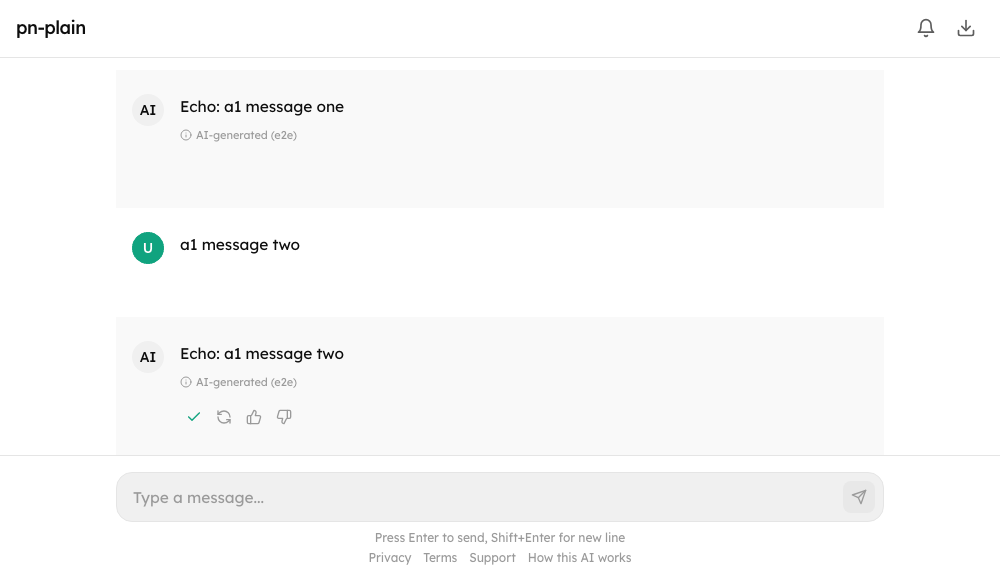
- Copy puts the text on the clipboard. Inside an iframe without
allow="clipboard-write"it falls back to the older copy command. - Regenerate runs the newest answer again (
POST /conversations/:id/messages/:messageId/regenerate). The old answer is replaced as the new one streams; if the server refuses (conversation_busy, a budget), the old answer comes back.useChatreturnsregenerate()andcanRegenerate. - Edit replaces one of your messages in place and runs the turn again (
POST .../messages/:messageId/edit {content}); the editor says that every message after it is replaced (Ctrl or Cmd + Enter saves, Escape cancels). A message this page sent a moment ago has an id the server may not know yet: the server's id is looked up when you press Edit.useChatreturnseditMessage(id, text)andcanEdit. - Regenerate and edit are offered only while nothing is running and no card waits.
- The button row shows when the message is hovered or has keyboard focus, always under the newest message, and always on touch screens. An answer this page wrote itself after a Stop (it carries no server id yet) offers copy only.
Feedback
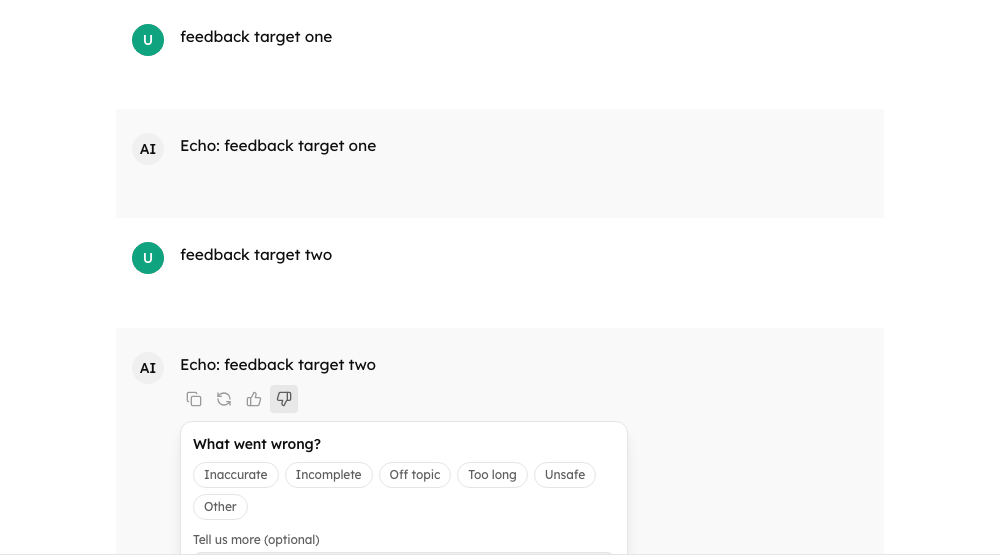
A thumbs-up is sent at once. A thumbs-down opens a small form: reasons (inaccurate, incomplete, off_topic, too_long, unsafe, other, or your own) and an optional comment of up to 1000 characters. Pressing a pressed thumb takes the rating back. The rating shows immediately and is undone if the server refuses.
POST /conversations/:id/messages/:messageId/feedback { rating: "up" | "down" | null, reasons?, comment? }. A rating the server stored comes back on the message as feedback or metadata.feedback ({ rating, reasons, comment }). onFeedback tells the host. useChat returns submitFeedback(id, input) and canRate. A transcript (readOnly) offers no thumbs.
History: rename, pin, bulk delete
| Action | Request |
|---|---|
| Rename | PATCH /conversations/:id { title } |
| Pin / unpin | PATCH /conversations/:id { pinned } (a top-level field: agent-server drops metadata.pinned from what a client sends). The answer is the conversation; it carries pinned: true while pinned. A list item with pinned (or metadata.pinned) is listed first |
| Delete several | POST /conversations/bulk-delete { ids }, at most 100 per call (more are sent in turns). agent-server answers { results: [{ id, status: "deleted" | "not_found" | "busy" | "error", message? }], deleted: <count> }; each id is judged by its own status. The older { deleted: string[], failed: [...] } is read too. A server without the route is served one by one |
Renaming and pinning show at once and are undone if the server refuses; a pin is also taken back when the server answers but the conversation it returns is not in the state that was asked for (a server that ignores the pin can no longer leave a pin on screen that is not saved). What went wrong is shown under the list. A conversation that is not_found, busy or error in a bulk delete stays in the list and is counted in the message. useChatHistory returns renameConversation, pinConversation and deleteConversations; a transport's pinConversation may resolve with the pin it stored (AgentServerClient does), which is what the list compares.
The empty chat
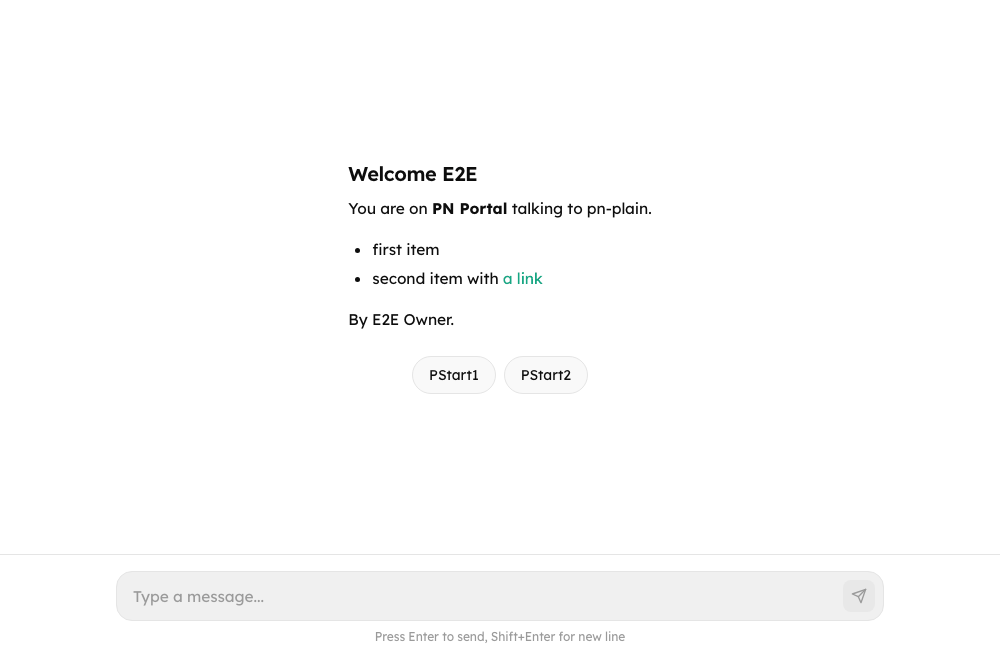
welcome is Markdown (headings, lists, tables, emphasis, links, pictures), drawn with the same safe renderer as announcements: no raw HTML, links open in a new tab, a picture must be https: (optionally from welcomeImageHosts), a path of the page itself, or a PNG / JPEG / GIF / WebP data URL. renderEmptyState still wins; starters appear under it. Up to six starters (an entry can also be a plain string, or use prompt / message for text and title for label); a chip fills the composer, or sends when autoSend is true. Chips are disabled while the composer cannot take a message.
Deep links
const params = new URLSearchParams(location.search);
<Chat
  initialAgentId={params.get("agent") ?? undefined}
  initialInput={params.get("q") ?? undefined}
  autoSend={params.get("send") === "1"}
/>initialAgentId is only the first choice (the person can switch) and is ignored when the agent does not exist or agentId is set. initialInput fills the composer once. autoSend sends it once, when the chat is ready and empty; it never sends into a conversation opened with conversationId. Let the server decide whether a link may auto-send; do not forward arbitrary query strings to autoSend.
AI label and legal links
With disclosure.aiLabel, every answer carries "AI-generated". The links are shown in a fixed order (privacy, terms, support, how this AI works) and only if they are plain web addresses, mailto: (support), or a path of the page; javascript: and the like are dropped.
Announcements

{ id, severity: "info" | "warning" | "critical", text, startsAt?, endsAt?, dismissible? }. Only those due now are shown (the window is checked again every 30 seconds, so a notice appears and disappears while the page is open), most severe first, at most five. severity defaults to info, id and text are required and an id may appear once. text is short inline Markdown (emphasis, code, links; no headings, lists or pictures). A person can close the ones that allow it; the choice is kept in localStorage under cp:announcement:dismissed:<id> (and onAnnouncementDismiss lets the host keep it on its server too). A critical notice is announced to screen readers at once.
Terms gate
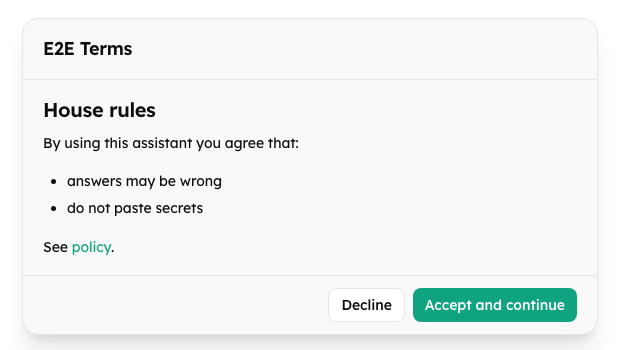
TermsGate is not part of Chat; wrap it around the chat. The host decides whether acceptance is required (never accepted, new version, expired) and records it:
<TermsGate
  required={terms.required}
  title={terms.title}
  body={terms.markdown}
  version={terms.version}
  onAccept={() => fetch("/api/portal/support/terms/accept", { method: "POST", body: JSON.stringify({ version: terms.version }) })}
>
  <Chat ... />
</TermsGate>Nothing inside is mounted until the person accepts, so the chat makes no request before that. Declining shows "You need to accept to use this portal" with a way back. A new version asks again. If onAccept throws, the dialog stays and says it could not be saved (or, for an error with a code the library knows such as terms_changed or invalid_version, says that in the person's language).
| Prop | Default | Effect |
|---|---|---|
required | required | false shows the children at once |
title, body | required | The dialog's heading and the terms (Markdown) |
version | none | Changes whenever the terms do: a new version asks again |
onAccept | required | Records the acceptance; the children appear once it resolves |
onDecline | none | The person pressed Decline |
acceptLabel, declineLabel | localized | Button texts |
declinedTitle, declinedBody | localized | The screen shown after declining |
allowedImageHosts | any https host | Hosts a picture of the terms may come from |
className | none | Container class |
Export
The header menu asks the server first (GET /conversations/:id/export?format=md|json|pdf&tools=0|1). A server that has no such route (404 / 405 / 501) is served from the messages on screen: Markdown and JSON are built in the browser, and PDF opens the print dialog ("Save as PDF"). Long conversations loaded in pages export only what is loaded in the fallback; the server route exports everything.
The PDF item. agent-server publishes export.formats as ["md", "json", "html"] (plus "pdf" only when it has a PDF renderer). The menu's PDF item is offered for either pdf or html, because the print view is how a person without a renderer on the server gets a PDF. A pdf request that the server answers with 501 export_format_unsupported is repeated as format=html, and the print-friendly page it returns (text/html) is printed in a hidden frame ("Save as PDF" is in the dialog). If that is refused too, the page falls back to the messages on screen.
Background alerts
While the tab is hidden: a turn that finishes, or an approval or question that starts waiting, adds to a counter in the tab title ("(2) Support"), plays a chime if sound is on and the person has not muted it, and shows a desktop notification only if the person turned them on in the bell menu. The browser's permission prompt appears only at that click, never on load. Looking at the tab clears everything. The person's choices are kept in localStorage (cp:notify:prefs).
Transport methods
All optional on ChatTransport; AgentServerClient implements them: regenerateMessage, editMessage, sendFeedback, renameConversation, pinConversation, deleteConversations, exportConversation.
Accessibility
Every control is a labelled button; the rows of buttons under a message are groups that appear on hover and keyboard focus (always on touch screens and under the newest message); the feedback form takes focus, closes on Escape and returns focus; copy, rating and deletion results are announced; menus support arrow keys, Home / End and Escape; the terms dialog traps Tab. Strings are in English and Turkish; add others with customMessages.
Troubleshooting
| Symptom | Cause and fix |
|---|---|
| A switch does nothing | Check both parties: the host prop must be on and the agent must not have taken it away in metadata.experience. Anything the host did not pass stays off. |
| No regenerate, edit or thumbs | The transport lacks the method (regenerateMessage, editMessage, sendFeedback; a custom transport has to implement them), or a turn runs or a card waits (regenerate and edit), or the chat is readOnly (no thumbs). |
403 action_disabled | The server refuses the action for this agent. The button should not have been offered: align the host prop with the agent's published experience. |
| Rename or pin snaps back | The server refused, or answered with a conversation that is not in the state that was asked for. The reason shows under the list. |
| Some conversations stay after a bulk delete | They were not_found, busy or error on the server; they stay selected so you can try again. |
| The export menu is missing | exportMenu is off, the agent publishes no format you asked for, or the conversation has no messages yet. |
| PDF opens the print dialog | By design: without a server-side renderer the PDF item prints the server's print view (or the messages on screen) so the person can "Save as PDF". |
| No desktop notification | The person has not turned them on in the bell menu, the browser blocks them for the site, or notifications.desktop is not "opt_in". The permission prompt appears only at that click. |
| The welcome picture is missing | Welcome images must be https: (and from welcomeImageHosts when you set it), a path of the page itself, or a PNG / JPEG / GIF / WebP data URL. |