

Usage Limits
A conversation on @cognipeer/agent-server 0.3.0 or later can have a usage limit (a budget): a cap on what its turns cost. When the limit is used up the turn stops, and the conversation waits for a higher limit or ends. Chat shows where the conversation stands, closes the composer when nothing more can be sent, and - where the host allows it - lets a person raise the limit and carry on.
New in 0.4.0
The usage meter, the "limit reached" notice, raise-and-continue, and the useChat members that drive them. The server side (prices, how a limit is set and enforced) is in Usage & Budgets.
Nothing changes for a conversation that has no limit.
When to use it
Give a conversation a limit when people with open-ended access (a public portal, a trial, an intranet assistant) could run up a bill, and let Chat show where they stand. Show the meter to operators and to people who budget their own usage; hide it (showBudgetMeter={false}) where amounts should stay private. The notice still shows when the limit is used up.
What the page shows
The server sends conversation.budget ({ maxCostUsd, onReach }), conversation.spentUsd and conversation.runtime.status. Chat draws a thin meter while there is room and a notice once the limit is used up:
Conversation usage                    $1.25 of $5.00 used
[██████░░░░░░░░░░░░░░░░░░░░░░░░░░]onReach | When the limit is used up |
|---|---|
pause | The conversation is paused and carries on from where it stopped once the limit is raised. runtime.status is budget_paused, and a turn the limit stopped midway stays that way after the raise until it is continued (or a new message abandons it). |
stop | The conversation has ended. Raising the limit reopens it, but nothing is carried on. The notice does not promise to. |
In both cases the composer is closed (composerState is budget_paused) and the last answer carries the "usage limit" notice. A send the server refuses with budget_reached (402) makes the page fetch the conversation again, which shows the notice.
<Chat
  showBudgetMeter={false}          // hide the meter (default true); the notice still shows
/>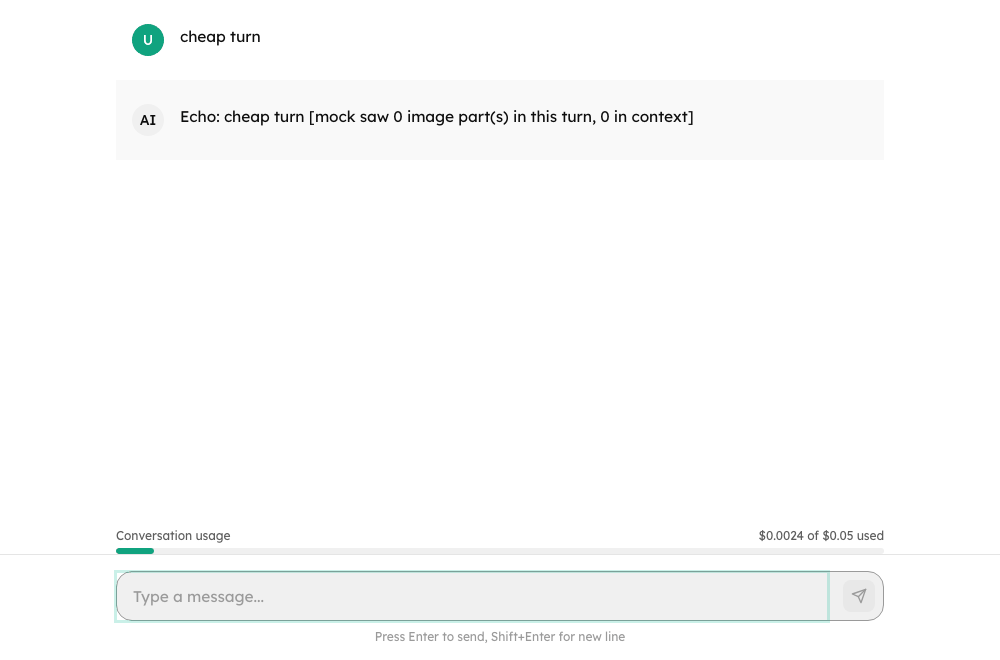
The meter shows amounts in USD (formatUsd: two decimals, four for amounts under one cent so they do not read as zero, in the page's locale). The server only sends a limit for conversations that have one. Turn the meter off where people should not see amounts.
Who may do what about it
What a person can do once the limit is used up is the host's call, because the server may refuse a change (budget_forbidden, unless the host set authorizeBudget).
Prop (or capabilities.budget.* of the agent) | The banner offers |
|---|---|
| nothing (default) | "Ask an administrator to raise the limit." |
allowBudgetContinue / allowContinue | Continue, for a paused conversation whose limit was raised somewhere else. While the limit is still used up the server answers 402 budget_reached, and that is shown. |
allowBudgetEdit / allowEdit | A field for a new limit with Increase and continue (paused) or Increase limit (ended), and Remove limit. The new limit has to be above what was spent. |
<Chat allowBudgetEdit /> // for operatorsAn agent can say it for itself: a host that lists its agents puts capabilities: { budget: { allowContinue: true } } in the agent's info (GET /agents). It overrides the props, in both directions, so a portal can allow it for one agent only.
From code
const chat = useChat({ baseUrl, agentId });

chat.budget;            // { maxCostUsd, onReach } | null
chat.spentUsd;
chat.budgetExhausted;   // used up
chat.composerState;     // "budget_paused" when it is

await chat.updateBudget({ maxCostUsd: 20, onReach: "pause" }, { continue: true });
await chat.updateBudget(null);                     // remove the limit
await chat.continueConversation(); // carry on a paused turnupdateBudget resolves false when the server refused the change and error says why. With continue: true the turn the limit stopped carries on afterwards, as a new assistant message - but only when the server's answer to the change says it can: continuable: true. A turn the limit stopped midway stays budget_paused after the raise and is continuable; a turn that had already finished its answer before the limit is not (the raise only reopens the conversation), and no continue request is made. A server that does not send continuable is read by the runtime its answer reports (still budget_paused means carry on), and one that reports neither keeps what the page knew. continuable is on the answer to the change and on a loaded conversation (Conversation.continuable). When a continuation ends the conversation is fetched again, so what it has cost (spentUsd) and the meter are the server's figures even where the end of the turn does not carry them. A "nothing to continue" answer (someone else already did, or the agent cannot be continued) is not an error. It resolves true once the limit is changed, whatever the continuation then does. canUpdateBudget and canContinue say whether the transport can do it at all.
A paused conversation whose limit has room again (raised in another window, or here when the continuation failed) shows Continue beside the field for a new limit, so a person who can edit the limit does not have to raise it a second time just to carry on.
onBudgetReached({ conversationId, budget, spentUsd }) is called when a turn ends on the limit.
BudgetBanner is the component, and renderBudgetBanner replaces it:
<Chat renderBudgetBanner={(props) => <MyBanner {...props} />} />Transport
interface ChatTransport {
  updateBudget?(conversationId: string, budget: ConversationBudget | null): Promise<Conversation>;   // PATCH /conversations/:id
  continueConversation?(conversationId: string, options?: ContinueOptions): Promise<SendMessageResponse | undefined>;   // POST /conversations/:id/continue
}AgentServerClient implements both. A refusal arrives as an error with the server's code (budget_forbidden, invalid_budget, budget_reached, nothing_to_continue) and details (spentUsd, maxCostUsd, onReach).
Troubleshooting
| Symptom | Cause and fix |
|---|---|
| No meter shows | The conversation has no budget (the server only sends one for conversations that have a limit), spentUsd is missing, or showBudgetMeter is false. |
| The composer is closed and says the conversation reached its usage limit | composerState is budget_paused. Raise the limit (the banner offers it only where allowBudgetEdit or the agent's capabilities.budget.allowEdit is on) or ask an administrator. |
| "You can not change the usage limit of this conversation" | The server refused with budget_forbidden. What a person may do is decided on the server as well as by the props. |
| "Enter an amount above $x" | The new limit has to be above what was spent. |
| Continue answers "usage limit" again | The limit is still used up: the server answers 402 budget_reached until it has room. |
| Raising the limit only reopens the conversation | The turn had already finished its answer before the limit (continuable: false) or the budget is onReach: "stop": there is nothing to carry on. |