

Approval and Question Cards
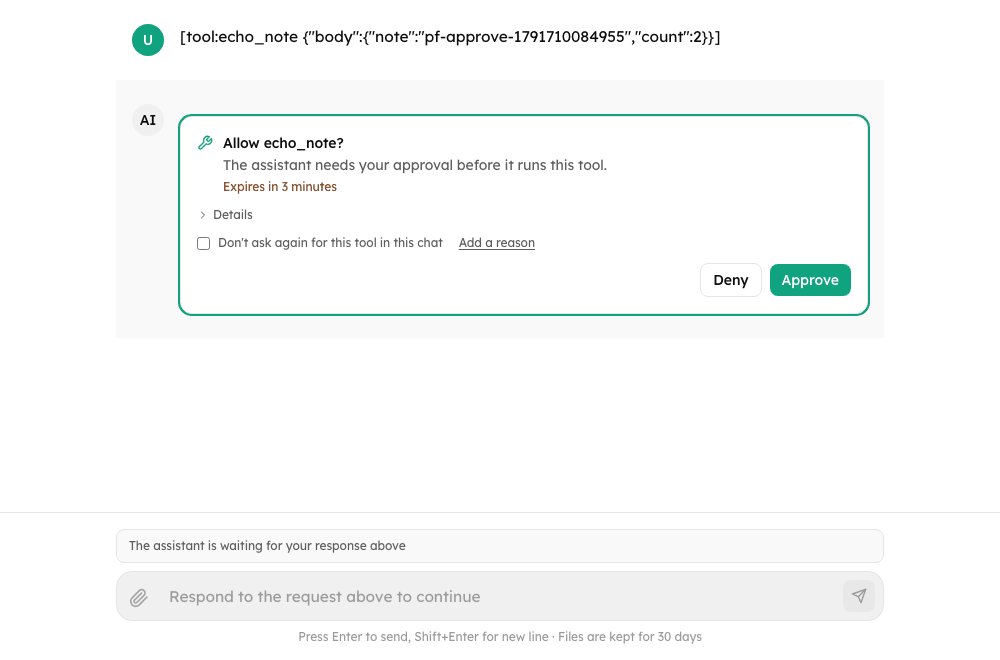
The cards Chat draws under an assistant message when a turn pauses: ToolApprovalCard for a tool call that needs a decision, and QuestionCard for questions the assistant asks. MessageActionCards draws every card of a message. Use them directly in a custom layout, or replace them with renderToolApproval / renderQuestion.
New in 0.4.0
Everything on this page is new. For the flow (what the person sees, deadlines, history, errors) read Approvals and Questions.
Import
import {
  ToolApprovalCard,
  QuestionCard,
  MessageActionCards,
  type ToolApprovalCardProps,
  type QuestionCardProps,
  type ChatActionsConfig,
} from "@cognipeer/chat-ui";ToolApprovalCard
<ToolApprovalCard
  action={{ id: "act_1", type: "tool_approval", toolName: "send_email", args: { to: "a@example.com" }, expiresAt: "2026-10-12T18:00:00Z" }}
  allowArgumentEdit
  onResolve={(resolution) => resolveAction("act_1", resolution)}
/>| Prop | Type | Default | Description |
|---|---|---|---|
action | PendingAction of type: "tool_approval" | required | The request: toolName, title, summary, args, argsSchema, expiresAt |
state | ActionState | pending | Where the card is in its life: pending, resolving, resolved, cancelled, expired, with the resolution when known |
readOnly | boolean | false | This app cannot answer: shows "Waiting for approval in another app" instead of the buttons |
allowArgumentEdit | boolean | false | "Details" becomes a JSON editor (only when the action has arguments) |
expiryWarningSeconds | number | 600 | The countdown turns amber below this |
autoFocus | boolean | false | Move focus to the card when it mounts (the card itself, never a button that decides) |
onResolve | (resolution) => void | required | Called with { type: "tool_approval", decision, comment?, approvedArgs?, rememberForSession? } |
className | string | - | Container class |
The card shows the title (title, else "Allow {tool}?"), the summary, the countdown, the collapsible arguments, a "Don't ask again for this tool in this chat" checkbox, "Add a reason" for a denial, and Deny / Approve. Approve is disabled while the edited arguments are not a valid JSON object or break argsSchema; the reasons are listed in a role="alert" list.
QuestionCard
<QuestionCard
  action={{
    id: "act_2",
    type: "user_question",
    questions: [{ question: "Which environment?", header: "Environment", options: [{ label: "staging" }, { label: "production", description: "Needs a window" }] }],
  }}
  onResolve={(resolution) => resolveAction("act_2", resolution)}
/>| Prop | Type | Default | Description |
|---|---|---|---|
action | PendingAction of type: "user_question" | required | questions (question, header, multiSelect, placeholder, required, options), allowFreeText, expiresAt |
state, readOnly, expiryWarningSeconds, autoFocus, className | As above (autoFocus lands on the first control) | ||
onResolve | (resolution) => void | required | Called with { type: "user_question", answers, cancelled? } |
Behaviour: a lone single-choice question without previews answers as soon as an option is picked (Enter in its free-text field also sends); anything else collects answers and waits for Send. A question is required unless it says required: false (asterisk); Skip (which answers { answers: {}, cancelled: true }) is offered only when no question is required. An option with preview is a list row with a collapsed "Preview".
MessageActionCards and ChatActionsConfig
MessageActionCards draws a card for every action of a paused message (message.pendingActions except client_tool), reading how each ended from message.actionStates. ChatMessage and ChatMessageList use it; their actions prop is a ChatActionsConfig:
| Field | Default | Effect |
|---|---|---|
onResolve(actionId, resolution) | none | Sends the answer. Without it the cards are read-only |
canResolve | true | false when the transport cannot answer: the cards are read-only |
enableToolApprovals, enableQuestions | true | false makes that kind read-only |
allowArgumentEdit | false | See above |
expiryWarningSeconds | 600 | See above |
renderToolApproval, renderQuestion | built-in cards | Replace a card: they receive { action, state, readOnly, resolve } |
focusActionIds | none | Cards for these action ids take focus when they mount (ChatMessageList sets it for cards that appeared while the list was on screen) |
<ChatMessageList
  messages={chat.messages}
  actions={{
    onResolve: chat.resolveAction,
    canResolve: chat.canResolveActions,
    renderToolApproval: ({ action, resolve, readOnly }) => (
      <MyApprovalCard action={action} disabled={readOnly} onAllow={() => resolve({ type: "tool_approval", decision: "allow" })} />
    ),
  }}
/>Accessibility
Cards are labelled groups. A new card is announced and takes focus (a question on its first control, an approval on the card itself), the outcome is a role="status" line, the editor's problems are a role="alert", and the countdown is plain text. See Accessibility.