

Code Agent & sandbox
A real checkout, in a sandbox, nowhere near your machine. The Code Agent clones the repository, edits files, installs dependencies, runs builds and tests, and opens pull requests — with a reviewable diff before anything is published.
Isolated by construction
A container per job. Your laptop, your credentials and your other repositories are not in it.
Diff before publish
Changes are captured as a reviewable change set. Pushing a branch and opening a PR is a separate, governed step.
More than writing code
PR review, merge-conflict resolution and multi-repo analysis use the same sandbox.
For work that touches real repositories, Pulse runs a dedicated Code Agent inside an isolated sandbox: a full git checkout where it can edit files, install dependencies, run builds and tests, and operate on GitHub — without ever touching your machine.
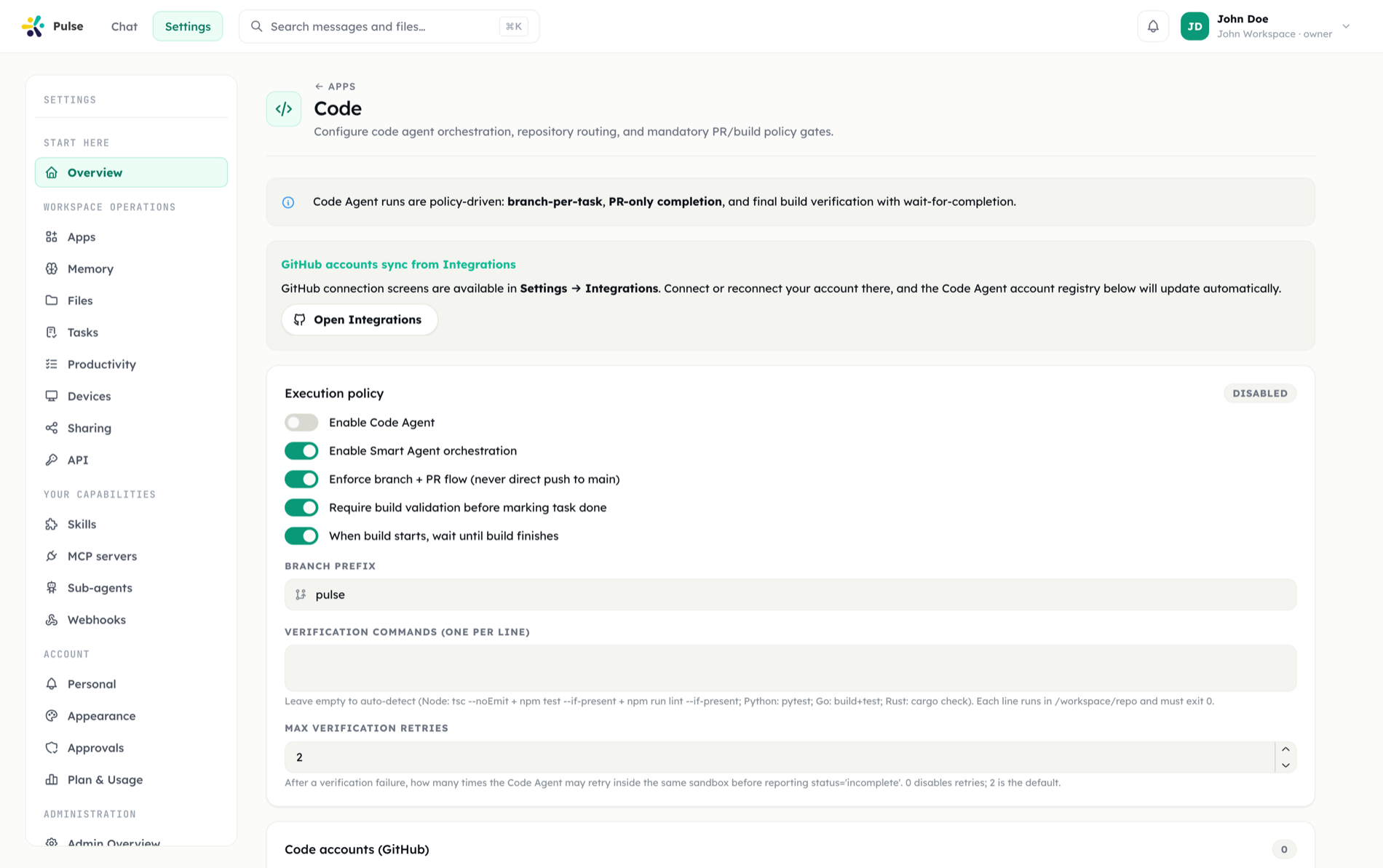
The Code Agent ships as a built-in app, available on Pro and Enterprise plans — on other plans it appears in Apps with a Requires plan notice, and organization admins can disable it workspace-wide. Connect GitHub when Pulse asks (a Connect card appears in chat) or ahead of time from its card in Settings → Apps, register repositories on the Code Agent's settings screen — the Settings link on the same card — then just ask.
What it can do
Write and change code
Add rate limiting to the public API endpoints in our backend repo,
with tests, and prepare the change for review.The agent works on a feature branch in a real checkout at /workspace/repo — scaffolding new projects (an empty repo is a valid starting point), editing existing code, installing dependencies, and running the actual build and test suite until it passes. The result is a Code Change Set: a reviewable diff artifact in Pulse. You inspect it and open the pull request from the Change Set UI — the agent never opens or merges PRs on its own.
Review pull requests
Review PR #142 in acme/backend and tell me if it's safe to merge.The agent reads the PR metadata, changed files, existing review threads, CI checks and job logs — then inspects the actual code on the PR branch for context the diff alone doesn't show. It returns a structured verdict: what the PR intends, correctness and regression risks with file/line references, CI status, and an approve / request-changes / needs-discussion recommendation. It can deliver this as a task summary, a workspace document, or post it as a formal GitHub review — posting to GitHub always goes through an approval first.
Resolve merge conflicts
PR #98 has merge conflicts with main — resolve them and update the branch.The agent merges the base branch into the PR branch, resolves each conflict semantically (never a blind "take ours/theirs", never leftover conflict markers), verifies the build and tests, and pushes the resolved branch back so the PR updates. It can push to feature branches; pushing to main is forbidden.
Document and audit codebases
Write an architecture overview of our payments service —
module map, data flow, and the risky areas.For analysis work, the deliverable is a document in your workspace Files — not a change to the repo. The agent builds a code-intelligence graph and wiki of the repository on first clone, which it searches while writing, so reports are grounded in the actual structure of the code.
It can also triage CI failures on a branch or PR by reading workflow runs and job logs.
Multi-repo analysis
Ask for a combined analysis and the agent clones up to six additional repositories read-only under /workspace/repos:
Compare how our web, mobile, and api repos handle authentication,
and write up the differences.The primary repository stays writable; the secondary ones are inspect-only. If one of the extra repos fails to clone, the analysis continues with the rest and notes the gap. The output is one combined cross-project report — shared patterns, divergences, and cross-repo dependencies — rather than separate documents per repo.
The sandbox
Beyond repository work, the Worker Agent also has a general compute sandbox for ad-hoc data and file processing. Both sandboxes share the same properties:
- Network access —
git clone,curl,pip install, and package managers work, so the agent can fetch a dataset or dependency and process it end to end inside the sandbox. - Preinstalled tooling — Python (pandas, openpyxl, pypdf, reportlab, python-pptx, python-docx) and Node.js, with heavier dependencies installed on first use.
- Pause and resume — long-running work is checkpointed; a resumed sandbox keeps its working tree, feature branch, installed dependencies, and edits.
Sandbox files vs. workspace Files
Files written inside the sandbox stay in the sandbox — they are not visible in your workspace until exported. The agent knows this and delivers work explicitly:
| Output | Where it lands |
|---|---|
| Code changes | A Code Change Set (diff artifact) you review, then open a PR from |
| Documents and reports | Workspace Files, authored directly or exported |
| Generated file batches | Bulk-exported — an entire sandbox directory (up to hundreds of files, structure preserved) lands in Files in one step |
So a request like "clone this open-source repo and generate API docs for every module" ends with the whole generated docs tree in your Files, not stranded in a container. Larger exported files now land in workspace Files more reliably as well.
TIP
The connected GitHub account's token powers cloning, fetching, and pushing — and Pulse redacts it from any command output or diff the agent shows you.
Related
- Tasks & automation — code tasks run as background work
- Files & artifacts — where reports and exports land
- Approvals — gating for GitHub write actions
- Integrations & MCP — connecting GitHub