

Webhooks
Webhook subscriptions let the Console call your URL when something happens to an agent session: a turn ends, an approval needs an answer, a budget is reached, a background run finishes. Each delivery is a signed POST; verifyWebhook checks the signature. client.webhooks manages the subscriptions.
New in 3.1.0
client.webhooks (create, list, get, update, delete, rotateSecret, test, deliveries, redeliver, eventTypes) and verifyWebhook in @cognipeer/console-sdk/webhooks. They need a Console with the agent runtime phase 1 release.
When to use
- You would otherwise poll
sessions.get()or hold an event stream open just to learn that a turn ended. - A backend should notify an approver (Slack, email, a ticket) when
action.requiredfires. - You track spend: react to
budget.reached. - You run background agent runs and want completion pushed to you, for many runs through one endpoint instead of a
callback_urlper run.
For live, fine-grained progress (tool calls, text deltas) use session events; webhooks carry small "something happened" notifications.
Set up a webhook
In the Console
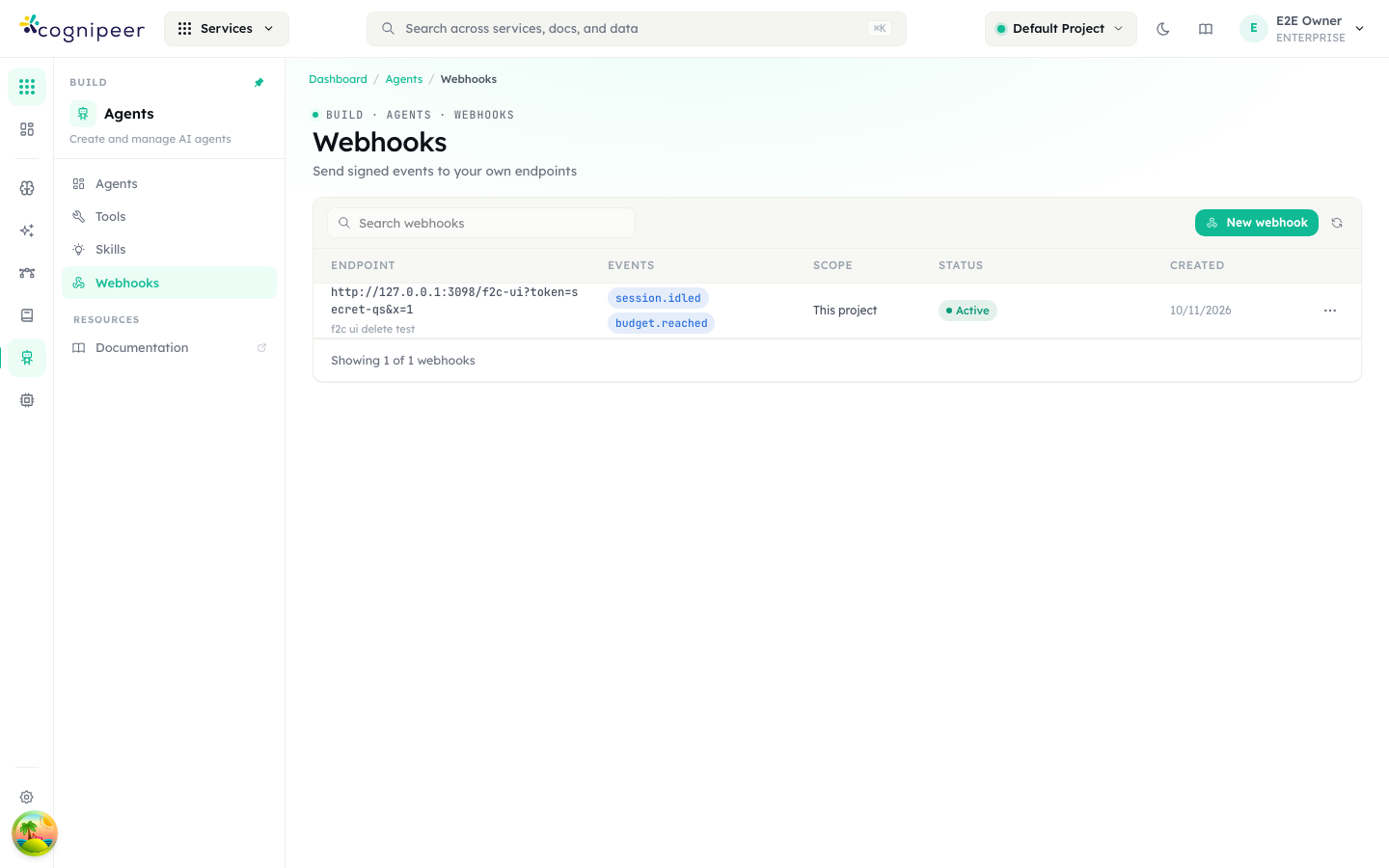
Open Agents → Webhooks (Build · Agents · Webhooks: Send signed events to your own endpoints). The list shows each endpoint with its events, scope (This project), status and creation date; New webhook adds one.
With the SDK
// 1. Subscribe a URL to events. Patterns like `agent_run.*` are allowed.
const hook = await client.webhooks.create({
  url: 'https://example.com/hooks/cognipeer',
  events: ['action.required', 'session.idled', 'agent_run.*'],
  description: 'Support bot notifications',
});

// 2. Store the signing secret NOW — it is returned only by create() and rotateSecret().
saveSecret(hook.secret); // 'whsec_…'

// 3. Send a test event and read what your server answered.
const delivery = await client.webhooks.test(hook.id);
console.log(delivery.status, delivery.lastStatusCode, delivery.lastError);Then verify every delivery on your server.
Who may call it
The Console's permission engine is the only authority. webhooks is an administration service, so workspace owners and admins hold it by default and everybody else holds nothing until it is granted (Authorization → People / Groups).
| Permission | Allows |
|---|---|
webhooks.read | list, get, deliveries, eventTypes |
webhooks.admin | everything that changes something: create, update, delete, test, rotateSecret, redeliver — and seeing the full URL |
- A token acts for its owner, within its own scope: the owner must hold the permission and the token's scope must allow it. Being a project admin is no longer enough on its own.
- With only
webhooks.read, each endpointurlcomes back with its userinfo and query string removed (https://host/path?…,urlRedacted: true), because they often carry credentials. Never write a URL you read as a read-only caller back withupdate(). - A caller without the permission gets
403witherrorCode === 'forbidden', the engine's reason as the message and adecisionIdinerror.response.503 authorization_unavailablemeans the engine could not decide — retry later; it is never an allow. - A token manages its own project's endpoints only — never tenant-wide ones or those of other projects. A tenant can have at most 50 endpoints (
409 limit_reached). - On a Console that predates the permission engine, the token owner must be a project admin or a tenant owner/admin instead.
Methods
| Call | Route | Needs | Returns |
|---|---|---|---|
webhooks.eventTypes() | GET /webhooks/events | read | { type, group }[] — the event types a subscription can ask for |
webhooks.create(body) | POST /webhooks (201) | admin | WebhookEndpointWithSecret |
webhooks.list() | GET /webhooks | read | WebhookEndpoint[] of the project |
webhooks.get(id) | GET /webhooks/{id} | read | WebhookEndpoint (never the secret) |
webhooks.update(id, body) | PATCH /webhooks/{id} | admin | WebhookEndpoint |
webhooks.delete(id) | DELETE /webhooks/{id} | admin | { deleted: true } (no id) |
webhooks.rotateSecret(id) | POST /webhooks/{id}/rotate-secret | admin | WebhookEndpointWithSecret — the old secret stops working |
webhooks.test(id) | POST /webhooks/{id}/test | admin | WebhookDelivery — waits for your receiver |
webhooks.deliveries(id, query?) | GET /webhooks/{id}/deliveries | read | { deliveries, hasMore }, newest first |
webhooks.redeliver(deliveryId) | POST /webhooks/deliveries/{deliveryId}/redeliver (202) | admin | the reset WebhookDelivery (pending) |
(Routes are relative to /api/client/v1.) Unlike the rest of the agent API, webhook objects keep camelCase field names (projectId, createdAt, endpointId), and errors come as { error: '<message>', code }.
Create
const hook = await client.webhooks.create({
  url: 'https://example.com/hooks/cognipeer',  // http(s), resolves to a public address, max 2048 chars
  events: ['action.required', 'agent_run.*'],  // non-empty
  description: 'Ops approvals',                // optional, max 500 chars
});| Field | Rules |
|---|---|
url | http or https, at most 2048 characters, and must resolve to a public address: it is checked against the SSRF guard when saved and again on every delivery. Private, loopback and link-local addresses are refused (400) |
events | Non-empty. Each entry is an exact type (session.idled), a prefix.* pattern (agent_run.*), or * for everything. An unknown type is 400 |
description | Optional, at most 500 characters |
projectId | Omitted = the token's project, the only one a client token can create for. null, "*" or another project's id is refused with 403 (A webhook can only be created for your own project), tenant owner or not |
The result is a WebhookEndpointWithSecret:
interface WebhookEndpoint {
  id: string;
  url: string;                       // redacted for a read-only caller
  urlRedacted?: boolean;
  description: string | null;
  events: string[];
  projectId: string | null;          // null = every project of the tenant
  status: 'active' | 'disabled';
  disabledReason: string | null;     // 'redirect' | 'blocked_address' | 'sustained_failure' | 'manual' | …
  failingSince: string | null;       // ISO — when it started failing continuously; cleared by any 2xx
  createdBy: string;
  createdAt: string | null;
  updatedAt: string | null;
}
interface WebhookEndpointWithSecret extends WebhookEndpoint { secret: string } // 'whsec_…'The secret is shown once
secret is returned by create() and rotateSecret() only. It cannot be read again. Store it in your secret manager immediately; if you lose it, rotate.
Update, pause, re-enable
await client.webhooks.update(hook.id, { events: ['action.required'] });
await client.webhooks.update(hook.id, { status: 'disabled' }); // pause
await client.webhooks.update(hook.id, { status: 'active' }); // re-enable (e.g. after fixing the receiver)update takes any of url, events, description, status.
Rotate the secret
const rotated = await client.webhooks.rotateSecret(hook.id);
saveSecret(rotated.secret); // the old secret stops working immediatelyDeploy the new secret to your receiver at the same moment, or accept a short window of rejected deliveries (they are retried).
Events
webhooks.eventTypes() returns the live list your Console supports. The SDK types the following (WEBHOOK_EVENT_TYPES); the type is an open string, so a newer Console may offer more — acknowledge (2xx) and ignore types you do not handle.
| Event | Fires when | data |
|---|---|---|
session.idled | A turn ended and the session is idle (or waiting) | { conversationId, agentKey, stopReason } |
session.work_done | The agent finished its work | { conversationId, agentKey } |
action.required | A tool approval or a question needs an answer | { conversationId, agentKey, actionId, kind } — kind is tool_approval or user_question |
budget.reached | A session reached its spend budget | { conversationId, agentKey, spentUsd, maxCostUsd } |
agent_run.succeeded / .failed / .canceled / .requires_action | A background run reached that state | { runId, conversationId, agentKey } |
schedule.fired / schedule.failed | A scheduled agent run started / failed | { scheduleId, agentKey, conversationId?, error? } |
webhook.test | You called webhooks.test() — sent only to the tested endpoint, never published | {} |
data holds ids and small fields only. Fetch the rest by id (sessions.get(conversationId), agents.runs.get(runId)). stopReason is end_turn, requires_action, limit, cancelled, error or budget_reached.
The delivery body
{
  "id": "evt_3f9c2a1b7d4e5f6a8b9c0d1e",
  "type": "action.required",
  "createdAt": "2026-10-12T09:17:42.000Z",
  "projectId": "66f2a1c8b0d4e5a9c3d71e00",
  "data": {
    "conversationId": "66f2a1c8b0d4e5a9c3d71e04",
    "agentKey": "ops-agent",
    "actionId": "act_71c0b8",
    "kind": "tool_approval"
  }
}(Ids in the examples are illustrative.) id is evt_<id> and equals the webhook-id / x-cognipeer-event-id header.
Delivery headers
| Header | Value |
|---|---|
Content-Type | application/json |
User-Agent | cognipeer-webhooks/1.0 |
X-Cognipeer-Signature | t=<unix seconds>,v1=<hex HMAC-SHA256(secret, "<t>.<raw body>")> |
X-Cognipeer-Event | the event type, for example action.required |
X-Cognipeer-Event-Id | evt_… — stable per event |
webhook-id | evt_… — the same id; dedupe on it |
Verify a delivery
Verify every delivery before trusting it, on the raw body — the exact bytes received, not a re-serialised JSON.stringify(req.body), whose key order and whitespace may differ.
verifyWebhook lives in the Node-only @cognipeer/console-sdk/webhooks entry point (it uses node:crypto, which the browser-safe main entry avoids):
import express from 'express';
import { verifyWebhook, type WebhookEvent } from '@cognipeer/console-sdk/webhooks';

const app = express();

app.post('/hooks/cognipeer', express.raw({ type: 'application/json' }), (req, res) => {
  const ok = verifyWebhook({
    rawBody: req.body,                                      // Buffer
    signatureHeader: req.get('X-Cognipeer-Signature'),
    secret: process.env.COGNIPEER_WEBHOOK_SECRET!,
    toleranceSeconds: 300,                                  // default
  });
  if (!ok) return res.sendStatus(400);

  const event: WebhookEvent = JSON.parse(req.body.toString('utf8'));
  // event.type: 'session.idled' | 'action.required' | 'agent_run.requires_action' | …
  queue.add(event);          // do the work asynchronously
  res.sendStatus(204);       // answer 2xx fast
});Next.js App Router:
import { verifyWebhook, type WebhookEvent } from '@cognipeer/console-sdk/webhooks';

export async function POST(req: Request) {
  const raw = await req.text(); // the exact body
  const ok = verifyWebhook({
    rawBody: raw,
    signatureHeader: req.headers.get('x-cognipeer-signature'),
    secret: process.env.COGNIPEER_WEBHOOK_SECRET!,
  });
  if (!ok) return new Response('invalid signature', { status: 400 });

  const event = JSON.parse(raw) as WebhookEvent;
  return new Response(null, { status: 204 });
}verifyWebhook(params)
| Param | Type | Description |
|---|---|---|
rawBody | string | Uint8Array | The body exactly as received |
signatureHeader | string | null | undefined | The X-Cognipeer-Signature header |
secret | string | The endpoint's secret (whsec_…), or a run's callback_secret |
toleranceSeconds | number | Maximum age (either direction) of the timestamp. Default 300 |
nowSeconds | number | Override "now" (tests) |
It returns true only when the header is well-formed, the timestamp is within tolerance and one of its v1 signatures matches (compared in constant time). It never throws. verifyAgentRunCallback and VerifyAgentRunCallbackParams still work and delegate to it.
Verify without the SDK
The scheme is plain HMAC-SHA256, so any language can check it: split the header on , into t and one or more v1; compute HMAC_SHA256(key = secret, message = t + "." + rawBody) as hex; compare with each v1 in constant time; reject if |now − t| > 300.
import hmac, hashlib, time

def verify(raw_body: bytes, header: str, secret: str, tolerance=300) -> bool:
    parts = dict(p.split("=", 1) for p in header.split(",") if "=" in p)
    t = parts.get("t")
    if not t or not t.isdigit() or abs(time.time() - int(t)) > tolerance:
        return False
    expected = hmac.new(secret.encode(), t.encode() + b"." + raw_body, hashlib.sha256).hexdigest()
return hmac.compare_digest(expected, parts.get("v1", ""))(A header may carry several v1 values; the SDK accepts any of them.)
Delivery, retries and endpoint health
A delivery is retried until your endpoint answers 2xx.
| Rule | Behaviour (defaults) |
|---|---|
| Timeout | 10 seconds per attempt |
| Retries | After a failure the delivery stays pending and is retried after 1 min, 5 min, 30 min, 2 h, 6 h, 12 h, 24 h — 8 attempts in all — then it is failed |
| Redirects | Not followed. A 3xx answer fails the delivery and disables the endpoint (disabledReason: 'redirect'). Update the URL to the final address |
| Blocked address | An address the SSRF guard refuses disables the endpoint (blocked_address) |
| Sustained failure | An endpoint that fails continuously for 72 hours is disabled (sustained_failure). Any 2xx clears the failing streak |
| Disabled | Pending deliveries are failed; no new ones are queued. Re-enable with update(id, { status: 'active' }) |
| Tests | test() sends one webhook.test event, no retries, and the answer does not count towards the endpoint's health. It works on a disabled endpoint, so you can check a fix before re-enabling |
| Retention | Settled deliveries are kept for 30 days |
The timeout, retry schedule, auto-disable window and retention are the Console operator's settings; the numbers above are the defaults.
Because deliveries repeat, make handlers idempotent and dedupe on webhook-id.
Inspect and replay deliveries
const { deliveries: failed, hasMore } = await client.webhooks.deliveries(hook.id, {
  status: 'failed',   // 'pending' | 'delivered' | 'failed'
  limit: 50,          // default 50, max 200
  skip: 0,            // page on with skip += deliveries.length while hasMore
});

for (const d of failed) {
  console.log(d.eventType, d.attempts, d.lastStatusCode, d.lastError);
}

// After fixing the receiver: put a delivery back in the queue (same event id, current URL and secret).
await client.webhooks.redeliver(failed[0].id); // 202 — the delivery is reset to 'pending' and sent asynchronouslyinterface WebhookDelivery {
id: string;
endpointId: string;
eventId: string; // 'evt_…' — the webhook-id header
eventType: string;
payload: WebhookEvent; // the body that was (or will be) POSTed
status: 'pending' | 'delivered' | 'failed';
attempts: number;
nextAttemptAt: string | null; // while pending
lastStatusCode: number | null;
lastError: string | null;
lastDurationMs: number | null;
createdAt: string;
deliveredAt: string | null;
}redeliver is refused with 409 endpoint_disabled (enable the endpoint first) or 409 delivery_pending (it is already queued).
Run callbacks vs. subscriptions
Both are signed with the same scheme and verified with the same verifyWebhook. They differ in setup and body:
callback_url of a background run | Webhook subscription | |
|---|---|---|
| Set up with | responses.create({ background: true, callback_url, callback_secret }) | client.webhooks.create(...) |
| Scope | one run | every matching event of the project |
| Secret | the callback_secret you send (min 16 chars) | generated by the Console (whsec_…) |
| Body | { id, event, createdAt, runId, tenantId?, projectId?, conversationId?, data } | { id, type, createdAt, projectId, data } |
| Event names | agent_run.succeeded | failed | canceled | requires_action | the full list above |
| Dedupe on | X-Cognipeer-Event-Id | webhook-id (or X-Cognipeer-Event-Id) |
Errors
Webhook routes answer { error: '<message>', code }; the SDK reads the top-level code into CognipeerAPIError.errorCode when error is a plain string.
| Status | errorCode | When |
|---|---|---|
| 400 | — | Invalid URL (not http/https, too long, not a public address), unknown event type, empty events, description too long |
| 403 | forbidden | The caller lacks webhooks.read / webhooks.admin, or tried to create for a project that is not its own. error.response.decisionId names the decision |
| 404 | not_found | No such endpoint or delivery in the token's scope |
| 409 | limit_reached | The tenant already has 50 endpoints |
| 409 | endpoint_disabled | redeliver on a disabled endpoint |
| 409 | delivery_pending | redeliver on a delivery that is already queued |
| 503 | authorization_unavailable | The permission engine could not decide — retry |
Security notes
- Always verify the signature on the raw body, and reject anything that fails — before parsing or acting on it.
- Keep the timestamp tolerance (300 s by default): it is the replay window. Run your receiver on a clock that is NTP-synced.
- Treat the payload as a hint. It carries ids only; fetch the resource through the API with your own token before acting.
- Store the secret in a secret manager, not in source control or logs, and rotate it if it may have leaked. Webhook URLs often carry credentials in the query string — a read-only caller never sees them.
- Use HTTPS. The Console delivers to http and https public hosts; your receiver should only accept TLS.
- Your receiver must be publicly reachable: private, loopback and link-local addresses are refused at save time and again on every delivery.
Troubleshooting
The endpoint shows disabled. Read disabledReason: redirect — your URL answers a 3xx (HTTP→HTTPS, a trailing slash); use the final URL. blocked_address — it resolves to a non-public address. sustained_failure — it failed for 72 h; fix the receiver. Then update(id, { status: 'active' }) and test().
verifyWebhook returns false. (1) You verified a re-serialised body: use the raw bytes (express.raw, await req.text()). (2) Wrong secret: it is per endpoint, and rotateSecret invalidates the old one. (3) Clock skew over the tolerance. (4) A proxy modified the body. (5) The header was stripped: log X-Cognipeer-Signature.
I get every event twice. Deliveries are at-least-once. Dedupe on webhook-id.
I do not receive an event. Check the endpoint is active, that its events cover the type (agent_run.* matches agent_run.succeeded), and that the endpoint's project is the project the session ran in (a project-scoped endpoint does not see other projects' events). Look at deliveries() for failed rows.
403 forbidden from create(). Your token owner lacks webhooks.admin. Ask a workspace owner or admin to grant it under Authorization → People / Groups.
test() returns failed with Timed out after 10000 ms. Your receiver is too slow. Acknowledge with a 2xx immediately and process asynchronously.
Related
- Agent sessions · Approvals & questions · Session events
- Agents → Background runs —
callback_urlandcallback_secret - Example: verify a webhook
- Agent error codes