

Examples
Example projects and code snippets for @cognipeer/agent-server.
Quick Examples
Basic Express Server
import express from 'express';
import {
  createAgentServer,
  createInMemoryProvider,
  createExpressMiddleware,
} from '@cognipeer/agent-server';

const storage = createInMemoryProvider();

const agentServer = createAgentServer({
  basePath: '/api/agents',
  storage,
  allowAnonymousList: true, // a quick start with no sign-in: see "Who may list" in Request Context
  swagger: { enabled: true },
});

agentServer.registerCustomAgent('echo', {
  processMessage: async ({ message }) => ({
    content: `Echo: ${message}`,
  }),
});

const app = express();
app.use(express.json());

await storage.connect();
app.use(createExpressMiddleware(agentServer));

app.listen(3000, () => {
  console.log('Server running at http://localhost:3000');
});Next.js App Router
// app/api/agents/[...path]/route.ts
import {
  createAgentServer,
  createInMemoryProvider,
  createNextRouteHandlers,
} from '@cognipeer/agent-server';

const storage = createInMemoryProvider();

const agentServer = createAgentServer({
  basePath: '/api/agents',
  storage,
  allowAnonymousList: true, // a quick start with no sign-in: see "Who may list" in Request Context
});

agentServer.registerCustomAgent('echo', {
  processMessage: async ({ message }) => ({
    content: `Echo: ${message}`,
  }),
});

await storage.connect();

export const { GET, POST, PATCH, DELETE, OPTIONS } = createNextRouteHandlers(agentServer);Standalone server
The examples/standalone folder of the agent-server repository is a complete server as its own process, on SQLite or MongoDB: an agent-sdk agent (approvals, questions, files, cancel), a host-backed agent, CORS and Swagger. It runs with a scripted model, so no API key is needed:
cd examples/standalone && npm install
npm run start:sqlite # or: npm run start:mongodbagent-server example: storage sqlite, agents assistant, host-echo
docs: http://127.0.0.1:4310/api/agents/docs
api: http://127.0.0.1:4310/api/agents| Setting | Default | |
|---|---|---|
PORT | 4310 | 0 takes a free port; the banner prints the URL |
HOST | 127.0.0.1 | |
STORAGE | sqlite | sqlite, mongodb or memory |
SQLITE_FILE | ./data/example.db | :memory: for a throwaway database |
MONGODB_URL, MONGODB_DB | in-memory server, agent_server_example | |
BASE_PATH | /api/agents | |
CORS_ORIGINS | * | comma-separated origins allowed to call the API from a browser |
BUDGET_USD | none | a spend limit for every new conversation |
LLM_BASE_URL, LLM_API_KEY, LLM_MODEL | none | an OpenAI-compatible API; without LLM_BASE_URL the agents use the scripted model |
The scripted model reacts to what you type:
| Say | It does |
|---|---|
hello | answers You said: "hello" (streamed word by word) |
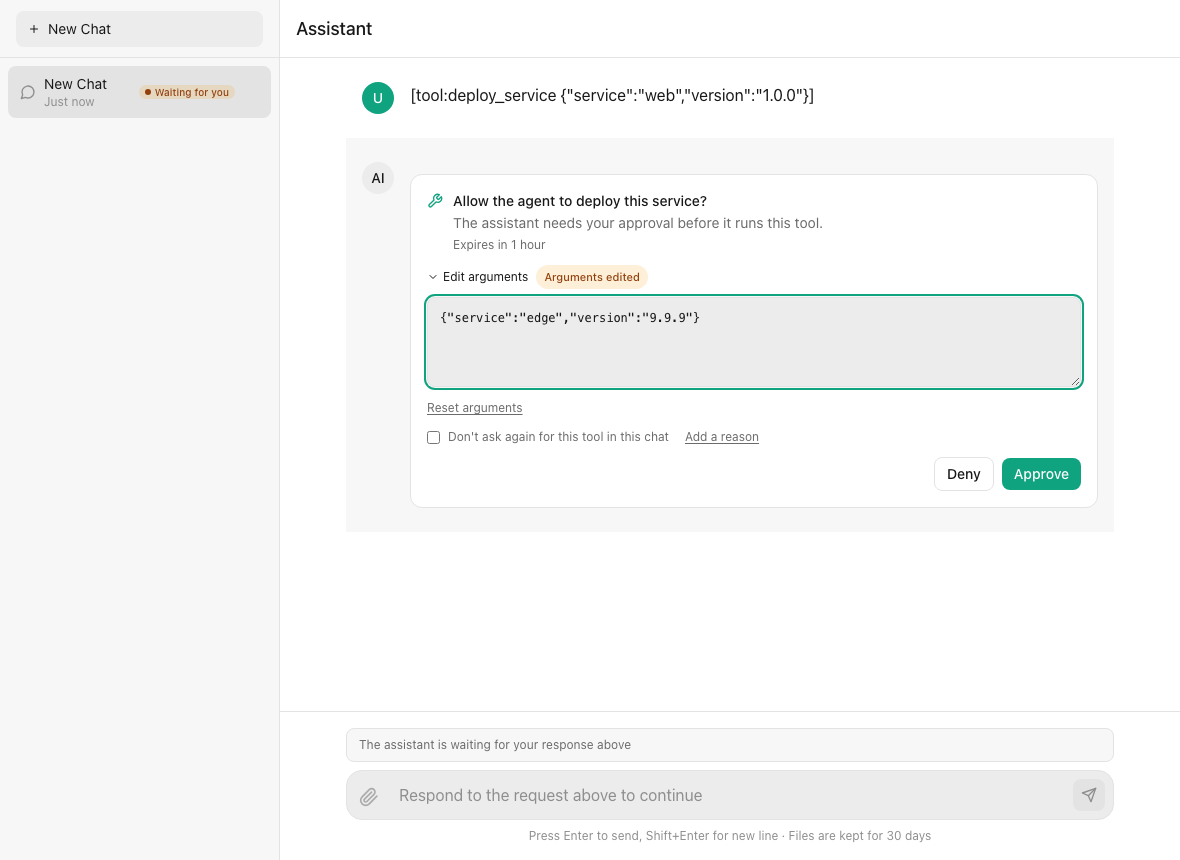
deploy web | calls deploy_service, which pauses for your approval |
ask me something | asks a question (staging or production) |
what is in my files? | lists and reads the files you uploaded to the conversation |
slow please | takes four seconds - long enough to cancel it, or to reload the page and follow the run |
Try an approval, a file and a cancel with curl:
API=http://127.0.0.1:4310/api/agents

ID=$(curl -s -X POST $API/conversations -H 'content-type: application/json' -d '{"agentId":"assistant"}' | jq -r .conversation.id)

# a streamed turn
curl -N -X POST $API/conversations/$ID/messages -H 'content-type: application/json' -d '{"message":"hello","stream":true}'

# an approval
curl -s -X POST $API/conversations/$ID/messages -H 'content-type: application/json' -d '{"message":"deploy web"}' | jq '.pendingActions[0].id'
curl -s -X POST $API/conversations/$ID/actions/<that id> -H 'content-type: application/json' \
  -d '{"resolution":{"type":"tool_approval","decision":"allow"}}' | jq .response.content

# a file
curl -s -X POST "$API/files?name=notes.txt&conversationId=$ID" -H 'content-type: text/plain' --data-binary 'the launch code is 4242'
curl -s -X POST $API/conversations/$ID/messages -H 'content-type: application/json' -d '{"message":"what is in my files?"}' | jq .response.content

# follow what a conversation does, from any client, and stop it
curl -N $API/conversations/$ID/events/stream
curl -s -X POST $API/conversations/$ID/cancelListing conversations needs to know the user, so the example resolves one for every request (resolveContext): the X-User-Id header, else demo-user. Replace it with your own sign-in. It allows any origin, so a @cognipeer/chat-ui page on another port can talk to it directly: <Chat baseUrl="http://127.0.0.1:4310/api/agents" agentId="assistant" />.
More examples
In the repository's examples/ folder:
standalone- a complete server on SQLite or MongoDB (above)express-postgres.ts- Express with PostgreSQL and token authenticationtasks-demo.ts- background tasks with a callback server
Next steps
- Getting started
- Approvals & Questions and Runs, Cancel & Reattach - what the example exercises
- Host-backed agents - the
host-echoagent