

Introduction to Prompts
Prompts in Cognipeer are reusable templates that streamline interactions with Peers and AI models. They enable consistent, repeatable, and parameterized conversations, allowing you to create standardized queries that can be customized with different inputs each time they're used.
What Are Prompts?
Prompts are saved templates that contain predefined text with optional parameter placeholders. These templates can be reused across conversations, ensuring consistency while allowing for customization through parameters. Prompts can be shared with other users, promoting collaboration and standardization across teams.
Key Features of Prompts:
- Reusability: Create once, use repeatedly in any conversation
- Parameterization: Include dynamic fields that can be filled in each time the prompt is used
- Sharing: Control visibility to keep prompts private or share with specific users or teams
- Direct Integration: Send prompts directly to Peers with a single click
- Workflow Compatibility: Use prompts as part of broader Cognipeer workflows
Why Use Prompts?
Prompts offer several advantages for Cognipeer users:
Consistency
By using saved prompts, you ensure that queries follow a standardized format, which is particularly valuable for:
- Teams that need to maintain consistent communication styles
- Repetitive tasks that require the same basic structure
- Organizational processes that benefit from standardization
Efficiency
Prompts save time and effort by:
- Eliminating the need to retype common queries
- Reducing the cognitive load of formulating effective prompts
- Streamlining workflows through quick access to frequently used templates
Collaboration
The sharing capabilities of prompts facilitate collaboration by:
- Allowing teams to develop and refine effective prompts together
- Enabling knowledge sharing of best practices for interacting with AI
- Ensuring all team members have access to the same high-quality templates
Customization with Parameters
Parameters make prompts flexible and adaptable:
- Each use of a prompt can be customized with different inputs
- Forms are automatically generated based on the parameters in the prompt
- Users can quickly fill in specific details without modifying the template structure
Prompt Structure
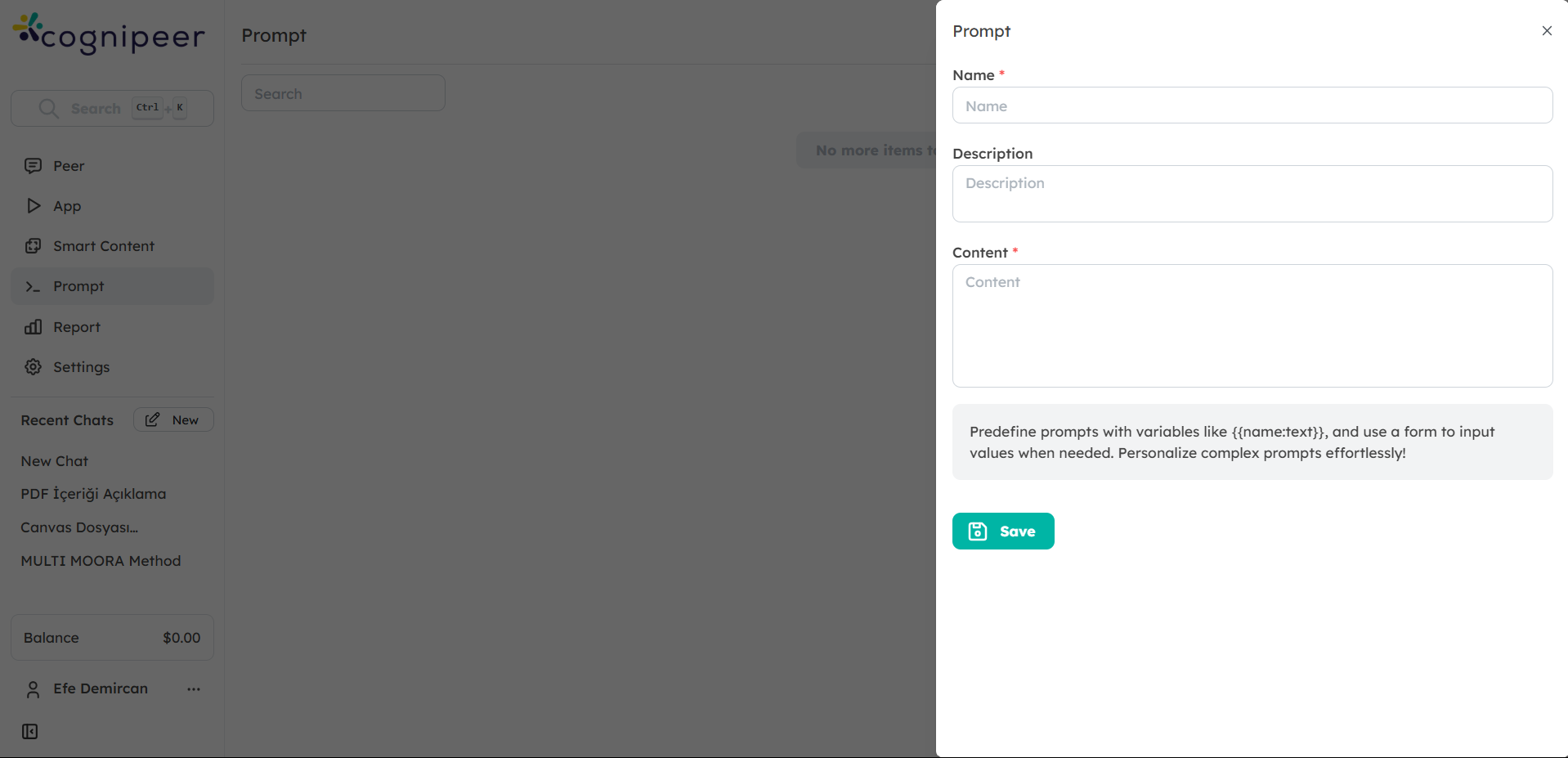
A prompt in Cognipeer consists of several components:
1. Metadata
- Title: A descriptive name that identifies the prompt's purpose
- Description: Optional context about when and how to use the prompt
- Tags: Optional labels to categorize and organize prompts
- Visibility Settings: Controls who can access and use the prompt
2. Prompt Text
The main content of the prompt, which can include:
- Static text that remains the same each time the prompt is used
- Parameter placeholders that will be replaced with user-provided values
- Formatting and structure to guide the AI's response
3. Parameters
Special placeholders embedded in the prompt text that follow this format:
{ {parameter_name:type} }Where:
parameter_nameis a descriptive identifier for the parametertypespecifies the kind of input expected (text, number, checkbox, date)
When a prompt with parameters is used, Cognipeer automatically generates a form for the user to fill in the values.
Getting Started with Prompts
To begin using prompts in Cognipeer:
- Navigate to the Prompts Section: From the dashboard, click on the Prompts section in the sidebar.
- Browse Existing Prompts: Explore prompts that have been shared with you or that you've created previously.
- Create a New Prompt: Click the Create Prompt button to start building your own template.
- Use a Prompt: Select any prompt and click Use to fill in parameters (if any) and send it to a Peer.
Use Cases
Prompts in Cognipeer can be used for a wide range of scenarios:
- Customer Support: Create templates for common customer inquiries with parameters for customer details and specific issues
- Content Creation: Develop prompts for generating different types of content with parameters for topics, tone, and length
- Data Analysis: Build templates for analyzing data with parameters for data sources, metrics, and time periods
- Research: Create standardized research queries with parameters for subjects, time frames, and specific questions
- Technical Support: Develop troubleshooting templates with parameters for error messages, systems, and components
Next Steps
Now that you understand the basics of Prompts in Cognipeer, explore the following guides to learn more:
- Creating and Managing Prompts: Learn how to create, edit, and organize your prompts
- Using Parameters in Prompts: Master the art of creating dynamic, parameterized prompts
- Sharing and Reusing Prompts: Discover how to collaborate with others using shared prompts
- Prompt Best Practices: Tips and strategies for creating effective prompts
By leveraging the power of Prompts, you can enhance consistency, efficiency, and collaboration in your interactions with Cognipeer's AI capabilities.